
.png)
What Is Google Workspace Used For? 10 Ways It Runs Your Business
What is Google Workspace used for? In short, Google Workspace is an all-in-one cloud platform that gives your business professional email, file storage, video conferencing, team collaboration, and productivity tools — all under your own domain name.
Instead of stitching together separate apps for email, documents, calendars, and chat, Google Workspace bundles everything into a single, integrated suite that works seamlessly from any device, anywhere. For small businesses especially, it replaces the patchwork of tools you've been juggling and puts everything in one place.
At Googally, we've migrated hundreds of small businesses to Google Workspace from platforms like Rackspace, GoDaddy, and Microsoft 365 — and the most common reaction we hear is, "Why didn't we switch sooner?"
Quick Takeaways
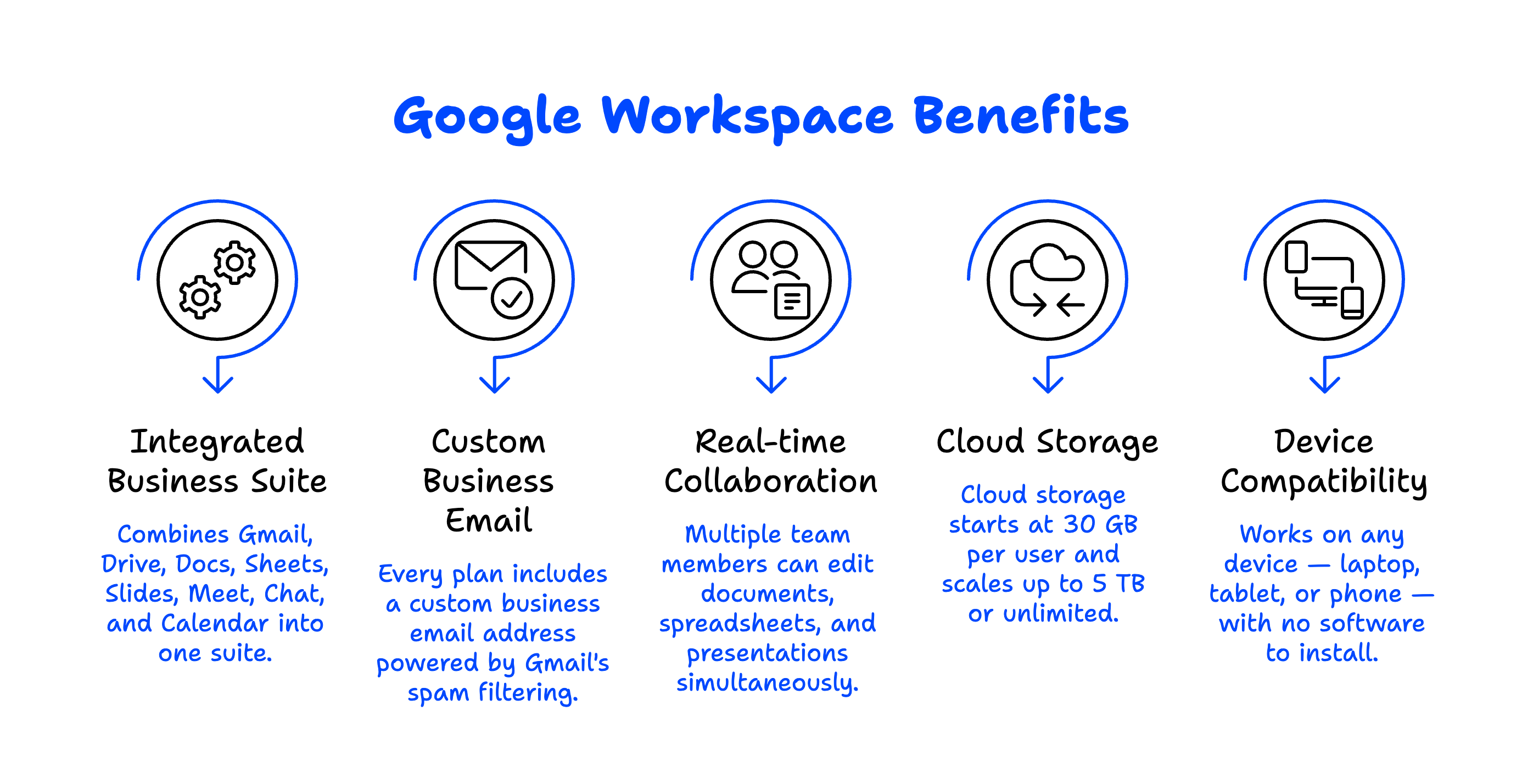
- Google Workspace combines Gmail, Google Drive, Docs, Sheets, Slides, Meet, Chat, and Calendar into one integrated business suite.
- Every plan includes a custom business email address (you@yourcompany.com) powered by Gmail's world-class spam filtering.
- Real-time collaboration lets multiple team members edit documents, spreadsheets, and presentations simultaneously — no more emailing attachments back and forth.
- Cloud storage starts at 30 GB per user and scales up to 5 TB (or unlimited on Enterprise plans), replacing the need for local file servers.
- Google Workspace works on any device — laptop, tablet, or phone — with no software to install or update.
What Apps Are Included in Google Workspace?
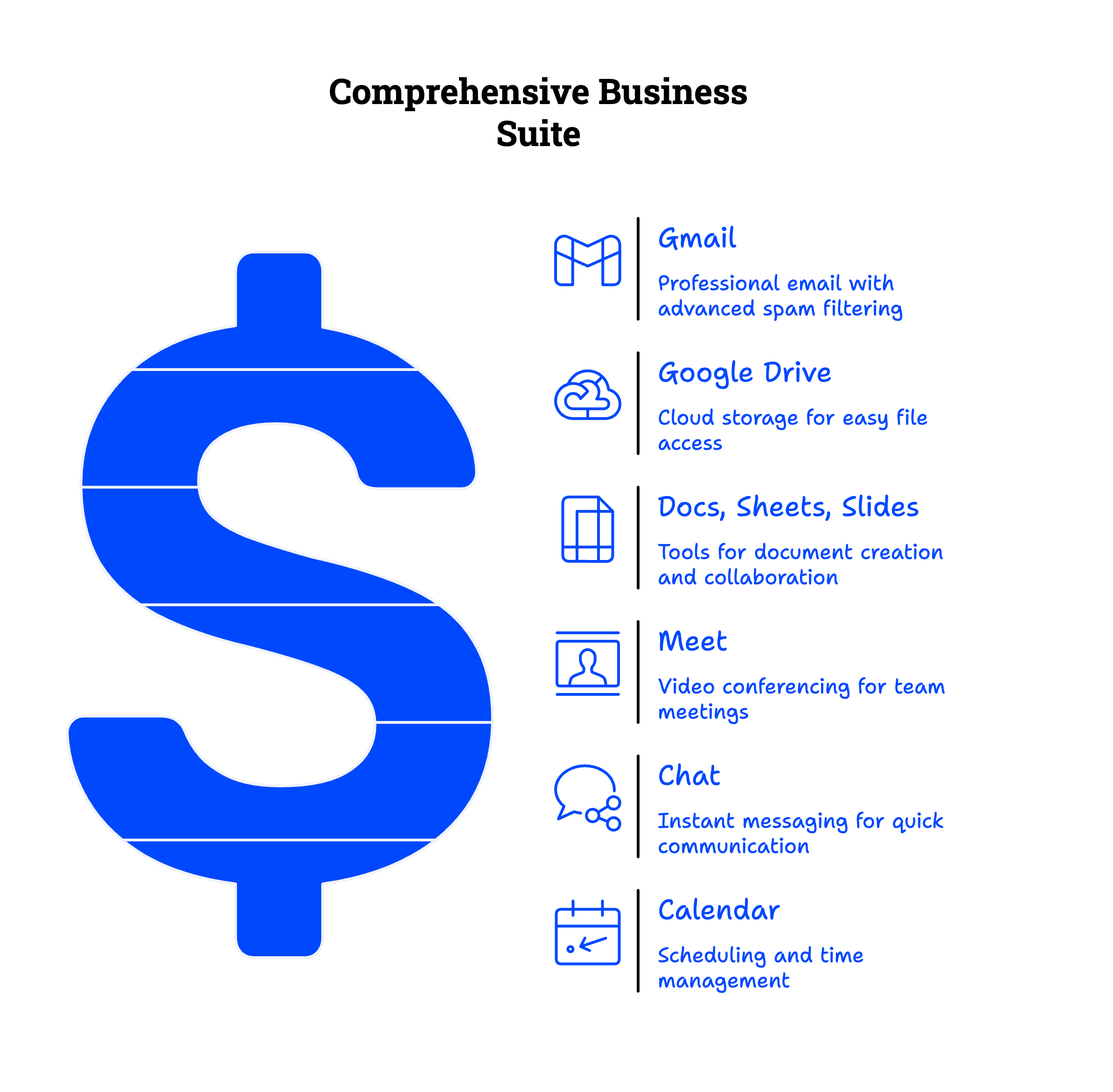
Google Workspace includes over a dozen integrated apps, but the core tools most small businesses rely on daily are Gmail, Google Drive, Google Docs, Sheets, Slides, Google Meet, Google Chat, and Google Calendar. Each app is designed to work together, so you can jump from an email to a shared document to a video call without switching platforms or losing context.
Here's a quick breakdown of the key apps and what they do:
- Gmail — Professional email at your domain with 99.9% uptime, powerful search, and industry-leading spam protection.
- Google Drive — Cloud file storage and sharing. Think of it as your company's filing cabinet in the cloud.
- Google Docs, Sheets, and Slides — Create and co-edit documents, spreadsheets, and presentations in real time.
- Google Meet — Video conferencing with screen sharing, recording, and up to 500 participants on higher plans.
- Google Chat — Team messaging with spaces (channels) for organized conversations.
- Google Calendar — Shared calendars for scheduling meetings, booking rooms, and managing team availability.
- Google Forms — Build surveys, quizzes, and intake forms that automatically collect responses in Sheets.
- Google Sites — Create simple internal websites or project hubs without any coding.
Beyond these, you also get access to Google's Admin Console — a centralized dashboard where you (or your IT person) manage users, security settings, devices, and more.
How Do Small Businesses Actually Use Google Workspace Day to Day?
Most small businesses use Google Workspace as the backbone of their daily operations. It handles communication, collaboration, and file management — the three things every business does constantly.
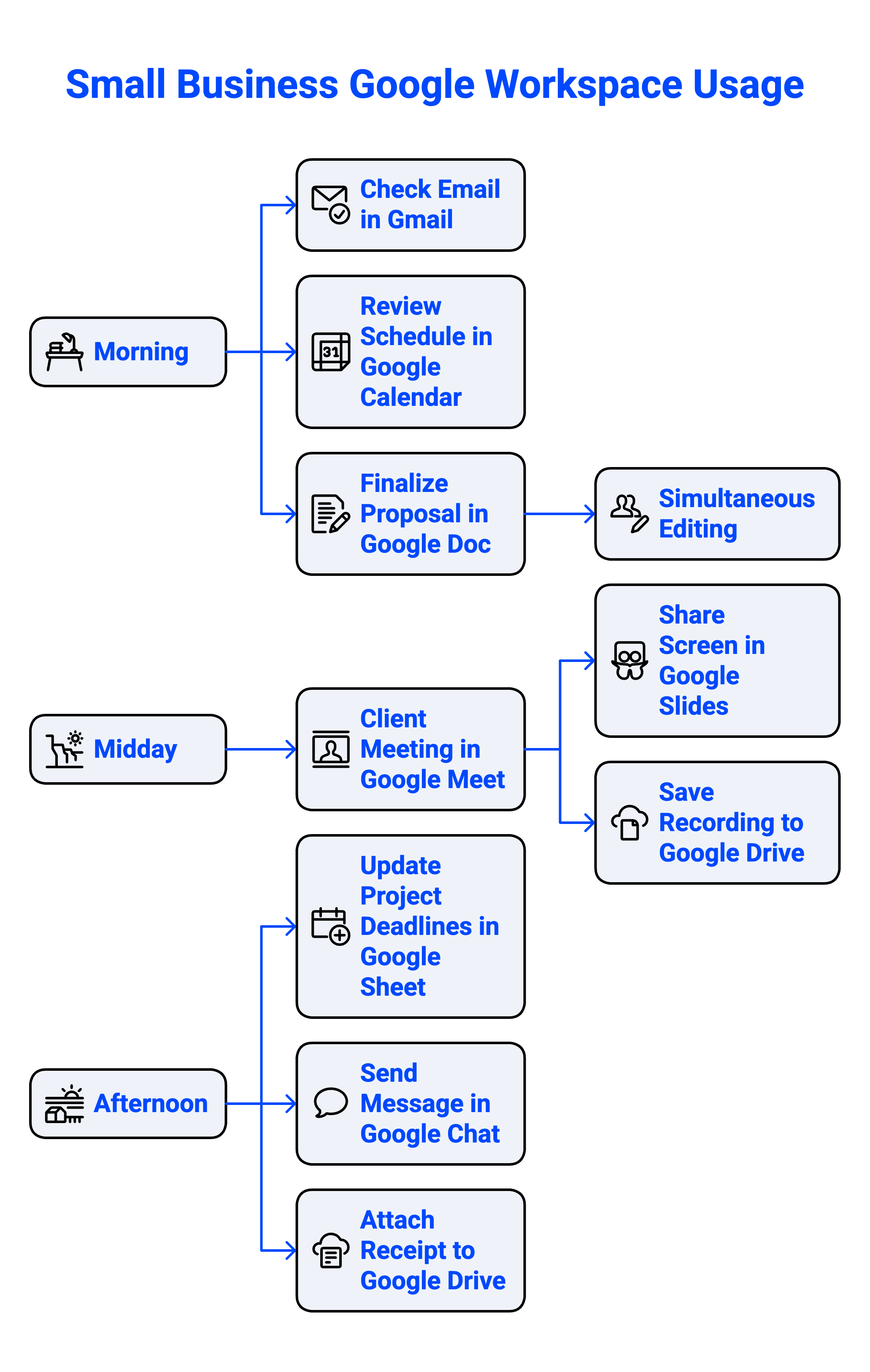
Here's what a typical day looks like for a small business on Google Workspace:
Morning: Your team checks email in Gmail, reviews the day's schedule in Google Calendar, and hops into a shared Google Doc to finalize a proposal. Two people edit the same document at the same time — no "track changes" conflicts, no emailing versions back and forth.
Midday: A client meeting happens over Google Meet. Someone shares their screen to walk through a Google Slides presentation. The recording is saved automatically to Google Drive for anyone who couldn't attend.
Afternoon: Your operations manager updates a shared Google Sheet that tracks project deadlines. A quick message goes out in Google Chat to let the team know a deliverable shipped. Your accountant attaches a receipt to a shared Drive folder from their phone while out grabbing lunch.
In our experience helping businesses like dental practices, law firms, real estate agencies, and e-commerce companies make the switch, these are the use cases that come up most often. The beauty is that none of this requires any special training — if you've ever used Gmail or Google Docs personally, you already know the basics.
Why Should a Small Business Choose Google Workspace Over Free Gmail?
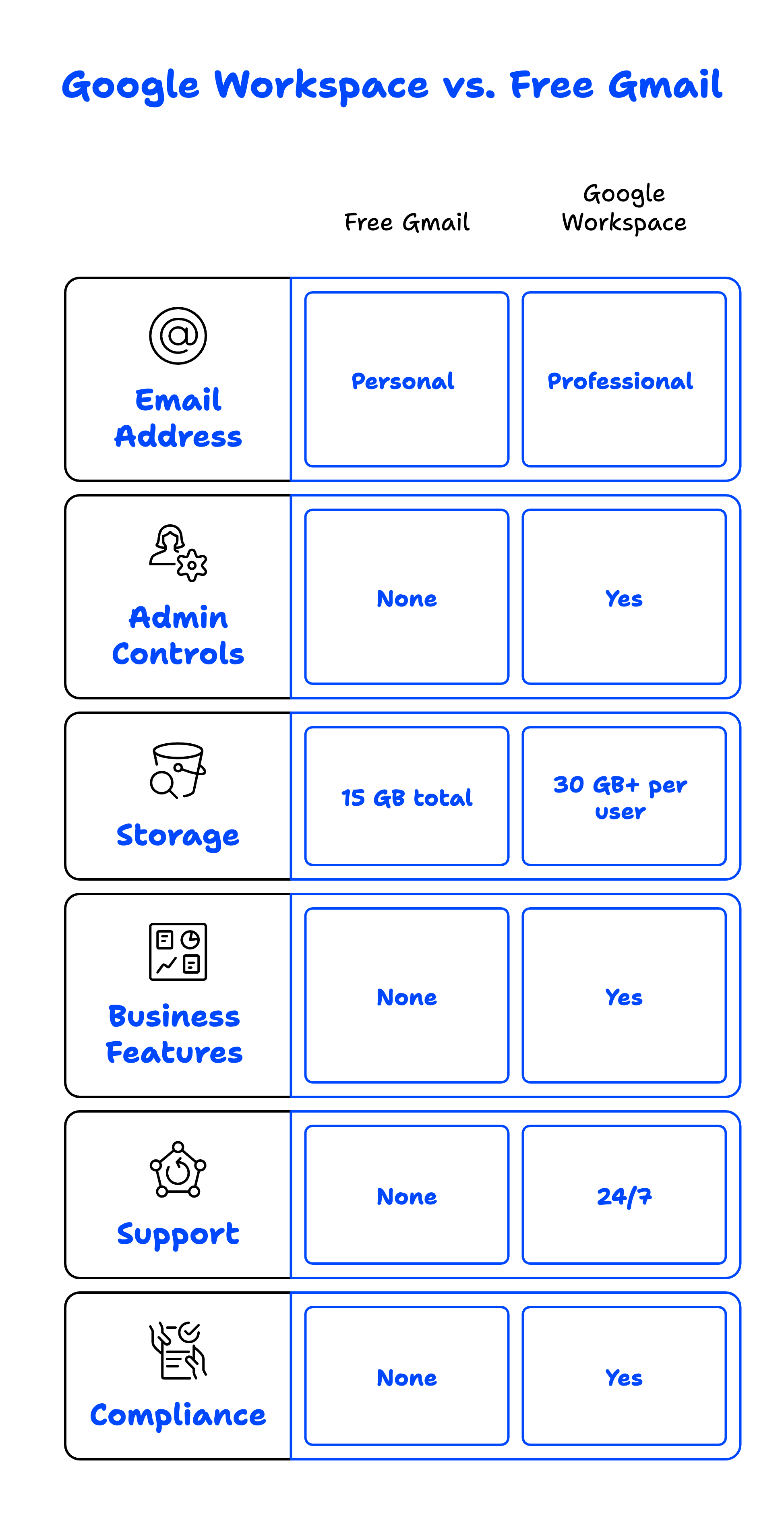
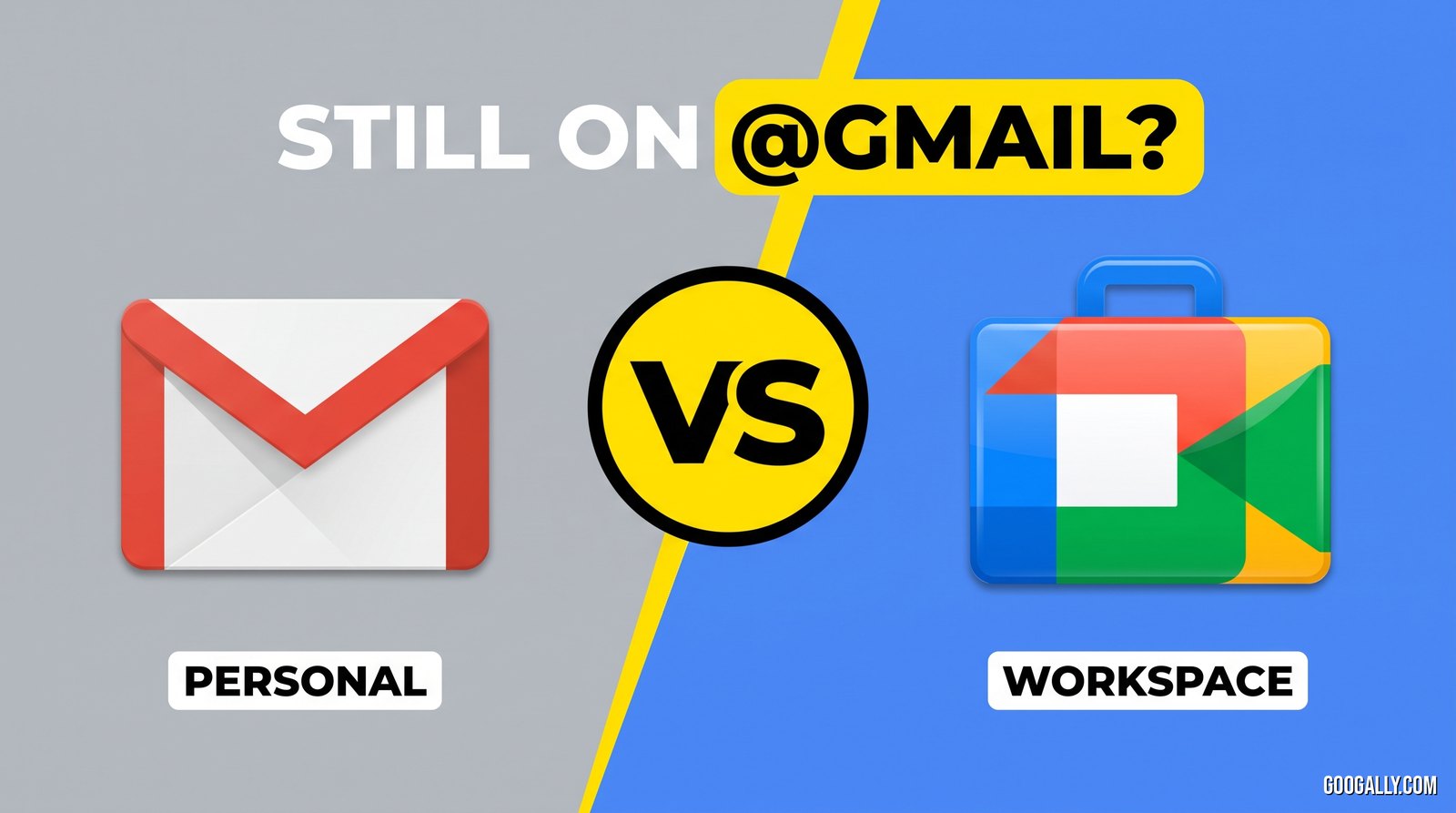
Free Gmail gives you a personal email account. Google Workspace gives you a professional business platform. The difference matters more than most people realize.
With Google Workspace, you get email at your own domain (team@yourcompany.com instead of yourcompany@gmail.com), which immediately boosts your credibility with customers and partners. But the differences go far beyond the email address:
- Admin controls — You can manage who has access to what, enforce two-factor authentication, and remotely wipe lost devices.
- More storage — Free Gmail gives you 15 GB total. Google Workspace starts at 30 GB per user and goes much higher.
- Business features — Shared drives for team files, company-wide calendar management, custom email routing rules, and data loss prevention policies.
- Support — Google Workspace includes 24/7 support from Google. Free Gmail does not.
- Compliance — Google Workspace meets HIPAA, SOC 2, and other compliance standards that free accounts do not.
If you want to understand it even more, read out my post here which I highlight 10 reasons to upgrade from personal Gmail to Google Workspace.
If you're running a business — even a small one — the professional features and admin controls in Google Workspace aren't just nice-to-haves. They're essential for security, credibility, and growth.
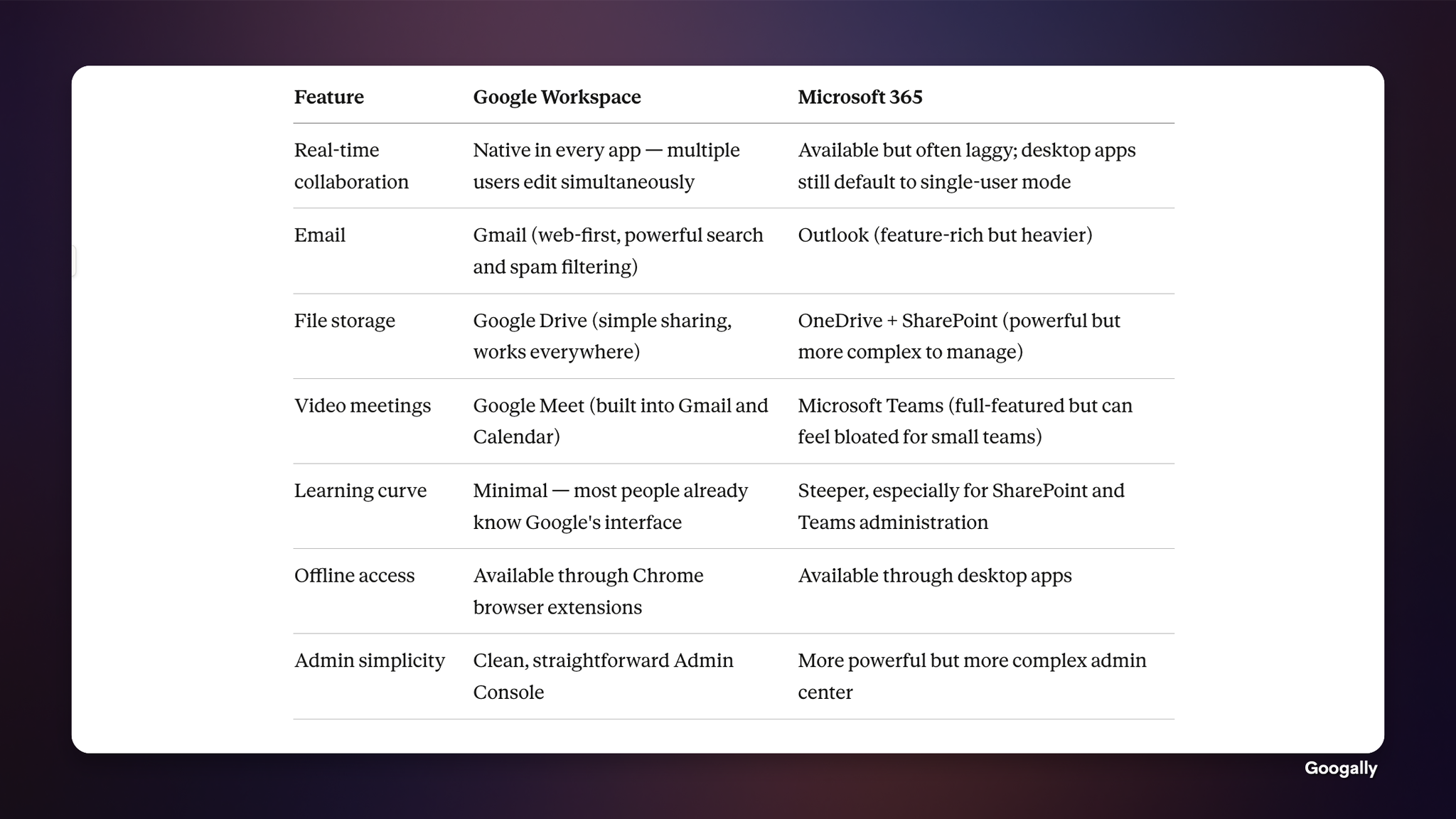
How Does Google Workspace Compare to Microsoft 365?
This is one of the most common questions we hear from businesses considering a switch. Both platforms offer email, cloud storage, and productivity apps. The key differences come down to collaboration, simplicity, and how your team actually works.
Is Google Workspace Secure Enough for My Business?
Yes — and for most small businesses, it's significantly more secure than what you're currently using. Google Workspace is built on the same infrastructure that protects Google Search, YouTube, and Gmail's 1.8 billion users.
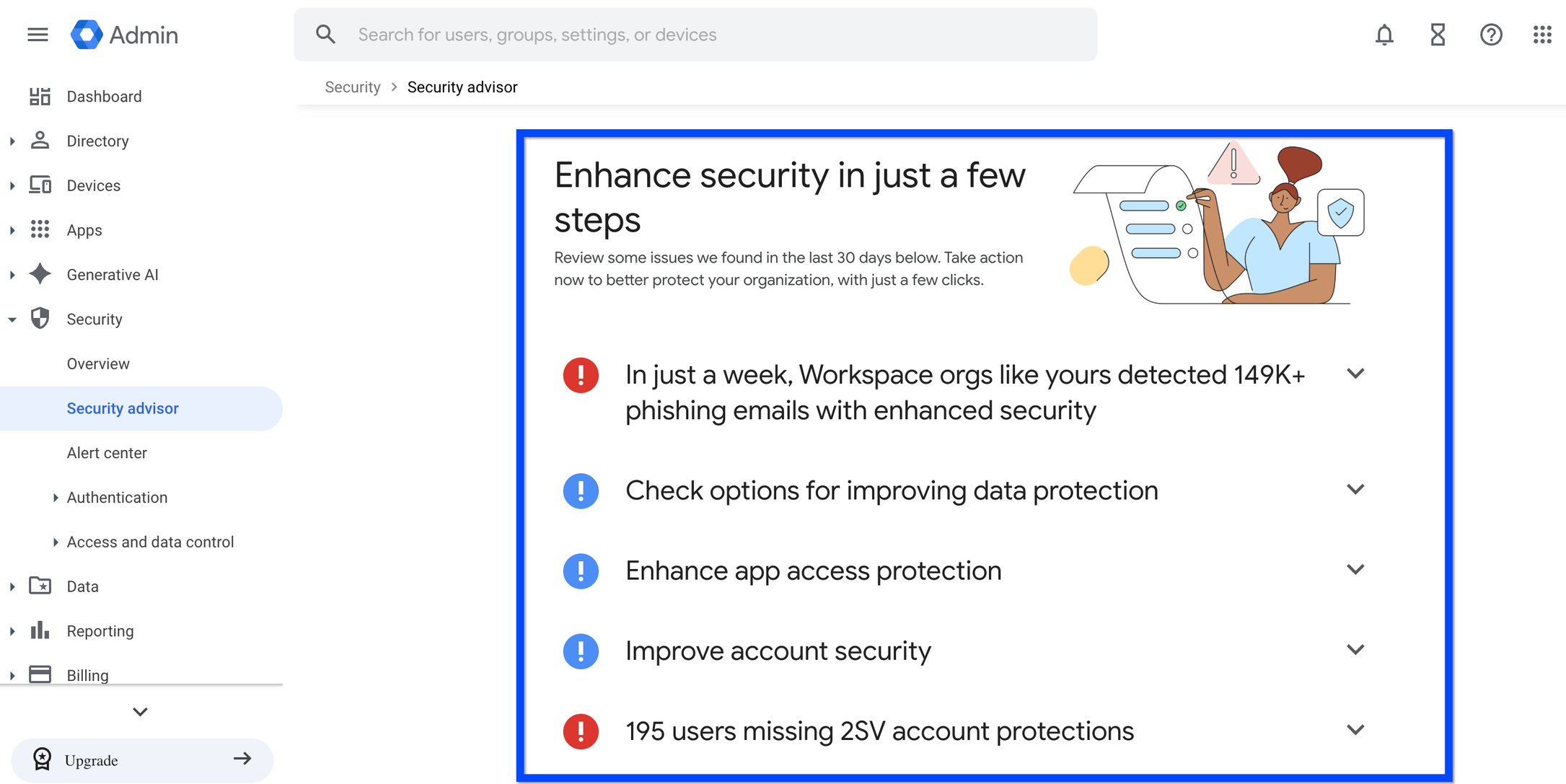
Every Google Workspace plan includes two-factor authentication, encryption in transit and at rest, advanced phishing protection, and automated security alerts. Higher-tier plans add features like data loss prevention (DLP), Vault for archiving and eDiscovery, and endpoint management to control access from mobile devices and laptops.
According to Google's security documentation, Google Workspace meets the requirements for HIPAA, SOC 2/3, ISO 27001, and FedRAMP compliance — which covers the regulatory needs of healthcare, legal, financial, and government-adjacent businesses.
In our experience, the biggest security upgrade most small businesses get from switching to Google Workspace isn't a specific feature — it's centralized admin control. When you can enforce password policies, manage devices, and control file sharing from one dashboard, your security posture improves dramatically overnight.
How Do I Migrate My Business to Google Workspace?
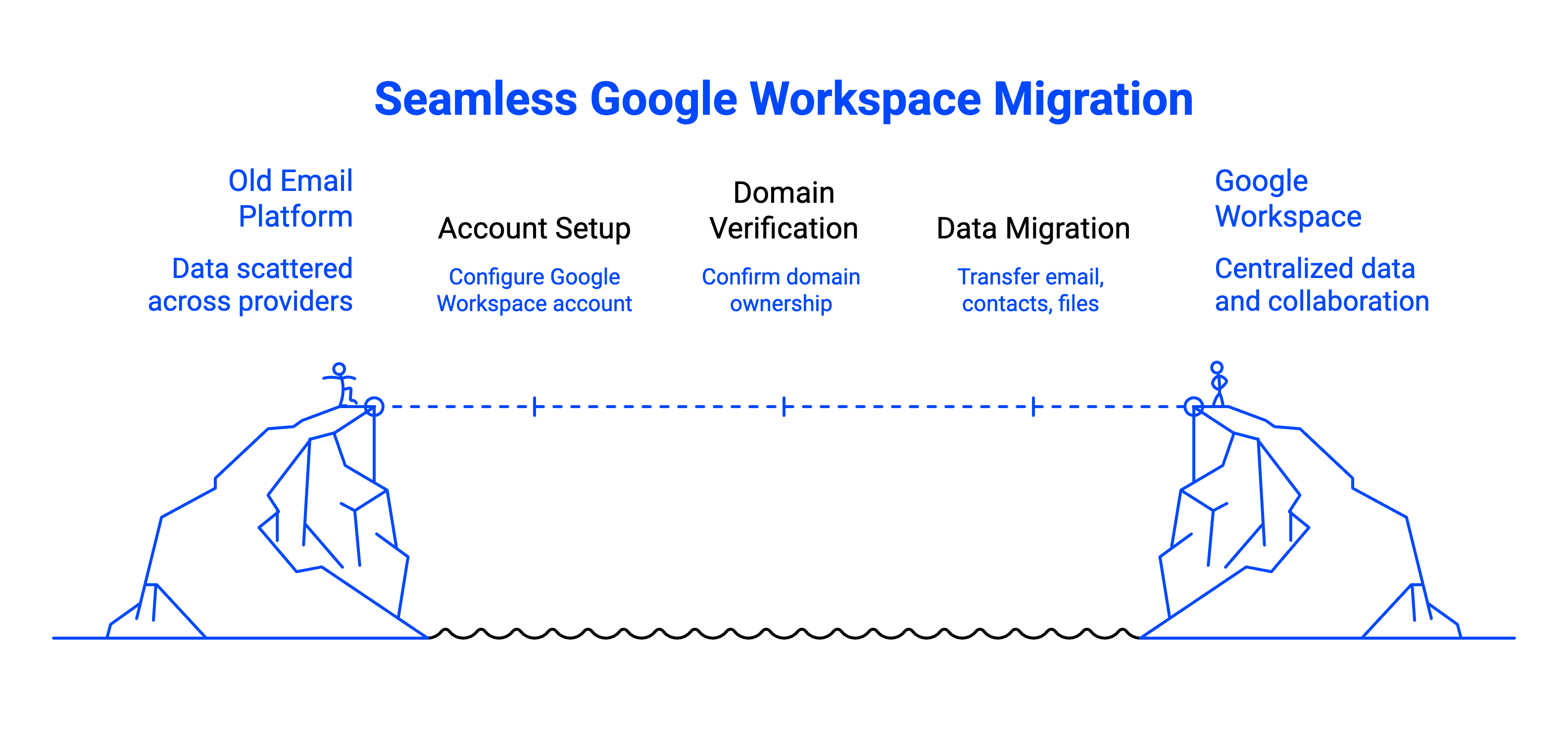
Migrating to Google Workspace is straightforward, especially with the right help. The process typically involves setting up your Google Workspace account, verifying your domain, migrating your existing email and files, updating your DNS records (specifically your MX records), and getting your team onboarded.
The part that makes most business owners nervous is email migration — nobody wants to lose emails or experience downtime. That's exactly what we offer, we handle everything from start to finish, including migrating your historical email, contacts, and calendar data, with zero downtime guaranteed. Your team keeps working normally throughout the entire process.
Whether you're coming from Rackspace, Godaddy, Microsoft 365, or another email provider, the migration process follows the same proven steps. We've done this hundreds of times, and we know the pitfalls to avoid — like DNS propagation delays, authentication hiccups, and making sure every last email makes it over.
What Google Workspace Plan Is Right for My Business?
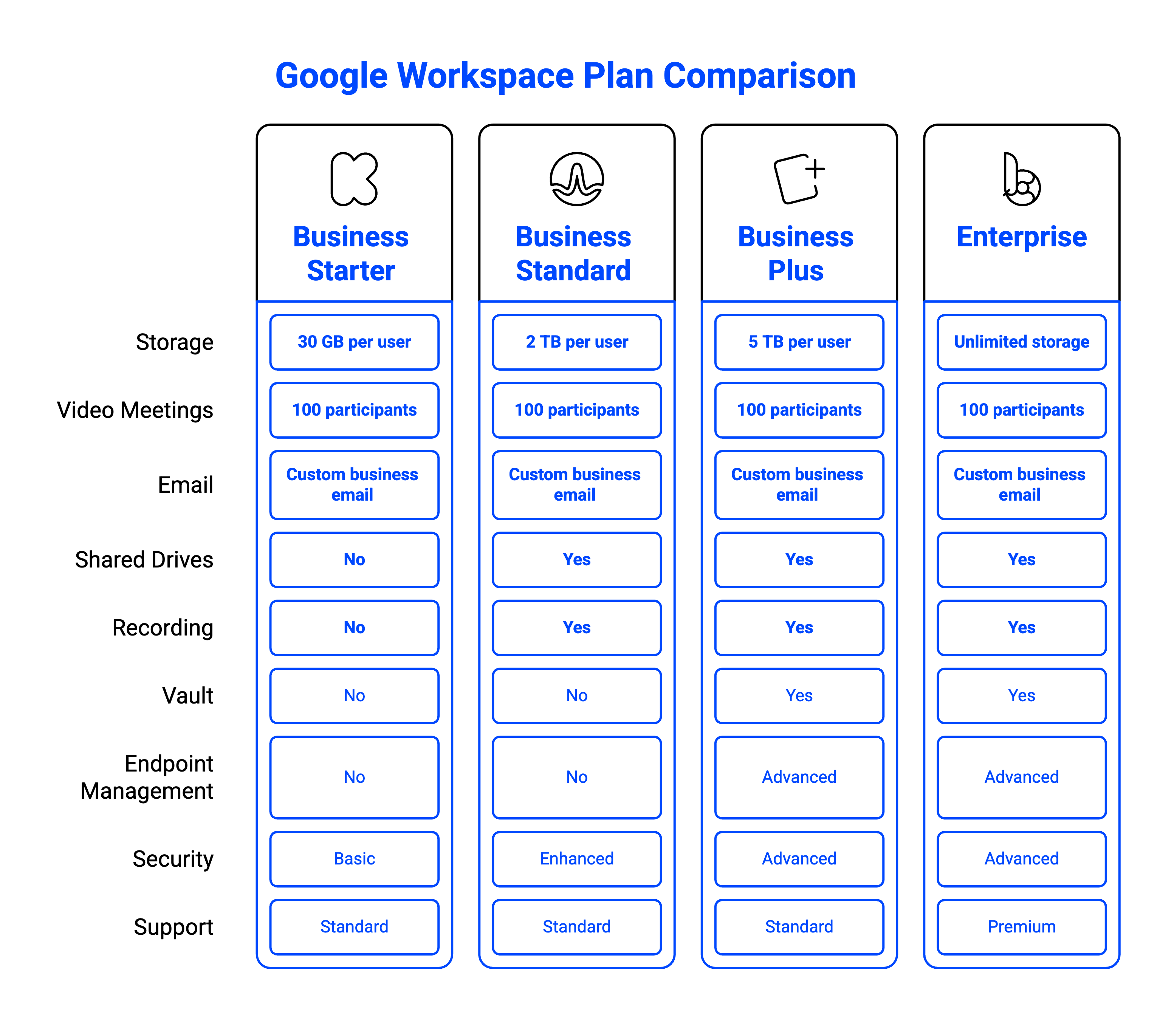
Google Workspace offers several plans, and the right one depends on your team size, storage needs, and feature requirements. For most small businesses, Business Starter or Business Standard hits the sweet spot.
- Business Starter — 30 GB storage per user, custom business email, 100-participant video meetings. Great for very small teams with basic needs.
- Business Standard — 2 TB storage per user, recording in Google Meet, shared drives, and enhanced security. The most popular choice for small businesses.
- Business Plus — 5 TB storage per user, Vault for compliance, advanced endpoint management. Ideal if you have regulatory requirements.
- Enterprise — Unlimited storage, advanced security and compliance tools, premium support. Best for larger organizations.
Not sure which Google Workspace plan fits your business? We broke it down in our guide to Google Workspace plans and pricing — or reach out and we'll walk you through your options in about ten minutes.
New customers can also lower the cost of any plan with our Google Workspace promo code — as an official Google partner, we pass on a 15% discount on Business Starter, Standard, and Plus for your first 3 months.
Frequently Asked Questions
Can I use Google Workspace on my phone and tablet?
Yes. Google Workspace works on any device with a web browser, and Google offers dedicated mobile apps for Gmail, Drive, Docs, Sheets, Slides, Meet, Chat, and Calendar on both iOS and Android. Your data syncs automatically across all devices, so you can start a document on your laptop and finish it on your phone.
Does Google Workspace work offline?
Yes. Gmail, Google Docs, Sheets, and Slides all support offline access through Chrome browser extensions. You can read and compose emails, edit documents, and view files without an internet connection. Changes sync automatically when you're back online.
How long does it take to migrate to Google Workspace?
For most small businesses, a full migration — including email, contacts, and calendars — takes between one and five business days depending on the volume of data. At Googally, we handle the entire process with zero downtime, so your team keeps working normally throughout.
Is Google Workspace HIPAA compliant?
Yes. Google Workspace supports HIPAA compliance when configured correctly and paired with a Business Associate Agreement (BAA) from Google. Google offers BAAs on Business Plus and Enterprise plans. Proper configuration is essential, so working with an experienced partner like Googally ensures nothing gets missed.
Can I keep my current email address when switching to Google Workspace?
Absolutely. Your email address stays exactly the same — you@yourcompany.com. Google Workspace uses your existing domain, so your clients and contacts won't notice any change. The only thing that changes is the platform running behind the scenes, which gets a major upgrade.
Ready to see what Google Workspace can do for your business? Contact us to migrate you this weekend.
Related Posts
Explore Tips and Guides! Discover expert insights and practical guides for optimizing your Google Workspace experience with our informative resources.










.png)
.png)
.png)
.png)
.png)
.png)
.png)
.png)


.png)
.png)





.png)
.png)


.png)


