

Best Google Workspace Plan for Solopreneurs: My No-Nonsense Guide
For most solopreneurs, Google Workspace Business Standard ($14/mo) is the best investment because it consolidates AI (Gemini), appointment scheduling, and eSignatures into one bill. While Business Starter ($7/mo) is a great entry point for professional email, the 30GB storage limit and lack of integrated productivity tools often lead to higher costs for third-party apps like Calendly or ChatGPT Plus.
So it seems like you have decided to go with Google Workspace as a Solopreneur but you are not sure which plan would be best for you.
Of course you looked at the long list of features and differences among the starter, standard and plus plans on Google’s pricing page, which might have even confused you further, which is expected as you may not know what some of these features do and how they will help your business.
So let me take you through my first hand journey to help you make an informed decision.
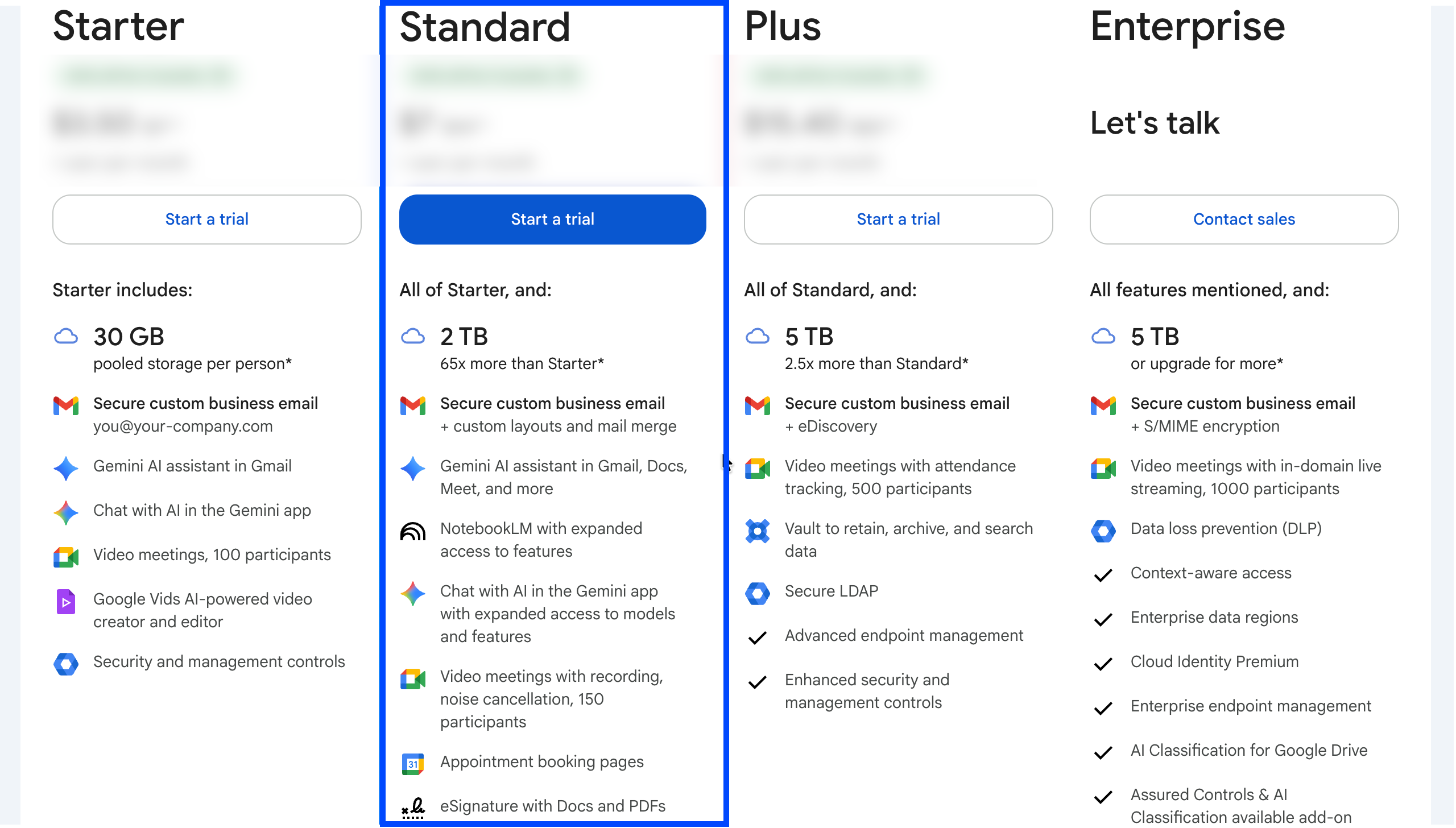
The Solopreneur’s Dilemma: Cost vs. Productivity
As a solopreneur, one side of us wants to have all the productivity tools in our stack, but the other side of us wants to keep our (recurring) software costs as low as possible (every penny matters when you are just getting started).
Starting Small: My Experience with Business Starter
So I also started with Business Starter which is the cheapest Google Workplace plan ($7/month) and it gave me all the tools to get started, I loved it initially because it gave me a professional email on my company domain, I had 30 GB of storage (which was good enough for me as I don’t storage huge photos or videos, just email and documents primarily).
Though I was missing some features which are security related such as Data Loss Prevention (which helps in restricting sharing sensitive information like SSN etc) but I was ok with it because I gradually learnt how to protect my information within Business Starter.
Managing Security on a Budget
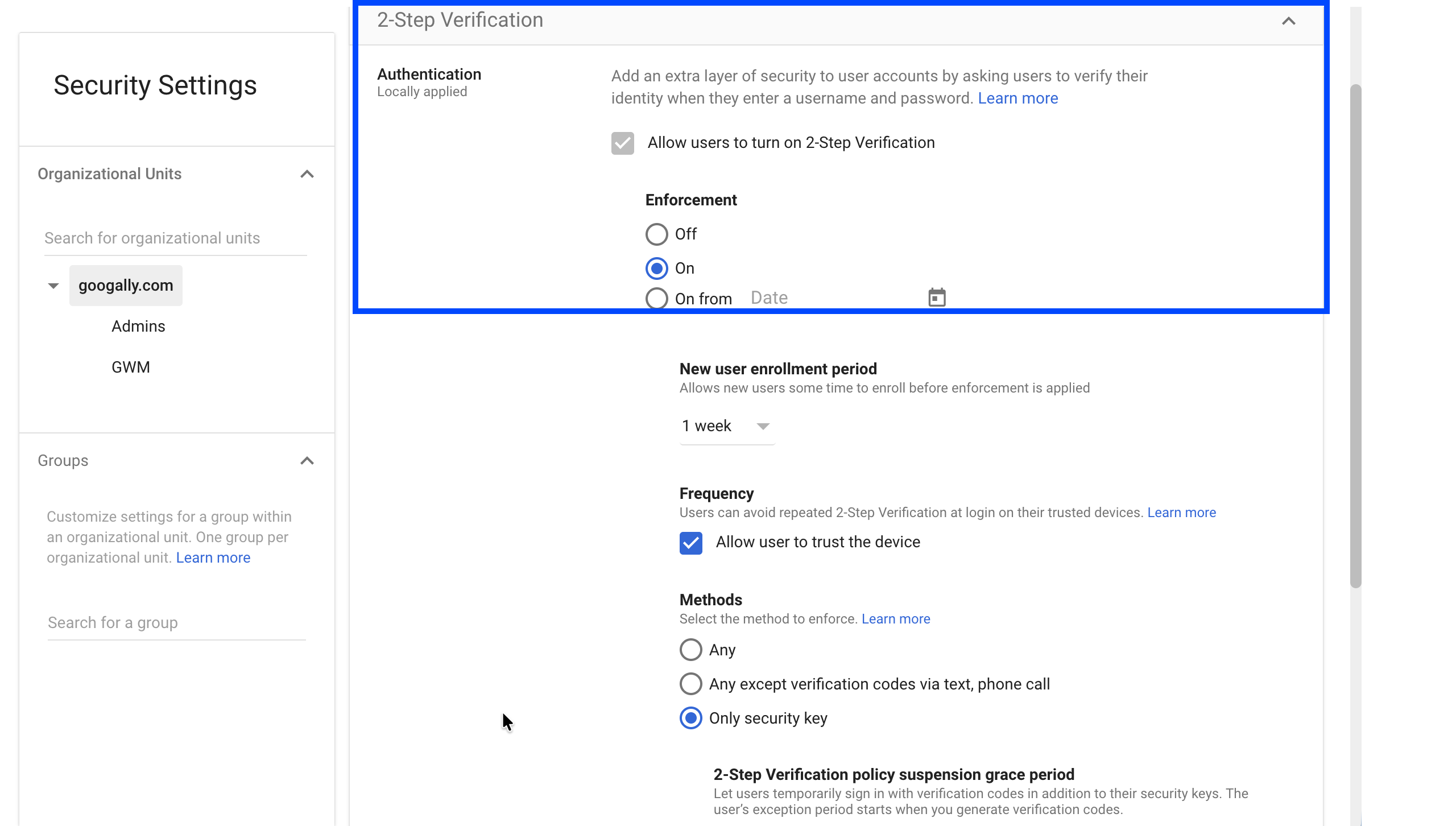
Essentially, I set up a strong password, turned on Multi-Factor Authentication, I organized my Google Drive nicely, and was very careful when sharing files to ensure I do not overshare.
The Breaking Point: Hidden Costs and Tool Friction
I personally started realizing that though I am saving some money on Google Workspace subscription with Starter plan, I am spending much more that elsewhere.
For example, to brainstorm about my business ideas, daily productivity I had ChatGPT pro which was costing me $20 per month. I was using a proposal management software for $50 per month (because I need to send proposals and get e-signatures for digital signing).
I was also paying 10 bucks a month for Calendly which allowed me to share my appointment booking page with my prospective and existing clients.
Though these tools work well with Google Workspace, I still started facing the friction as everything was in different places, and as a Solopreneur I always prefer keeping everything as centralized as possible.
The Upgrade: Why Business Standard is the ROI Winner
That's when I started to explore Google Workspace Business Standard plan, and it did not take me long to realize that it offers the best value for money.
This is how I use it for my business today, and I am glad I upgraded:
Gemini: The Integrated AI Advantage
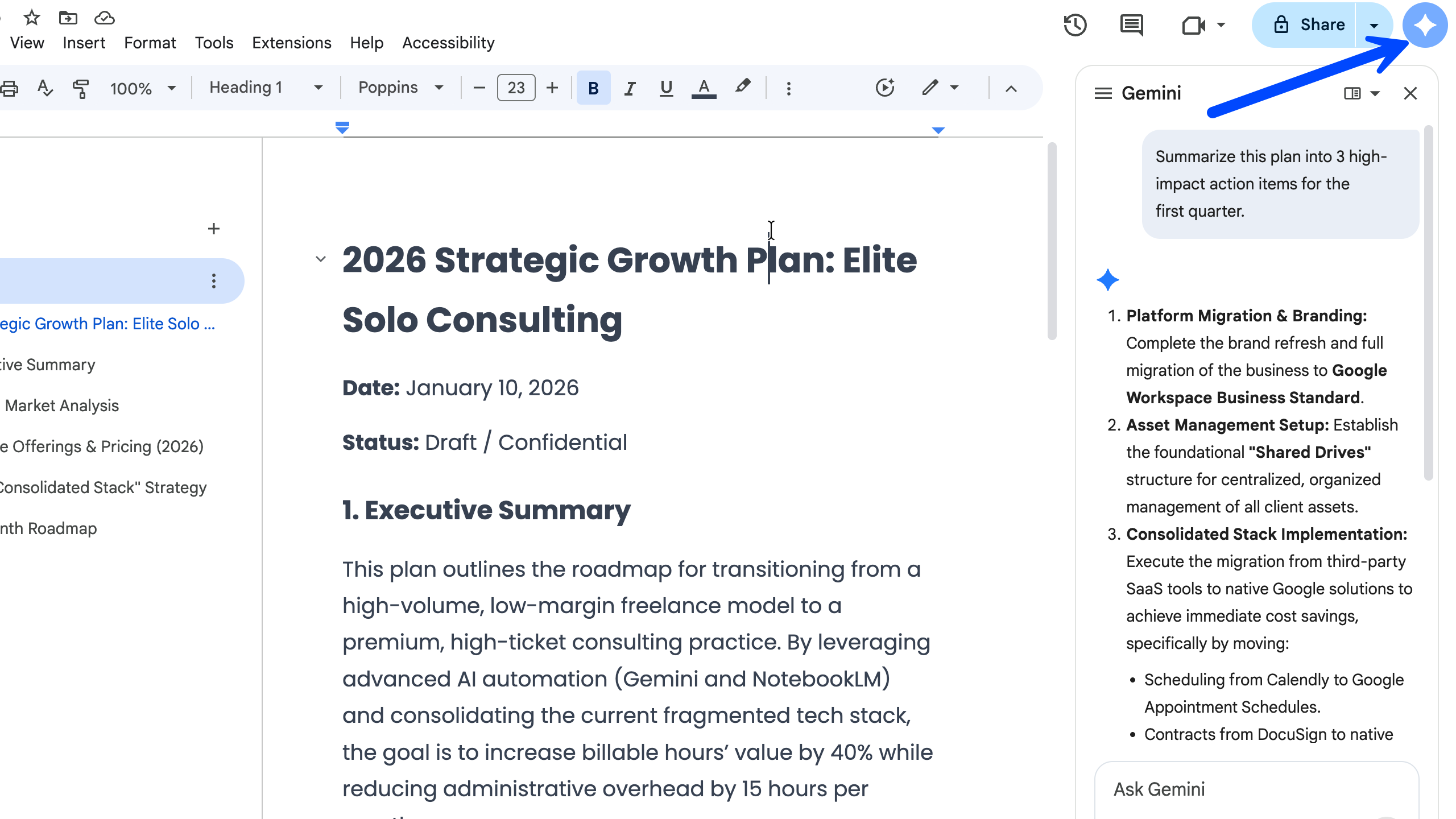
Though I got Gemini as part of the standard plan, but I did not cancel my ChatGPT plus right away, I wanted to prioritize productivity, so I started using both the tools together and very quickly Gemini was a clear winner (specially the newest model Gemini 3).
I started using it more than ChatGPT everyday because it is very well integrated in Gmail, Docs, Sheets etc, so instead of working in ChatGPT first and then copying/pasting stuff, I was now getting things done directly in Google Workspace without switching the context or the app.
I finally cancelled ChatGPT plus and right away I was spending less on my software costs even with Business Standard now.
Native Appointment Booking and eSignatures
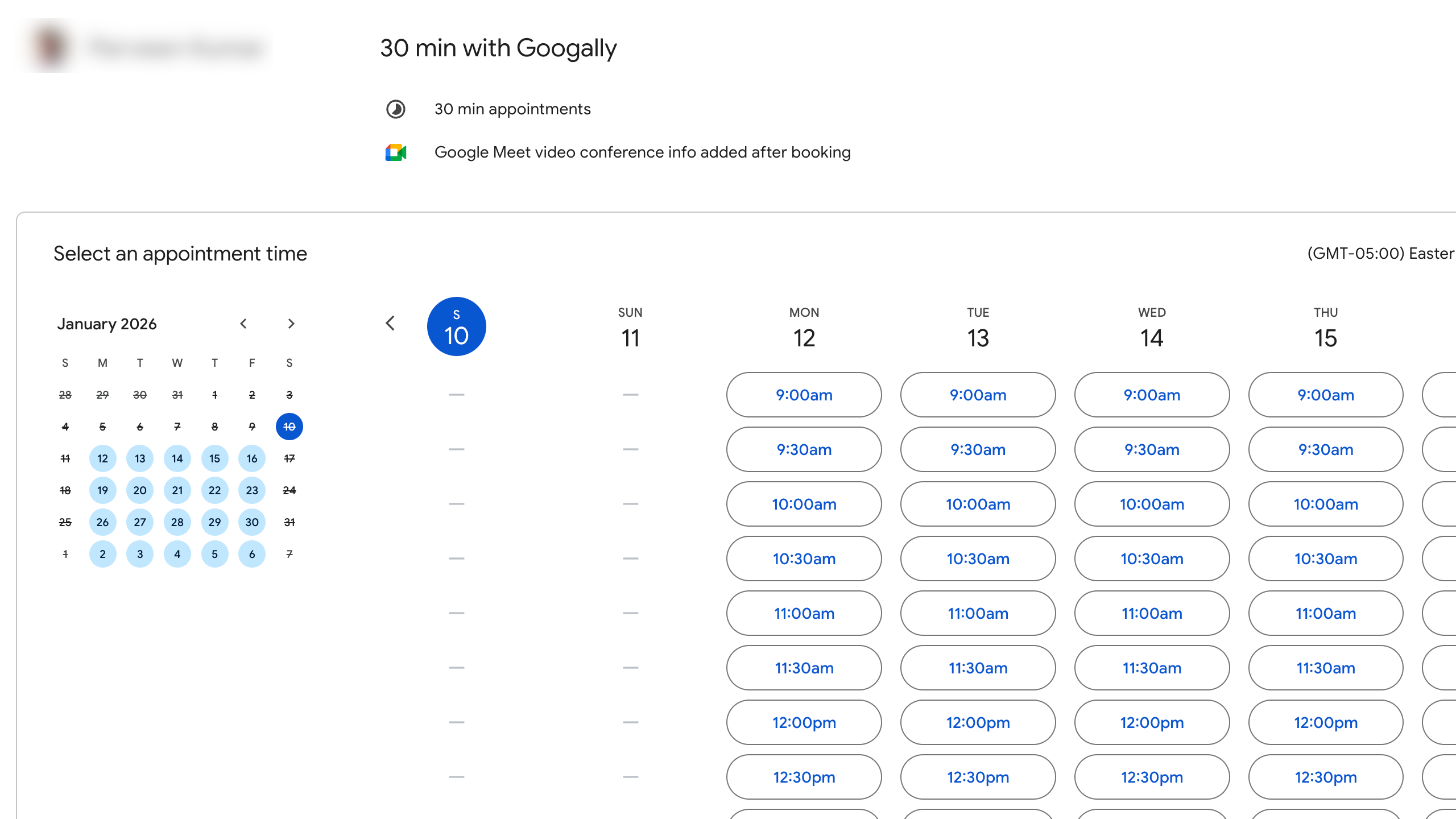
Next, I started working on replacing Calendly by creating an appointment page in Google Calendar (part of standard plan), the setup was very easy and because it is native to Google Calendar, sync is seamless too.
It also has an option to integrate Stripe if you want to collect payments from your clients when they book you, but I skipped it for now as its not my business case.
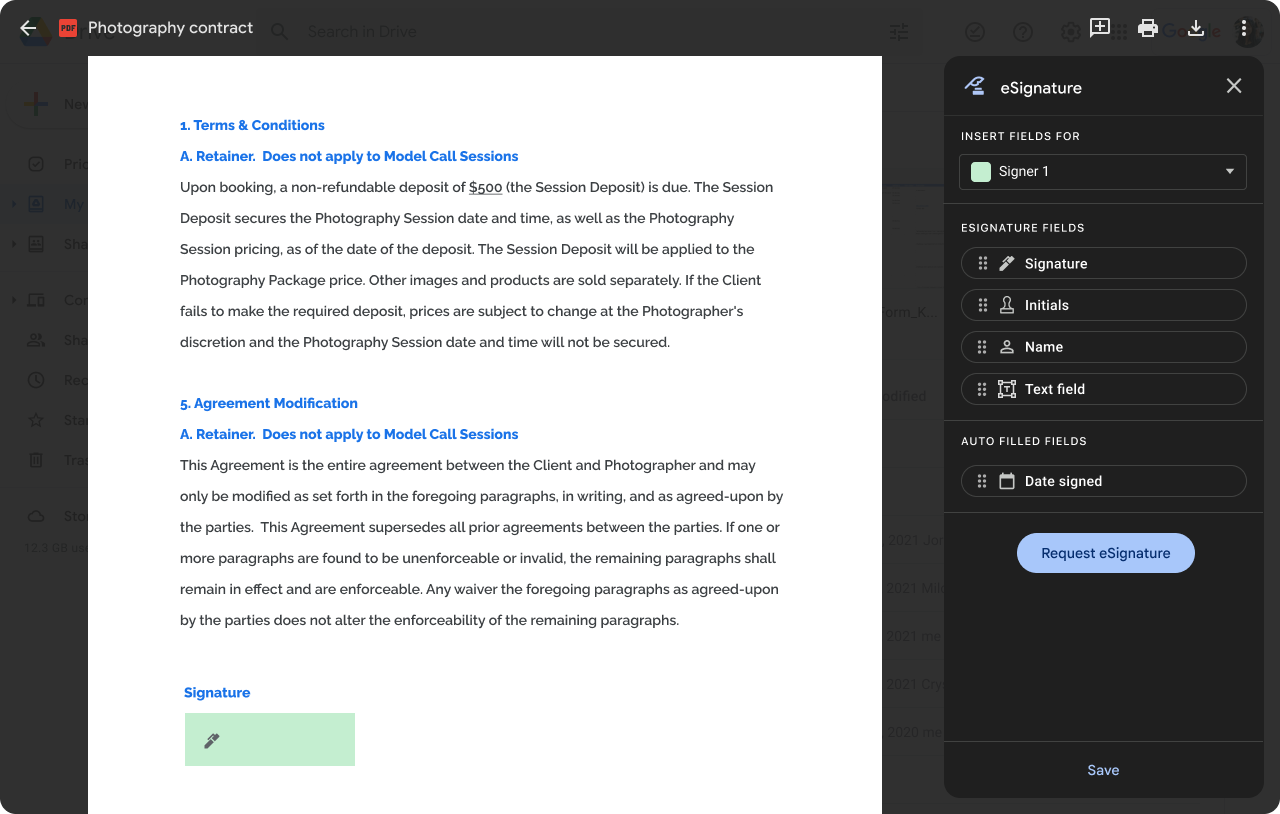
Finally, the big one, the proposals, now based on my experience though you get e-signature as part of business standar plan, there is a bit of work where you create your own Google Docs Proposal templates (of course Google does not have good looking ones out of the box like other prominent proposal softwares do), but it was one off work for me and am glad I went this route.
Now, I send proposals via my google docs template and request e-signatures from my clients (and yes, as per Google’s documentation they are legally valid).
Leveraging Meeting Recordings and AI Notes
Meeting Recordings : As part of Business Standard plan, I now record most of my Google Meet video meetings (of course with clients’ consent:). I also let Gemini take notes for me, and after the meeting along with the recording video, I also get meeting notes and a transcript which I can refer to later or use Gemini to ask questions about it.
It also allows me to share meeting recordings with the clients which helps me with being perceived as very organized and resourceful ;)
Overall, I was able to get from paying around $100 to just $14 per month.
Beyond Email: Automation Agents, Storage and Advanced Insights
Beyond built-in tools, you can use Google Workspace Studio to automate the 'glue' between your apps, saving you from hiring a virtual assistant.
There are more features I get with it like 2 TB of storage, so now instead of using my personal Gmail or iCloud storage, I use my workspace account to store my personal / family photos too, it's nice to have everything in one place, especially if you aren’t paying anything additionally for it.
NotebookLM: Your AI Business Thought Partner
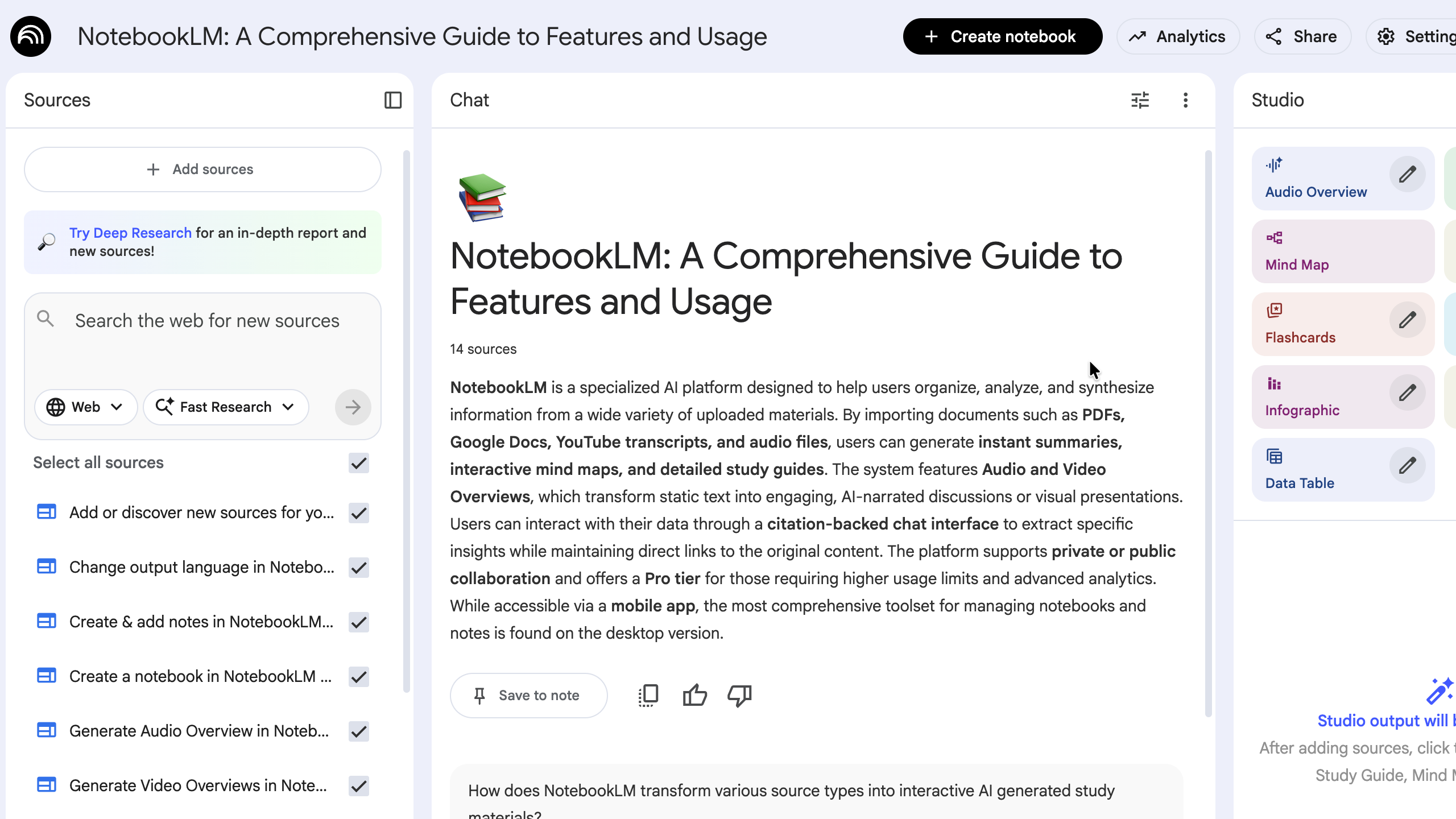
I also started using NotebookLM (which I am falling in love with), it has become my business thought partner. It allows me to upload documents from my laptop, Google Drive, webpages etc, and then I ask it questions to get insights quickly.
One of my top time saving tips is that instead of watching a long youtube video, you can simply add a video url to NotebookLM and then ask it to summarize it for you, or rather ask how can I apply the key takeaways from this video in my business.
Final Verdict: Which Plan Should You Choose?
I am very happy with my current setup, and feel like this $14 per month is one of my best purchases to keep my business organized.
So if you are really tight on the budget, then there is no more discussion, you can simply sign up for Google Workspace Starter plan, get going with it and upgrade it whenever you feel like (you can read more about it in my change your google worksplan plan).
But If you can spend a bit more, I will highly recommend going with Business Standard.
Also, sometimes we buy the expensive software by just looking at all the fancy features it offers, but never really invest the time to learn about how these can actually make a difference in our business.
So I would recommend you to explore Google Workspace official youtube channel, its documentation and other resources to ensure you are getting max out of your investment.
Editor’s Note: Since this guide is all about cutting costs, I’ve secured an exclusive referral link that gives you 15% off your first three month. If you’re planning to switch from several paid apps to one central plan, this helps make that first month even cheaper, but it only works for new customers.
[Grab your 15% discount at https://www.googally.com/workspace/promo-code] if interested.
Good Luck.
Frequently Asked Questions
Is Business Plus ($22/mo) actually worth it for a one-person business?
I looked at its features, and of course it has some compelling ones, especially Google Vault, which offers data retention policies (e.g. create a retention policy to retain Gmail, Drive etc data for 10 years), so if my data is deleted, I have an option to recover it. I might consider upgrading to it once I have more employees working for me (to avoid any by mistake or intentional data deletion) and legal cases, but for now I try to not do such mistakes:).
What is the "30GB Trap" and how fast does a solo founder usually hit it?
As you might have expected, the answer here really is ‘It depends”, just because you operate solo does not mean you may or may not hit 30 GB, if you are into a business where you store heavy photos, videos, zip files etc, you may hit that limit soon.
Can I really cancel my ChatGPT Plus or Claude subscription if I have Gemini on Business Standard?
Again, this is subjective, but I strongly feel, yes, you can, I was on ChatGPT plus for over a year, and with the Gemini 3, I am finding it better overall, I don’t feel like going back. I love the way Google has integrated Gemini within Gmail, Drive, Docs, Sheets, Chat, Meet etc, so I can interact with their Gemini Sidebar without leaving the application.
Do I get the same Gemini features if I stay on the Business Starter plan?
No, though Gemini was part of my Business Starter subscription too, but it was very very limited. Also, those sidebars in Gmail, Drive etc only come in Business Standard.
What happens to my data if I want to downgrade or switch plans later on?
You would of course miss on the features that are not part of the downgraded or Starter plan, but be careful with the storage, if you start with Business Standard, consume more than 30 GB and then downgrade, you may end up with read only Google Drive unless you delete some content and bring it back to less than 30 GB.
If I’m already paying for a personal Google One storage plan, can I merge it with my Workspace account?
No, You will need to transfer your data to your Workspace account before deleting or cancelling the Google One Storage.
Does the Business Standard plan actually replace my need for DocuSign or Calendly?
I was able to replace them, of course there will be some minor compromises which are expected when you sign up for a dedicated software for one case vs the one which bundles everything, for me it was worth it. So give it a try and see how it goes.
Is there any reason to stick with a free @gmail.com account instead of making the jump to Workspace?
No, I will never recommend you to use @gmail for business even if you are operating Solo, I have written more about why you should upgrade from Gmail to Google Workspace, even if you go for a Business Starter plan, that should still be much better.
What is "Shared Drive" and do I really need it if I don't have a team yet?
Good question, I personally think it's not a must have if you operate solo, however it's a good practice to start using it from day one, especially for your SOPs etc so when you grow, it becomes easy for you to scale. The whole idea behind Share Drives is that if you hire someone, and they leave, you would need to transfer their Drive content to you, but if it is in Shared Drive, your company has its ownership.
How long does it take to set up the Appointment Booking and eSignature features?
Appointment Booking is pretty straightforward, I would you say just a few minutes. eSignature setup in itself is not difficult, the time consuming part is setting up your proposals, NDAs etc templates in Google docs, making them look beautiful with images etc (if you care that much), but overall, I find it reasonably easy.
Related Posts
Explore Tips and Guides! Discover expert insights and practical guides for optimizing your Google Workspace experience with our informative resources.








.png)
.png)
.png)
.png)
.png)
.png)
.png)
.png)


.png)
.png)

.png)



.png)
.png)


.png)


