
Ditch the Landline: Why Small Businesses Are Switching to Google Voice
Google Voice for Business is a cloud-based VoIP phone system that gives your company a dedicated business phone number, unlimited calls to the US and Canada, voicemail transcription, and seamless integration with Google Workspace—starting at $10 per user per month.
If you're a small business already using Google Workspace (or considering a migration), adding Google Voice is one of the easiest ways to professionalize your communications without the complexity of traditional phone systems.
In this guide, we'll cover everything you need to know: what Google Voice is, how much it costs, its benefits for small businesses, and how to get started.
What Is Google Voice for Business?
Google Voice for Business is a Voice over Internet Protocol (VoIP) phone service that runs entirely through the internet. Instead of traditional phone lines, you make and receive calls using your computer, smartphone, or supported desk phone—all tied to a single business number.
Unlike the free personal version of Google Voice (which is limited to individual use in the US), the business version is designed for teams. It includes features like ring groups, auto-attendants, and multi-user support.
Key capabilities include:
- A dedicated local business phone number
- Unlimited calling and texting within the US
- Voicemail transcription sent directly to your email
- Automatic spam call filtering using Google's AI
- Integration with Google Calendar, Gmail, and Google Meet
How Much Is Google Voice for Business?
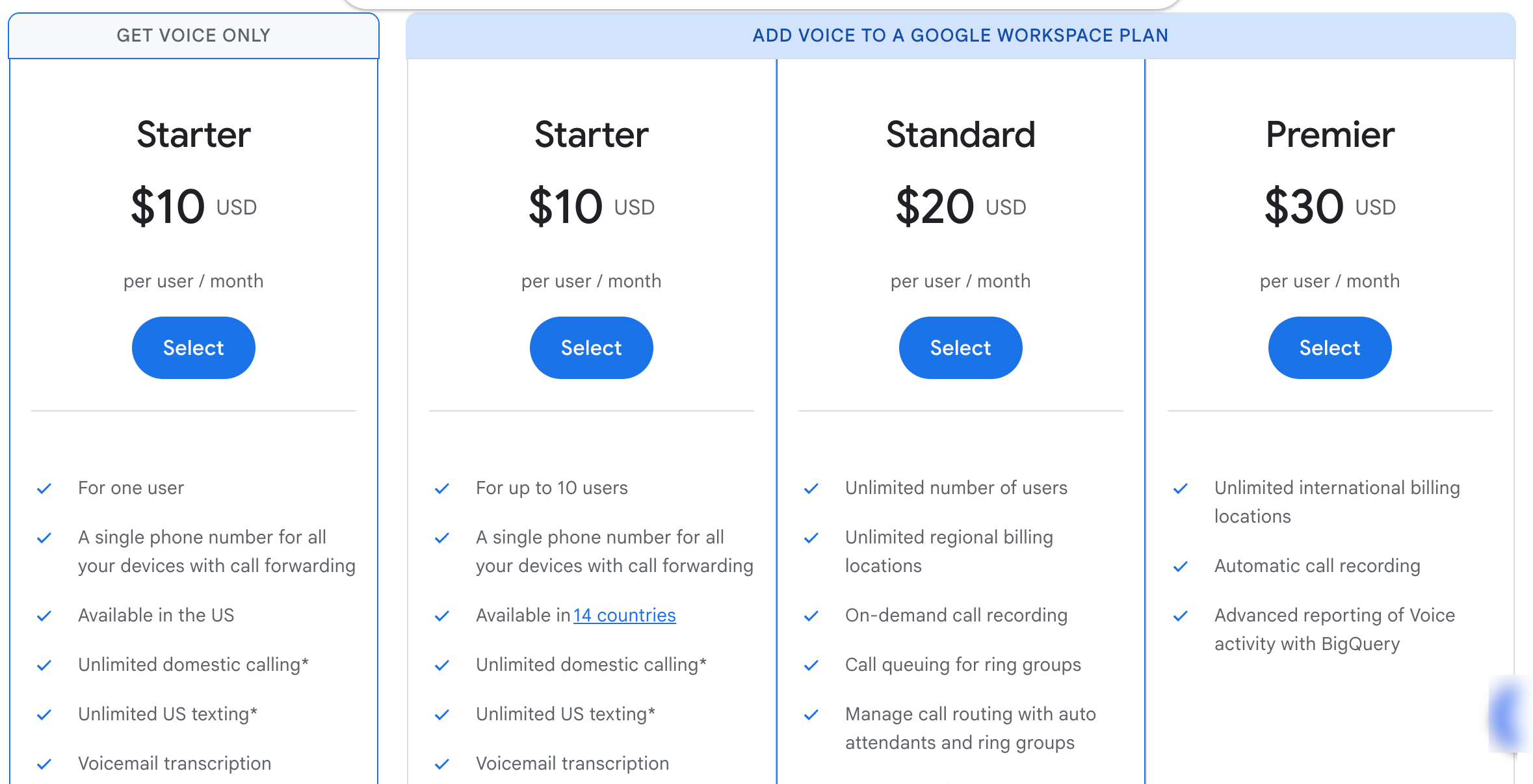
Google Voice offers three pricing tiers. All plans require a Google Workspace subscription (starting at $7/user/month) in addition to the Voice license.
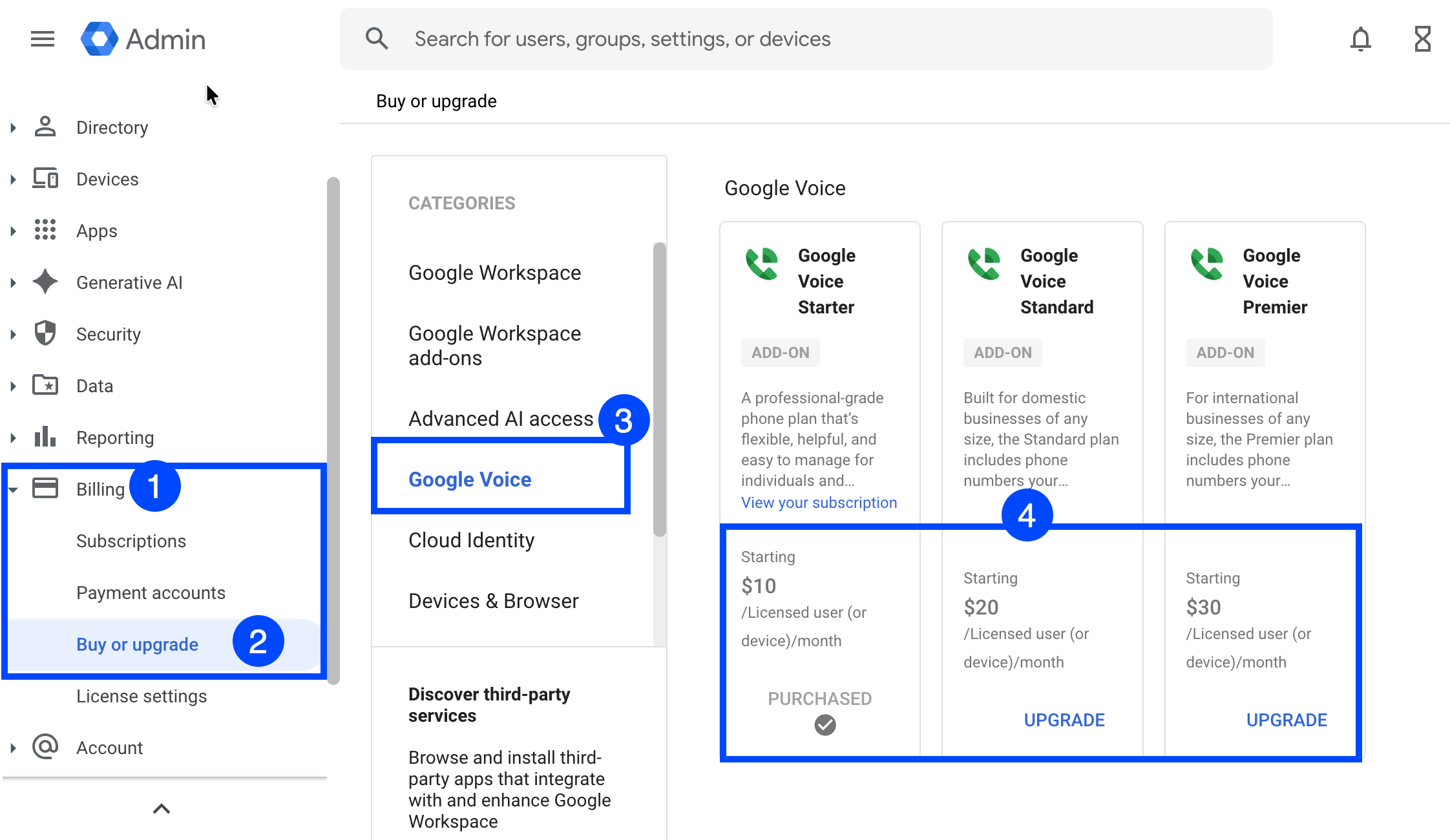
Its Starter plan costs $10 per user per month and supports up to 10 users—you get a local business number, unlimited calls to the US and Canada, voicemail transcription, and call forwarding.
The Standard plan at $20 per user per month removes the user cap and adds ring groups, an auto-attendant (virtual receptionist), desk phone support, and on-demand call recording.
The Premier plan runs $30 per user per month and includes everything in Standard plus automatic call recording, support for international locations, and advanced analytics through BigQuery.
Total cost example: A team of 5 on the Starter plan would pay approximately $85/month total ($10 Voice + $7 Workspace per user).
Also, if you are a new Google Workspace customer, you can save 15% on your subscription with our Google Workspace Promo Code.
Is Google Voice Free for Business?
No. While there is a free personal version of Google Voice, business use requires a paid plan. The free version doesn't support multiple users, ring groups, or the other features businesses need.
Benefits of Using Google Voice for Small Business
1. Works on Any Device
Google Voice isn't tied to a physical phone. Your team can answer business calls from their laptop, mobile phone, or tablet—wherever they are. This is ideal for remote teams or businesses without a physical office.
2. Separates Personal and Business Calls
Your employees can use their personal phones without giving out their personal numbers. Customers call the business number, and staff can choose when to answer, forward calls, or let them go to voicemail.
3. Seamless Google Workspace Integration
If your business already uses Gmail, Google Calendar, and Google Meet, Voice fits naturally into your workflow. Voicemails appear in Gmail. Calls can be scheduled around calendar availability. You can start a Meet video call directly from Voice.
4. AI-Powered Spam Filtering
Google's AI automatically detects and filters suspected spam and scam calls, so your team spends less time dealing with robocalls.
5. Simple Admin Setup
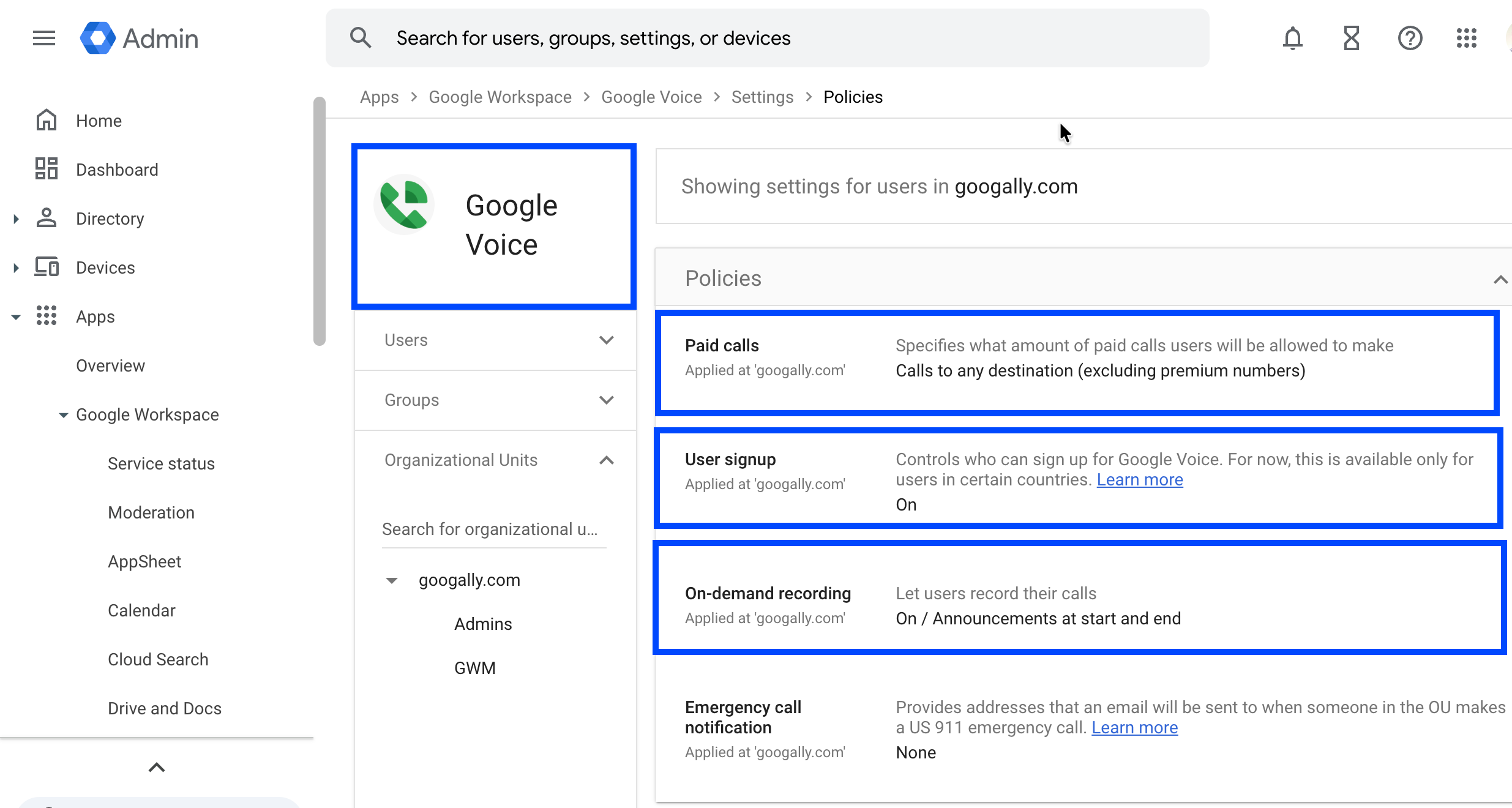
Adding Voice to existing Google Workspace accounts takes minutes through the Admin Console. There's no separate vendor relationship or complex phone system to manage.
6. Cost-Effective for Small Teams
Compared to traditional business phone systems, Google Voice offers a straightforward per-user price with no hardware costs (unless you want desk phones). For small businesses handling moderate call volumes, it's often significantly cheaper than alternatives. There are even more ways to reduce your Google Workspace costs.
How to Use Google Voice for Business
Step 1: Ensure You Have Google Workspace
Google Voice for Business requires an active Google Workspace subscription. If you're already using Workspace, you can add Voice directly from the Admin Console.
Step 2: Choose Your Plan
Select Starter, Standard, or Premier based on your team size and feature needs. Most small businesses start with Starter and upgrade as they grow.
Also, if you need help choosing the right plan, I have written about it in my Starter vs Standard vs Plus plan post.
Step 3: Assign Licenses and Numbers
From the Google Admin Console, assign Voice licenses to users who need them. Each user selects a local phone number from available area codes.
Step 4: Configure Call Handling
Set up how calls should be routed:
- Call forwarding: Route calls to mobile phones or other numbers
- Ring groups (Standard+): Multiple team members can answer the same number
- Auto-attendant (Standard+): Create a professional menu ("Press 1 for Sales, Press 2 for Support")
- Voicemail: Customize greetings and enable transcription
Step 5: Install the Apps
Users can access Google Voice through:
- The web at voice.google.com
- The Google Voice mobile app (iOS and Android)
- Supported Poly desk phones (Standard and Premier plans)
Is Google Voice Good for Business?
Google Voice works well for small businesses that:
- Already use Google Workspace
- Need basic calling features without complexity
- Have teams under 50 people
- Primarily operate within the US and Canada
However, Google Voice has limitations to consider:
- No toll-free numbers: You can only get local numbers
- US-centric texting: SMS only works in the US
- Limited international support: Only 14 countries are supported, and international locations require the Premier plan
- No desktop app: Voice is browser-only (no native Windows or Mac app)
- Basic integrations: No connections to CRM systems or other business tools outside Google Workspace
For businesses with high call volumes, international operations, or needs for advanced automation, dedicated VoIP providers may offer more robust solutions.
Can I Use Google Voice for My Business?
Yes, as long as you meet these requirements:
- Your business is in a country where Google Voice is available
- You have (or sign up for) a Google Workspace subscription
- You purchase Voice licenses for users who need phone access
Google Voice is available for businesses in the US, Canada, and select European countries. Check Google's current availability list for the full list of supported locations.
Frequently Asked Questions
How does Google Voice work for business?
Google Voice uses VoIP technology to route calls over the internet instead of traditional phone lines. When someone calls your Google Voice number, it rings on any device where you're signed in—your phone, computer, or desk phone.
Can I use Google Voice number for WhatsApp Business?
This is not officially supported. WhatsApp Business typically requires a mobile phone number, and Google Voice numbers may not work reliably for verification. For WhatsApp Business, most users need a dedicated mobile SIM.
What's the difference between Google Voice for business and personal?
The personal version is free but limited to one user in the US with basic features. The business version supports multiple users, ring groups, auto-attendants, desk phones, and integrates with Google Workspace administration.
Can I port my existing business number to Google Voice?
Yes, Google Voice supports number porting. There's a $20 fee to port an existing number. The process typically takes a few days depending on your current carrier.
Final Thoughts
Google Voice for Business offers a straightforward, affordable way for small businesses to get a professional phone system—especially if you're already in the Google Workspace ecosystem. At $10-30 per user per month (plus Workspace), it provides the essential features most small teams need without the complexity of traditional phone systems.
If you're migrating to Google Workspace or looking to simplify your business communications, Google Voice is worth considering as part of your setup.
Need help migrating your business to Google Workspace? Contact Googally for expert migration support.
Related Posts
Explore Tips and Guides! Discover expert insights and practical guides for optimizing your Google Workspace experience with our informative resources.









.png)
.png)
.png)
.png)
.png)
.png)
.png)
.png)



.png)
.png)

.png)







.png)
.png)


.png)


.png)
