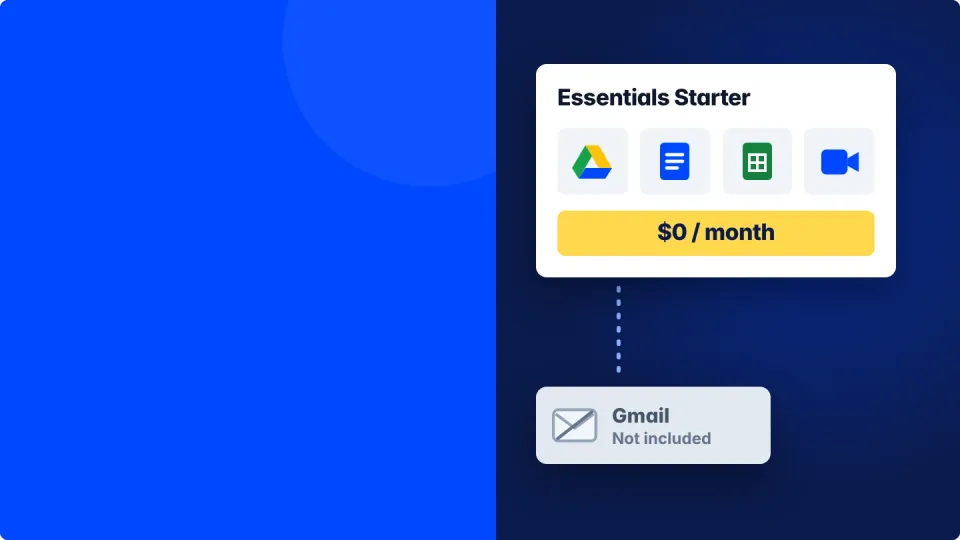
Google Workspace Essentials Starter is a free Google plan for teams that want Drive, Docs, Sheets, Meet and Chat but keep their current work email. It costs $0 with no trial and no credit card, gives each person 15 GB of Drive storage, and holds up to 100 people per team. The catch is that it has no Gmail and no Google support, so if you want Gmail on your own domain you need a paid Business plan instead.
Here's a call I get more often than you'd think. A business owner signs up for "free Google Workspace", invites the team, and everyone happily starts sharing Docs. Then a week later someone asks the obvious question. "So where's our new Gmail inbox?" There isn't one. They signed up for Essentials Starter, and nobody told them it's a plan built for people who already have email somewhere else.
That mix-up is easy to make, because the name sounds like the entry rung of the normal Workspace ladder. It isn't. Think of it as a free side door into Google's office apps, while Business Starter is the front door that comes with your own mailbox. Below I'll walk you through what the free plan actually gives you, what it leaves out, and how to tell in about a minute which one your business needs.
Quick takeaways
- Essentials Starter costs $0 with no time limit and no credit card, for up to 100 people per team.
- You get Drive, Docs, Sheets, Slides, Forms, Meet, Chat and Calendar, with 15 GB of storage per person.
- There's no Gmail, so you keep using Outlook, Microsoft 365, GoDaddy or whatever runs your email today.
- You sign up with a work address, not a gmail.com one, and only if your company doesn't already have Google Workspace.
- If you want Gmail on your own domain, a Business plan starts at $7 per user per month on an annual plan.
What is Google Workspace Essentials Starter?
Google Workspace Essentials Starter is Google's no-cost collaboration plan for work teams. You sign up with the email address you already use at work, and Google gives your team its office apps and video meetings without touching your email at all.
It exists for a very specific person. Picture a design studio that runs its email on Microsoft 365 or a GoDaddy mailbox, but whose clients keep sending Google Docs and Meet links. Instead of juggling personal Gmail accounts, the team signs in to Google with their real work addresses, and everything they create belongs to the business account rather than to someone's personal login.
According to Google's own Essentials editions page, any number of teams can sign up, each with up to 100 people. Teams that joined before June 3, 2022 are still capped at 25, so if you set one up years ago that's why your old limit looks smaller.
What's included in Essentials Starter, and what's missing?
You get Google's collaboration apps and none of its email. Drive, Docs, Meet, Chat and Calendar are included, while Gmail, Google support and the full Admin console are not.
Included in the free plan.
- Google Drive. 15 GB of storage for each person, the same amount a personal Google account gets.
- Docs, Sheets, Slides and Forms. Real-time editing, comments, and you can open and edit Microsoft Office files right in Drive.
- Google Meet. Video meetings with up to 100 participants.
- Google Chat and Calendar. Messaging and shared calendars for the team.
Not included.
- No Gmail. Your email stays exactly where it is today.
- No Google support. If something breaks, you're reading help articles, not opening a ticket.
- Light admin controls. A team admin can add and remove members, but the deeper security and policy settings in the Google Admin console come with paid plans.

Is Essentials Starter really free?
Yes. Google lists it at $0 a month with no trial period and no time limit, and it never asks for a credit card. You only start paying if you choose to upgrade.
Essentials Starter or Business Starter, which do you need?
Pick Essentials Starter if your email is staying where it is, and Business Starter if you want Gmail on your own domain. Business Starter costs $7 per user per month on an annual plan, or $8.40 on the flexible plan, and that money mostly buys Gmail, Google support and full admin control.
| Essentials Starter | Business Starter | |
|---|---|---|
| Price | $0 | $7 per user per month, annual plan |
| Gmail on your own domain | No | Yes |
| Drive storage | 15 GB per person | 30 GB per person, pooled |
| Docs, Sheets, Slides and Meet | Yes | Yes |
| Google support | No | Yes |
| Admin console | Team admin only | Full Admin console |
| Best for | Teams keeping their current email | Teams that want Gmail |
Prices checked November 2026, from Google's US list prices.
Storage is the quieter difference. Essentials Starter gives each person a separate allowance, while Business Starter pools 30 GB per person across the company, so one heavy user can borrow from the light ones. If you've never thought about it, this guide to how pooled storage works shows why it matters more than the headline number.
If you want the full rundown on the paid entry plan, here's a full breakdown of what Business Starter includes.
Who should use Essentials Starter?
Essentials Starter is a good fit when your email is staying put and you just want Google's apps for teamwork. If your email is the thing you want to fix, it's the wrong plan.
Good fits.
- A business that's happy on Outlook or Microsoft 365 for email but collaborates with clients in Google Docs.
- A project team inside a bigger company that needs shared Drive folders and Meet without waiting on IT.
- Contractors and freelancers who want a work identity in Google without switching email providers.
Poor fits.
- You want an inbox like [email protected] that runs on Gmail.
- You're leaving GoDaddy, Rackspace or another host because the email itself is the problem.
- You want Google to answer the phone when something goes wrong.

Still not sure which paid plan fits your team? Try the free Best Workspace Plan tool. It asks a few questions and points you to one.
Who can sign up for Essentials Starter?
Anyone with a work email address at a company that doesn't already use Google Workspace. Three rules trip people up, so it's worth knowing them before you start.
- It must be a work address. Google won't accept gmail.com, yahoo.com or other public webmail. That's because the plan ties your team to your company's domain.
- Your company can't already have Workspace. If you pay for any other Google Workspace edition, you can't add Essentials on top. You'd add the person to your existing account instead.
- Schools aren't eligible. Educational institutions need Google's education editions.
One more gotcha. If someone at your company has already verified your domain with Google, for example to set up an older account, you'll need that admin to sign up for you. When you sign up, you'll be asked to confirm your work email, then you can invite teammates by their work addresses.
How is Essentials Starter different from Enterprise Essentials?
Enterprise Essentials is the paid version of the same email-free plan. It keeps the no-Gmail setup but adds 1 TB of pooled storage per user, meetings for up to 250 people, security and policy controls, and Google support.
The names trip people up, so here's the family in plain words. Essentials Starter is the free tier. Enterprise Essentials and Enterprise Essentials Plus are paid upgrades with more storage and bigger meetings, and Essentials Plus goes up to 5 TB per user and 1,000 meeting participants. None of the three include Gmail. Google sells the paid Essentials tiers through its sales team or a reseller rather than listing a public price.
How do you get Gmail if you start on Essentials Starter?
You move to a Google Workspace Business edition. Google says that if you have an Essentials edition and now need Gmail, you need a Business edition, because no Essentials tier includes it.
Moving your email is the part that deserves care. Your old mailboxes, contacts and calendars need to come across, and your domain's MX records need to point at Google, without a day of bounced emails in between. If you'd rather not do that part yourself, my team at Googally runs it as an email migration service, and you can ask for a quote whenever you're ready.

One tip before you upgrade. New Business customers can take 15% off the first 3 months with a Google Workspace promo code, which takes some of the sting out of going from $0 to a paid plan.
If you're still stuck between the two, send me your setup and I'll tell you which plan I'd pick in your shoes. And if you want Gmail without a day of bounced email, my team at Googally can move everything for you.