
Google Workspace vs Microsoft 365: Price Won't Decide This
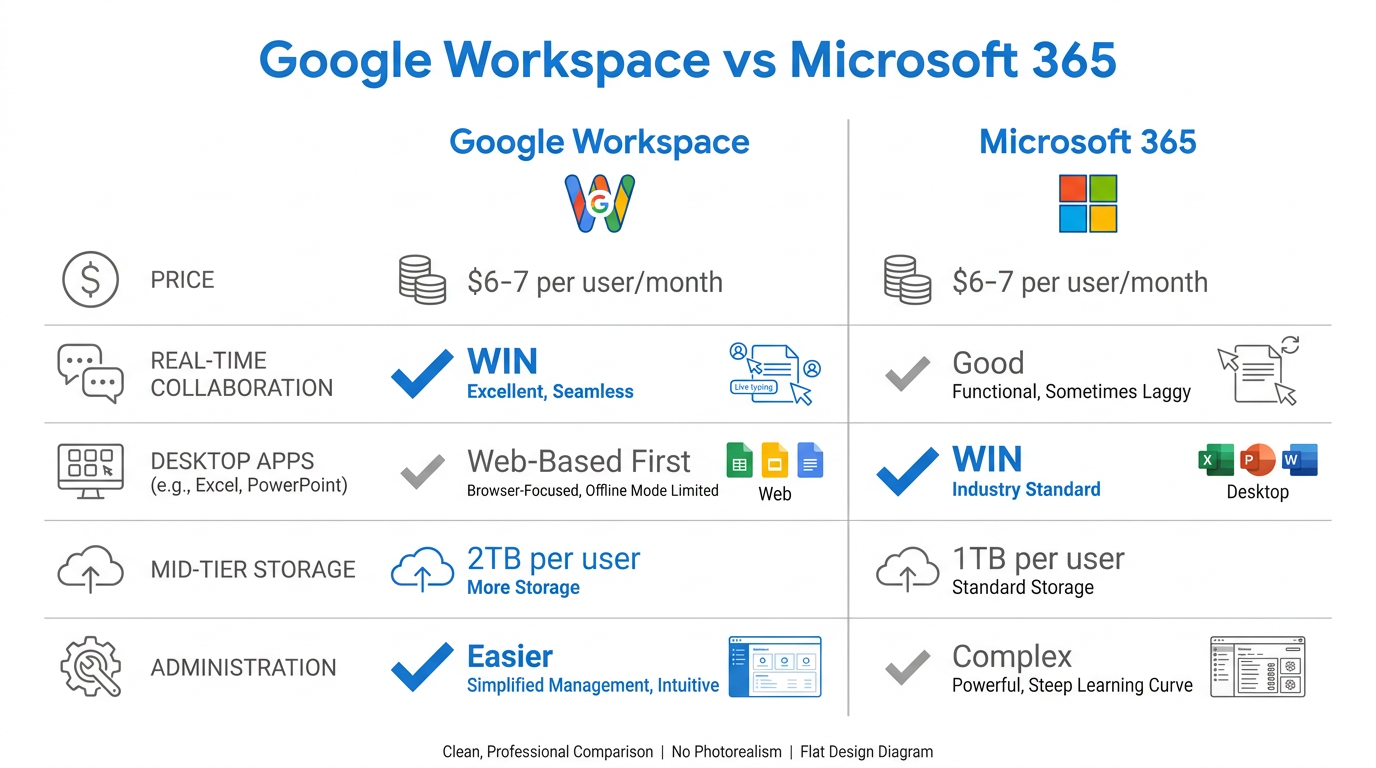
For most small businesses, Google Workspace is the better choice over Microsoft 365 when your team lives in the browser, collaborates in real time, and wants email, docs, storage, and video calls that just work together with almost no IT overhead. Microsoft 365 pulls ahead if your team depends on the full desktop power of Excel and PowerPoint or you're deep in the Windows/Teams ecosystem. Both start around $6–7 per user per month, so the real decision is about how your team actually works — not price. Here's the honest, side-by-side breakdown we give every business that asks us before a migration.
Quick Takeaways
- Both suites start at roughly the same price ($6–7/user/month), so cost is rarely the deciding factor.
- Google Workspace wins on real-time collaboration, simplicity, and near-zero administration — ideal for small, cloud-first teams.
- Microsoft 365 wins on powerful desktop apps (especially Excel) and fits businesses already standardized on Windows and Teams.
- Storage is comparable: Workspace Business Standard gives 2 TB/user; Microsoft 365 Business Standard gives 1 TB/user.
- New Google Workspace customers can apply an official partner promo code to save 15% on their first 3 months.
Google Workspace vs Microsoft 365: The Core Difference
The fundamental difference is philosophy. Google Workspace was born in the cloud — every app runs in the browser, collaboration is the default, and there's almost nothing to install or maintain. Microsoft 365 grew out of desktop Office — it offers deeper, more powerful applications, but with more layers, more settings, and a heavier footprint.
For a small business without a dedicated IT person, that difference matters more than any single feature. If you've ever used Gmail or Google Docs, you already know how to run Google Workspace. You can read our full primer on what Google Workspace is and what it's used for if you're new to it.
How Do the Prices Compare?
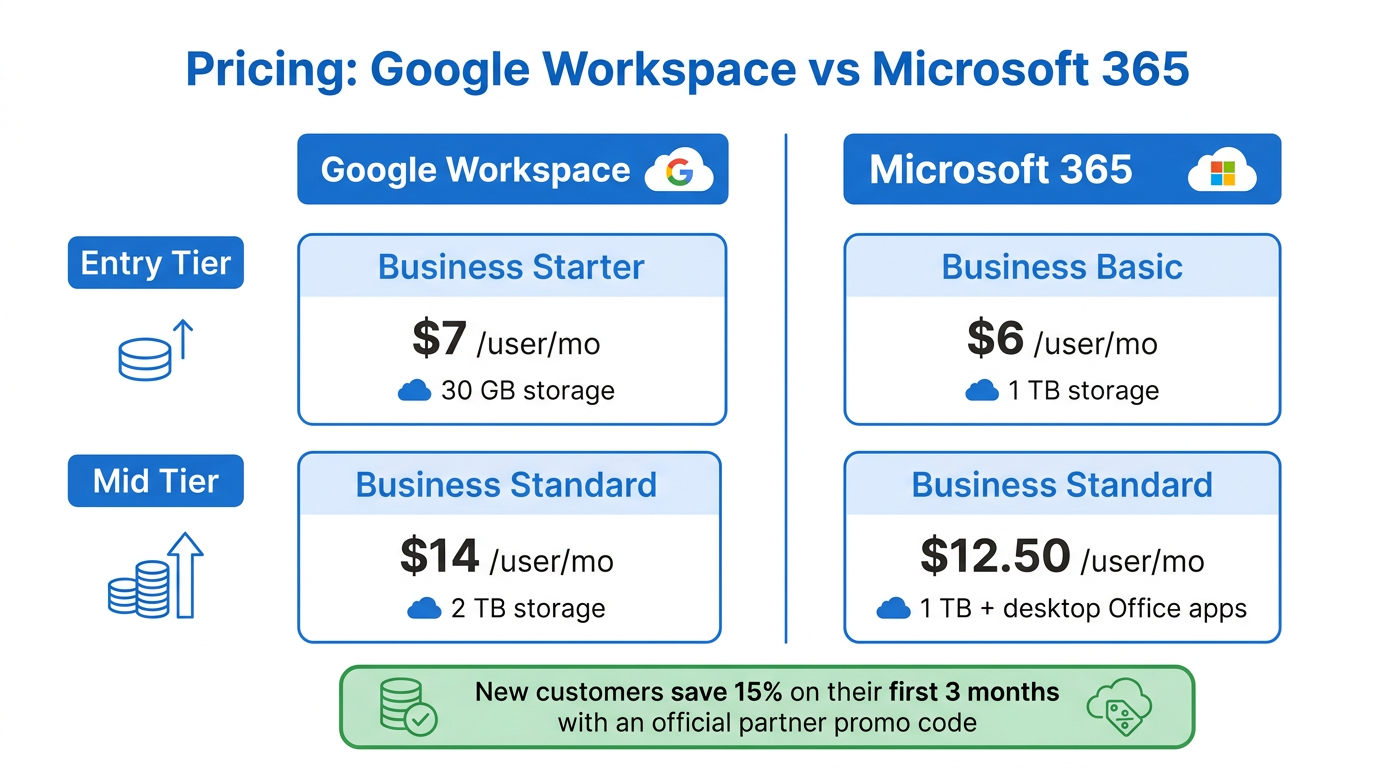
Pricing is close enough that it's usually a tie. Here's how the entry and mid tiers line up for business plans billed annually:
- Entry: Google Workspace Business Starter is about $7/user/month (30 GB storage); Microsoft 365 Business Basic is about $6/user/month (1 TB storage, web/mobile apps only).
- Mid: Google Workspace Business Standard is about $14/user/month (2 TB); Microsoft 365 Business Standard is about $12.50/user/month (1 TB, plus desktop Office apps).
On paper Microsoft's mid tier looks cheaper and bundles desktop apps, while Google's gives you double the storage. The gap is small either way. If you're leaning Google, note that as an official Google partner we can bring the cost down further — new customers can grab a Google Workspace promo code for 15% off their first 3 months on Business Starter, Standard, or Plus. Not sure which tier fits, read our guide to the best Google Workspace plan first.
Which Is Better for Collaboration?
Google Workspace, clearly. Real-time collaboration is where Google was built to win: multiple people edit the same Doc, Sheet, or Slide simultaneously, changes appear instantly, and there's no "who has the latest version?" confusion or emailing files back and forth. Comments, suggestions, and version history are effortless.
Microsoft 365 has added co-authoring to its web and desktop apps, and it works — but it can be inconsistent between the desktop and browser versions, and it's clearly a capability that was retrofitted rather than built in from day one. For a team that collaborates on documents all day, Google's experience is smoother.
Which Has Better Apps and Storage?
This is Microsoft's strongest argument. If your business runs on heavy Excel modeling, complex PowerPoint decks, or specialized Office add-ins, the Microsoft desktop apps are still the most powerful in the world, and Google Sheets and Slides, while excellent for most work, don't fully match them at the high end.
On storage, Google is more generous at the mid tier: Business Standard includes 2 TB per user versus Microsoft's 1 TB. For most small teams, either is plenty. If your business truly needs the full firepower of desktop Excel, Microsoft has the edge; if you need clean, shareable, everyday documents, Google is more than enough.
Which Is Easier to Manage and More Secure?
For a small business, Google Workspace is easier to administer. The Admin Console is clean, and most day-to-day tasks — adding a user, enforcing two-factor authentication, wiping a lost device — take a few clicks. Microsoft 365's admin center is more powerful but also more complex, which is a real cost when nobody on your team is a full-time administrator.
On security, both are enterprise-grade: encryption in transit and at rest, advanced phishing protection, and compliance coverage for standards like SOC 2 and ISO 27001. Both can also support HIPAA compliance when configured correctly with a signed Business Associate Agreement — we cover exactly what that takes in our guide on making Google Workspace HIPAA compliant. For official details on Google's security posture, see Google's own Workspace security documentation.
So Which Should Your Small Business Choose?
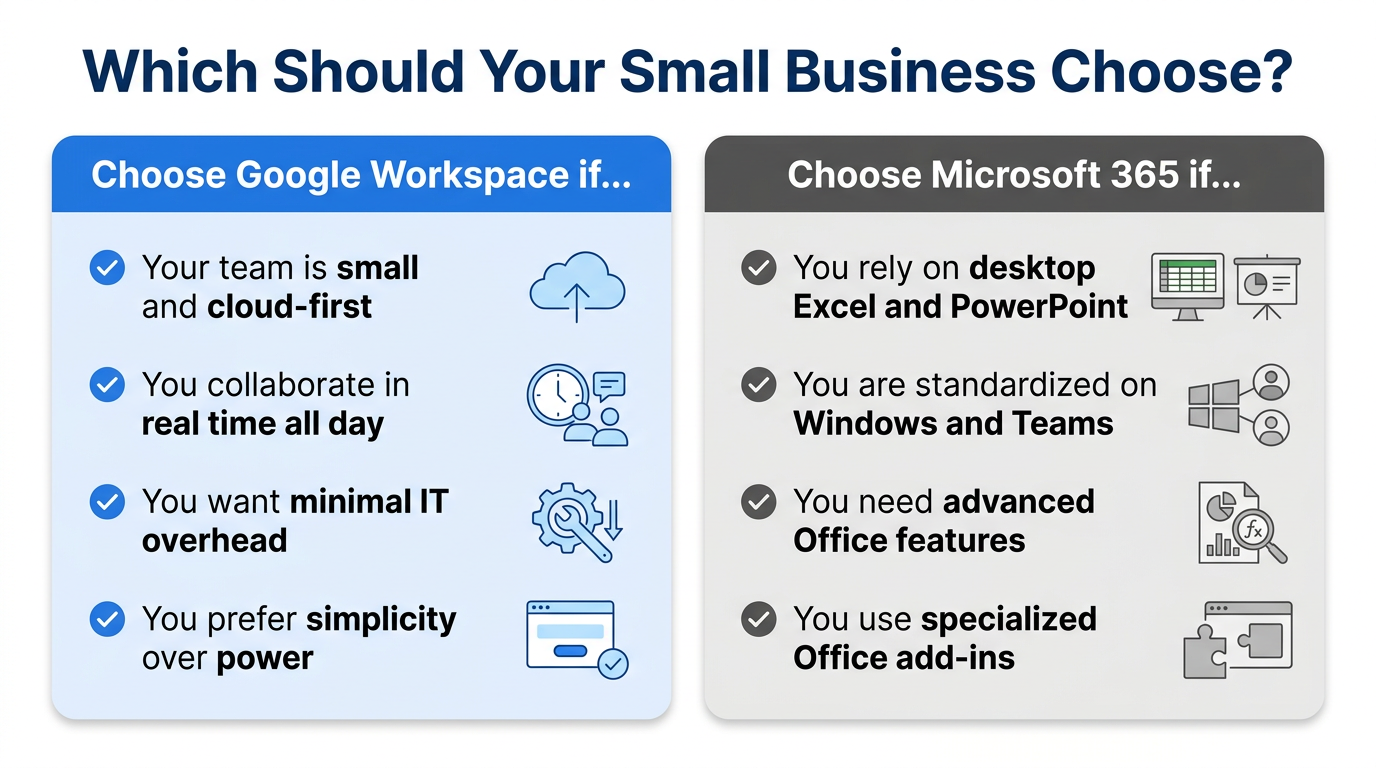
Choose Google Workspace if your team is small, cloud-first, collaborates constantly, and you want the least possible IT overhead. Choose Microsoft 365 if you rely on the full power of desktop Excel and PowerPoint or you're already committed to the Windows and Teams ecosystem.
In our experience migrating hundreds of small businesses, most that switch to Google Workspace do so because the day-to-day simplicity and collaboration save real time — and they rarely miss what they left behind. If you're leaning that way, we handle the whole move from Microsoft 365 with zero downtime; here's our Office 365 to Google Workspace migration process.
Frequently Asked Questions
Is Google Workspace cheaper than Microsoft 365?
They're priced almost identically — both start around $6–7 per user per month, and their mid tiers are within a couple of dollars. Google includes more storage at the mid tier (2 TB vs 1 TB), while Microsoft bundles desktop Office apps. New Google Workspace customers can also apply a partner promo code for 15% off their first 3 months.
Can Google Workspace open Microsoft Office files?
Yes. Google Docs, Sheets, and Slides open, edit, and save Word, Excel, and PowerPoint files, and you can keep files in Office format or convert them to Google formats. For most everyday documents the compatibility is seamless.
Is it hard to switch from Microsoft 365 to Google Workspace?
Not with the right help. A full migration — email, contacts, and calendars — typically takes one to five business days depending on data volume. Googally handles the entire process with zero downtime, so your team keeps working normally throughout.
Do I need Microsoft Office if I use Google Workspace?
Usually not. Google Workspace replaces email, documents, spreadsheets, presentations, storage, calendar, and video calls. The main exception is if your business depends on advanced Excel features or specific Office add-ins that don't have a Google equivalent.
Weighing a switch to Google Workspace? We move small businesses off Microsoft 365, GoDaddy, and Rackspace with zero downtime — and new customers save 15% on their first 3 months with our Google Workspace promo code. Talk to us and we'll map out your move.
Related Posts
Explore Tips and Guides! Discover expert insights and practical guides for optimizing your Google Workspace experience with our informative resources.


















.png)
.png)
.png)
.png)
.png)
.png)
.png)
.png)


.png)
.png)

.png)







.png)
.png)


.png)


