Gmail Canned Responses Setup
Login to your Gmail
- Go to mail.google.com and enter your Google Workspace email id and Password to login.
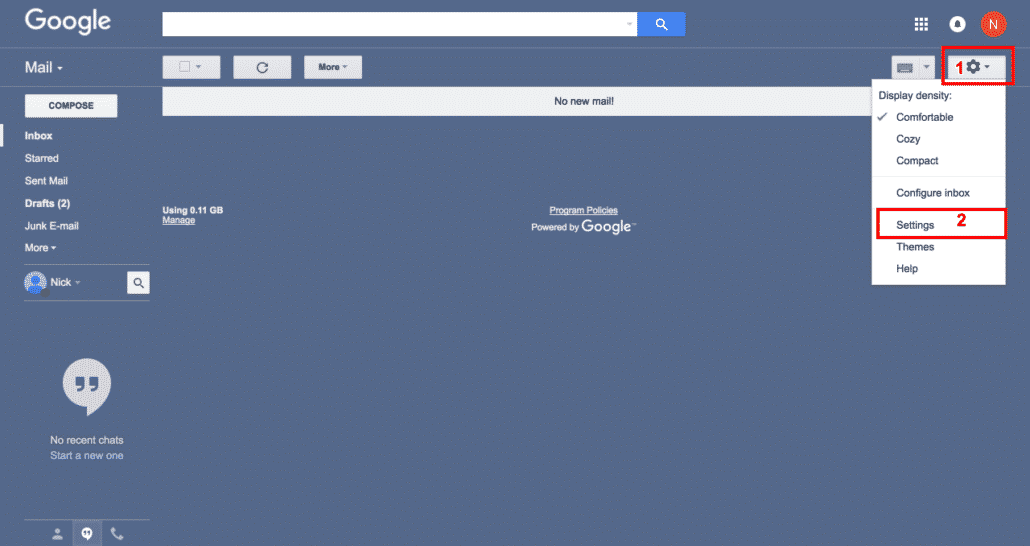
- Go to Gmail settings on the top right hand corner as shown in the screenshot
Enable the Lab in Settings
- Go to Labs under Gmail settings
- Search for Canned Responses lab
- Enable it
- Save Changes

Create and Save your Canned message
- Click to compose an email. Type your message which you want to insert later in one click, it’ll be your canned response
- Click on the small down arrow in the corner as shown in screenshot step number 3
- Click on Canned Responses. Then click on "New Canned Response".
- Give your canned response a name. And finally, click OK to save.

Compose Email and test it
- Click to compose an email
- Click on the small down arrow in the corner as shown in screenshot step number 2
- Click on Canned Responses, here you will find the responses you created
- Insert the one you want. You will see your predefine message is inserted in your email body

Gmail Canned Response FAQs
Does gmail canned response work with variables?
No, gmail does not support variables, so you can not put something like {{firstname}} and expect gmail to populate it from your recipient name, this will be a great feature though.
My gmail canned responses disappeared
Canned response is still a lab which are not supported by google support, we would suggest you to turn your gmail labs off and on and see if it works for you.
How to create a template in Gmail
You can create predefined messages as shown above in Google Workspace or Gmail which works well for basic template needs, for advance template needs you should consider application at google apps marketplace
Can i use them for auto reply in gmail?
Yes, you can create a filter based on your criteria and apply a canned response to it, this will give you auto responder functionality
Does it work with Microsoft Outlook?
No, though you can access your Gmail emails in MS Outlook via IMAP or Google Sync tool, but canned responses only work from within Gmail on web.
Is it possible to use canned responses on iPhone?
It only works within Gmail, not on phone, but there are some third party tools which you may consider as they work on phones too, we would recommend you to explore google apps marketplace
Can I insert attachments in canned response?
Unfortunately not, gmail does not provide this functionality yet of adding attachments in predefined messages, but you may consider inserting google drive links to make it work
Is there any keyboard shortcut for it?
No, there are keyboard shortcuts in Gmail for email actions and you can see them by pressing SHIFT + Q in your Gmail, but gmail does not support keyboard shortcut for canned responses yet
Related Posts
Explore Tips and Guides! Discover expert insights and practical guides for optimizing your Google Workspace experience with our informative resources.
Migrate Microsoft 365 to Google Workspace: No Lost Email
Google Workspace for Startups: Look Bigger, Move Faster
Google Workspace Annual vs Monthly: When 17% Isn't Worth It
NotebookLM Podcast: How to Make One in Gemini Notebook
Google Business Email Pricing: Per User, Not Per Inbox
Is Google Vids Free? What You Actually Pay For
Gemini Gems: Custom AI Your Team Can Reuse

How to Schedule an Email in Gmail (and Send It Later)

Gemini vs Copilot: Which AI Wins for Business?

Does Google Meet Have a Time Limit?

Does Google Workspace Back Up Your Data?

Personal Gmail vs Google Workspace: Which Do You Need?

Google Workspace for Nonprofits: Free vs Paid
Is Google Workspace Free? The Honest Answer
Google Workspace Free Trial: How It Works in 2026
Google Workspace vs Google One: It Was Never About Storage
Google Workspace Business Plus: Who Actually Needs It
Google Workspace vs Microsoft 365: Price Won't Decide This

How to Record a Google Meet (and Where It Saves)

OneDrive vs Google Drive: Which Wins for Business?
How to Delete a Page in Google Docs (4 Fast Fixes)
NotebookLM Pricing in 2026
How to Archive a Google Classroom (and When to Delete)
The Best Free Invoice Template for Google Docs
How to Create Forms in Google Forms (Step-by-Step)
How to Forward Emails in Gmail
How to Remove Duplicates in Google Sheets (3 Easy Ways)
How to Add a Signature in Gmail (Step-by-Step)
How to Share Your Google Calendar With Your Team
Google Sheets Formulas: A Practical Guide for Small Businesses
Google Sheets Templates (And How to Use Them)

Strikethrough in Google Docs: Shortcuts for Every Device
How to Unsend an Email in Gmail (Before It's Too Late)
Google Docs Dark Mode: How to Enable It on Any Device

What Is Google NotebookLM? Your Complete Guide to Google's AI Research Assistant
.png)
What Is Google Workspace Used For? 10 Ways It Runs Your Business

Google Workspace Can Be HIPAA Compliant. Yours Probably Isn't. Here's Why

Ditch the Landline: Why Small Businesses Are Switching to Google Voice

Google Workspace Studio: No-Code AI Automation for Small Business

How to Find Archived Emails in Gmail: A Guide for Small Businesses

Best Google Workspace Plan for Solopreneurs: My No-Nonsense Guide

What is the cheapest way to get Google Workspace? (A 2026 Guide)

How to Cancel Google Workspace Subscription (2026 Guide)

Gemini for Google Workspace Pricing 2025: Is It Included & Free?

Conflicting Google Accounts? Simple Workspace Solutions, Guaranteed

Google Drive for Desktop

Migrate your Calendar from Gmail.com to Google Workspace

Migrate Contacts from Gmail.com to Google Workspace

Create App Specific Password in Gmail

How to Add Music to Google Slides: Tips for a Dynamic Presentation

Google Workspace Plan Change Made Easy: Your Ultimate Guide

Google Workspace DNS Records

Google Workspace to Google Workspace Migration Process

How to upload company logo in google workspace

From Paperwork Purgatory to Streamlined Success: My Real Estate Journey with Google Workspace

Rackspace Email Alternatives: Streamline Your Business Communication in 2024

Master Your Time: Gmail Out of Office for the Busy Small Business Owner

Gmail Conversation View

How to Create an Email Aliases in Google Workspace?

Google Workspace to Google Workspace Migration Requirements

Can I Migrate Gmail Account to Google Workspace? Your Complete Guide

Gmail to Google Workspace - Migration Requirements

Zoho Workplace vs Google Workspace: A Comprehensive Comparison

Why are passwords needed for Migration?

What Is Included In Google Workspace?

What is Google Workspace?

Time to Say Goodbye to Microsoft Outlook

What is Google Vault?

User Vs Alias vs Group - How to choose smartly

How Do I Save Money on Google Workspace?

Rackspace Email vs Google Workspace

Transfer Contacts from Rackspace to Google Contacts

Office 365 vs Google Workspace
.png)
Rackspace to Gmail Migration – An Expert’s Advice
.png)
Rackspace Email Outage Solution

Understanding Multiple Domains in Google Workspace

Is Google Workspace HIPAA Compliant?

Is Google Workspace Worth It?

Easily Setup Google Workspace on your iphone
.png)
Google Workspace Super Admin Role

How to create Google Workspace SPF records

Google Workspace Sign up (with 15% discount)

Manage Law Firm with Google Workspace

Save 15% flat on your Google Workspace

Google Workspace Promotion Code

Google Workspace Ipad setup

How to create Google Workspace MX Records

Google Workspace MacBook Setup

Google Workspace Domain Verification

Google Workspace GMAIL IMAP Settings: Your Easy, Step-by-Step Guide

Google Workspace for Personal Use

Google Workspace Vs Godaddy – Choose Wisely

How To Contact Google Workspace Support

Google Workspace Business Starter

10 Reasons you should upgrade from Gmail to Google Workspace

Godaddy Office 365 vs Google Workspace

9 Reasons to switch from Godaddy Office 365 to Google Workspace

Setup Gmail on MS Outlook for Windows

Setup Gmail on MS Outlook for Mac