
Does Google Meet Have a Time Limit?
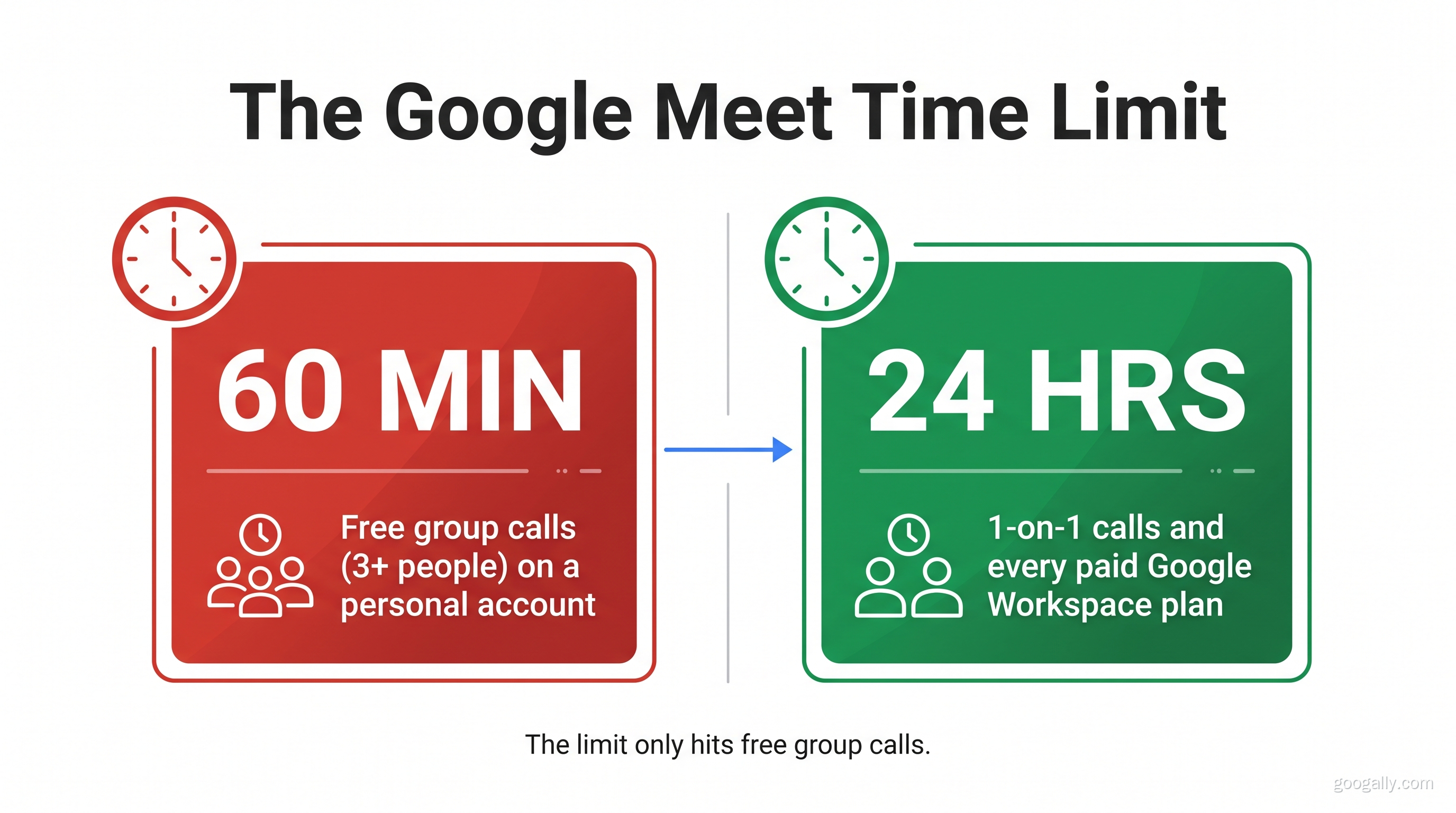
Yes — but only in one situation that catches people off guard. On a free personal Google account, Google Meet cuts off group calls (three or more people) at 60 minutes. One-on-one calls on the same free account can run up to 24 hours. And if you're on a paid Google Workspace plan, every meeting — group or not — can run up to 24 hours. So the famous "Google Meet time limit" is really just the 60-minute cap on free group calls, and it's the single most common reason a meeting suddenly ends mid-sentence. This guide breaks down the limit by plan, explains why your call keeps stopping at an hour, and shows the clean ways to get rid of it.
Quick Takeaways
- Free group calls (3+ people) stop at 60 minutes on a personal Google account — this is the limit almost everyone runs into.
- Free 1-on-1 calls run up to 24 hours — the time limit only bites once a third person joins.
- Google Workspace (paid) plans allow up to 24 hours per meeting, group or not.
- The 60-minute cap is a nudge to upgrade, not a technical ceiling — you can restart the call, but that's the friction Workspace removes.
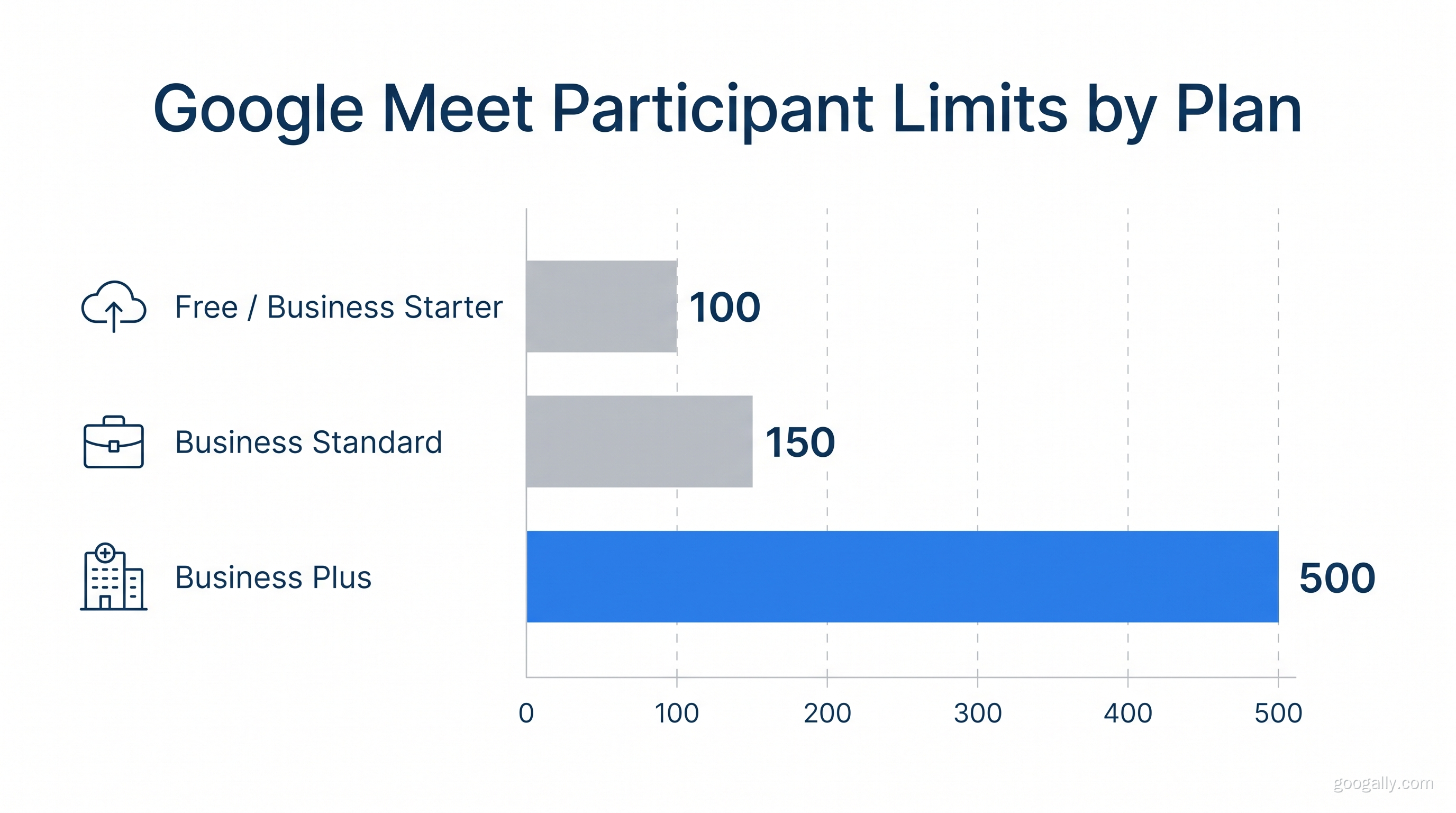
- Participant limits also scale by plan — 100 on Business Starter, 150 on Standard, 500 on Plus.
Does Google Meet Have a Time Limit?
Yes. Google Meet applies a time limit based on your account type and how many people are on the call. The limit exists so Google can offer Meet free to everyone while steering business users toward paid Google Workspace plans, which remove the cap and add business features. It is not a bug or a network issue — it's a deliberate product boundary.
Here's the important nuance most articles skip: the limit is tied to the account that starts the meeting, and to the number of participants. A free personal account hosting a quick two-person catch-up is fine for hours. The same account hosting a team standup with four people will hit the wall at 60 minutes. Understanding that distinction is the whole game.
What Is the Google Meet Time Limit by Plan?
The Google Meet time limit depends entirely on whether you're on a free personal account or a paid Google Workspace plan. Free accounts are capped on group calls; paid plans effectively aren't. Here's the full breakdown:
| Account / Plan | 1-on-1 calls | Group calls (3+) | Max participants |
|---|---|---|---|
| Free personal (Gmail) | Up to 24 hours | 60 minutes | 100 |
| Workspace Business Starter | Up to 24 hours | Up to 24 hours | 100 |
| Workspace Business Standard | Up to 24 hours | Up to 24 hours | 150 |
| Workspace Business Plus | Up to 24 hours | Up to 24 hours | 500 |
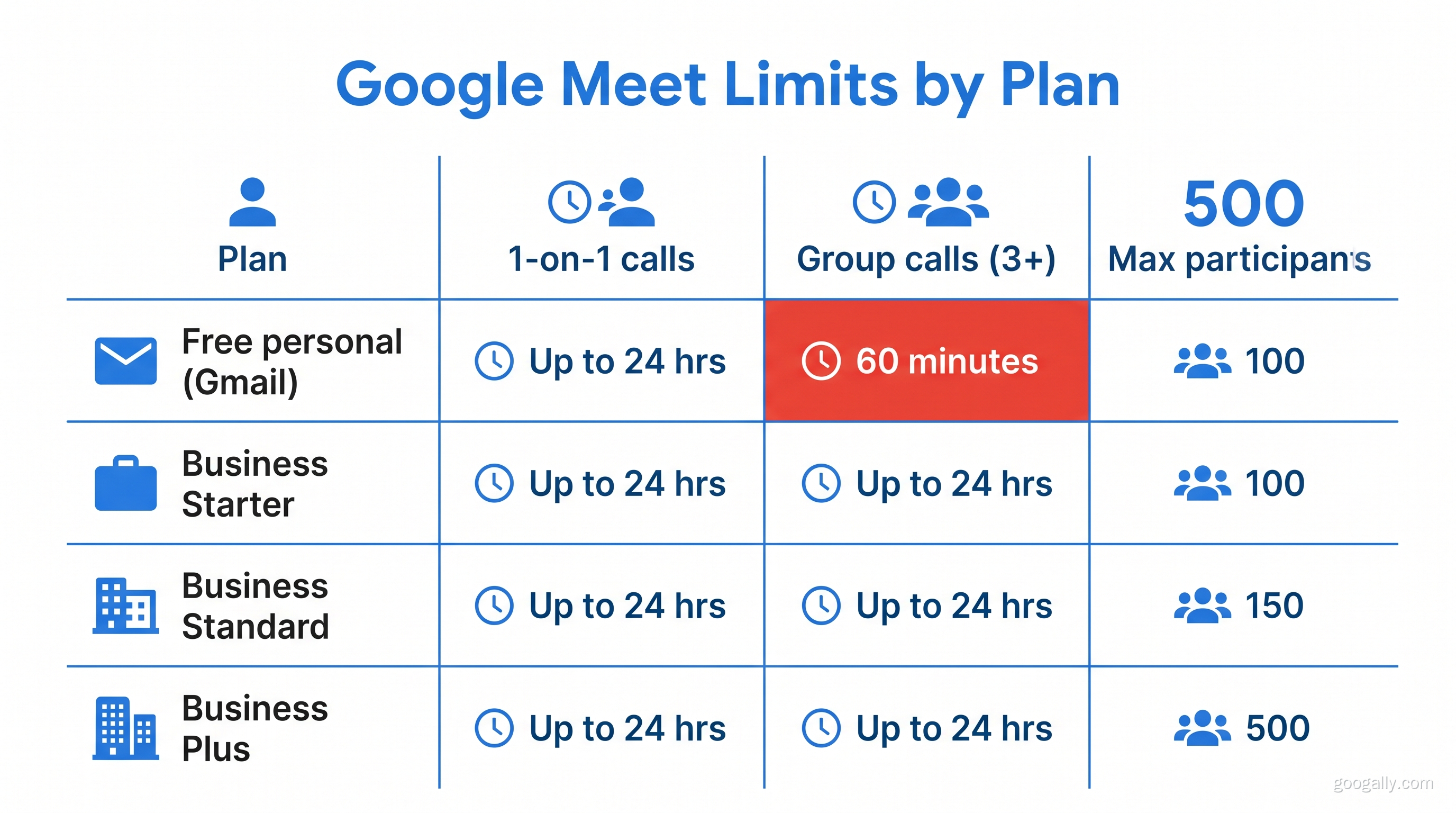
As the table shows, the moment you move to any paid Workspace tier, the 60-minute group-call limit disappears entirely and you get up to 24 hours per meeting. According to Google's Workspace documentation, this 24-hour ceiling is consistent across the Business plans — what changes between tiers is the participant cap and the extra features (recording, breakout rooms, attendance tracking) rather than the meeting length. You can confirm the current limits on Google's official Meet product page.
Why Does My Google Meet Keep Ending at 60 Minutes?
Your Google Meet keeps ending at 60 minutes because you're hosting a group call (three or more people) on a free personal Google account. Around the 55-minute mark, everyone sees a warning that the call will end soon, and at 60 minutes the meeting closes for all participants. Nothing is broken — you've simply hit the free-tier group-call limit.
In our experience helping small teams, this is the moment the friction becomes real. A weekly team meeting that runs long, a client call that needs another fifteen minutes, a training session — all of them get guillotined at the hour mark. People end up scrambling to send a new link and re-gather everyone, losing momentum and looking unpolished in front of clients.
You can technically work around it by restarting the call with a fresh link, but doing that every hour, in front of a client or a team, is exactly the kind of small unprofessional friction that adds up. The limit is designed to make upgrading feel worth it — and for any team that meets regularly, it usually is.
How Do You Get Past the Google Meet Time Limit?
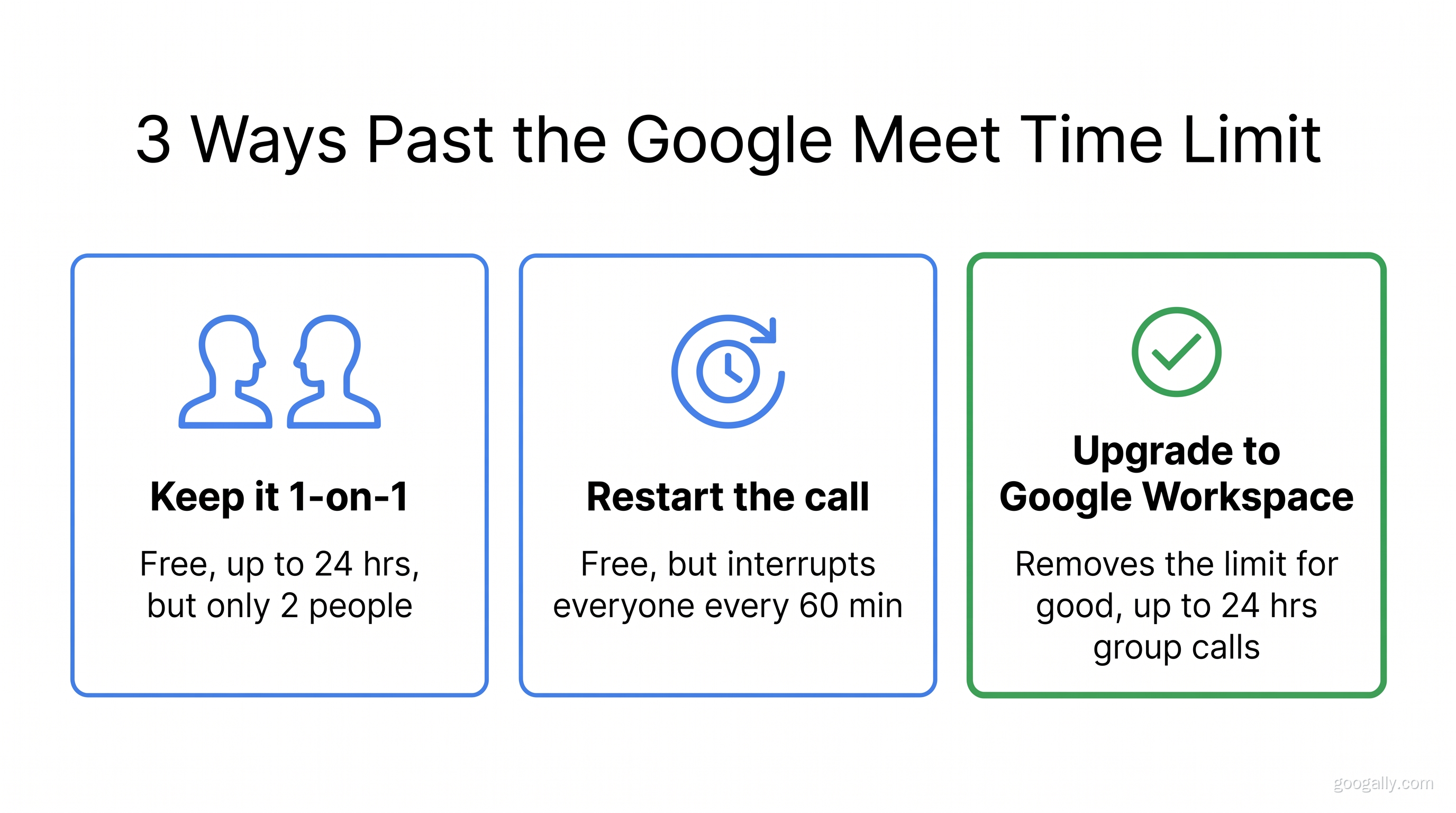
There are three realistic ways to get past the Google Meet time limit: keep calls to two people, restart the meeting every hour, or upgrade to a paid Google Workspace plan. Only the third one actually removes the limit rather than working around it.
Option 1 — Keep it 1-on-1. If your call only ever has two people, a free account already gives you up to 24 hours. This works for coaching, interviews, or sales calls, but it's useless the moment a third person joins.
Option 2 — Restart the call. When the 60-minute warning appears, end and immediately restart with a new link. It's free, but it interrupts the meeting, drops everyone momentarily, and looks amateurish on client-facing calls.
Option 3 — Upgrade to Google Workspace. Moving to any paid Workspace plan lifts the group-call limit to 24 hours, so meetings simply never cut out. You also get a professional email address at your own domain, more storage, and business features. This is the only option that removes the problem instead of managing it.
The Clean Fix: Upgrade to Google Workspace
For any business that meets regularly, upgrading to Google Workspace is the fix that pays for itself in saved hassle. Beyond unlimited-length meetings, you get a branded email address, admin controls, and the storage a growing team needs. As an authorized Google partner, we can get you 15% off the first 3 months for new customers on Business Starter, Standard, and Plus — just grab a Google Workspace promo code before you sign up, and compare the Business plans to pick the right tier.
How Many Participants Can Google Meet Have?
Google Meet's participant limit ranges from 100 on free and Business Starter accounts up to 500 on Business Plus. Free personal accounts and Business Starter both cap at 100 participants; Business Standard raises it to 150; and Business Plus supports up to 500 people in a single meeting. If your limit problem is about people rather than minutes, the plan you choose matters — a company all-hands needs a different tier than a five-person team standup.
Frequently Asked Questions
Can you use Google Meet for more than 1 hour?
Yes. One-on-one calls on a free account can run up to 24 hours, and any paid Google Workspace plan allows meetings of up to 24 hours even with large groups. The one-hour limit only applies to group calls (three or more people) hosted on a free personal Google account.
Is Google Meet free for 3 hours?
Only for one-on-one calls. A free personal account supports 1-on-1 calls up to 24 hours, so three hours is fine — but a group call on a free account will end at 60 minutes. To run a 3-hour group meeting, the host needs a paid Google Workspace plan.
How can I bypass the Google Meet time limit?
The only real way to remove the limit is to upgrade to a paid Google Workspace plan, which extends group meetings to 24 hours. As a free workaround, you can restart the meeting with a new link when the 60-minute warning appears, but that interrupts everyone and isn't practical for client or team calls.
Which is cheaper, Zoom or Google Meet?
Google Workspace and Zoom are priced similarly at the entry level, but Google Meet is bundled into Google Workspace — so you get business email, Drive storage, and the full app suite in the same subscription, not just video calls. For most small businesses already using Gmail, Workspace is the better value because Meet comes included.
Tired of your team meetings ending at the hour mark? Upgrading to Google Workspace removes the cap for good — and we can set it up (and migrate your existing email with zero downtime) so nothing breaks. See how our migration process works and get your team meeting without a countdown clock.
Related Posts
Explore Tips and Guides! Discover expert insights and practical guides for optimizing your Google Workspace experience with our informative resources.









.png)
.png)
.png)
.png)
.png)
.png)
.png)
.png)


.png)
.png)

.png)





.png)
.png)


.png)


