

Google Business Email Pricing: Per User, Not Per Inbox
When a client first asks me what a professional email address at their own domain will cost, they almost always expect to be charged per email address. I've set up Google Workspace for teams of two and teams of two hundred, and the single biggest source of confusion — and overspending — is that one assumption. So let me clear it up before you buy a single license.
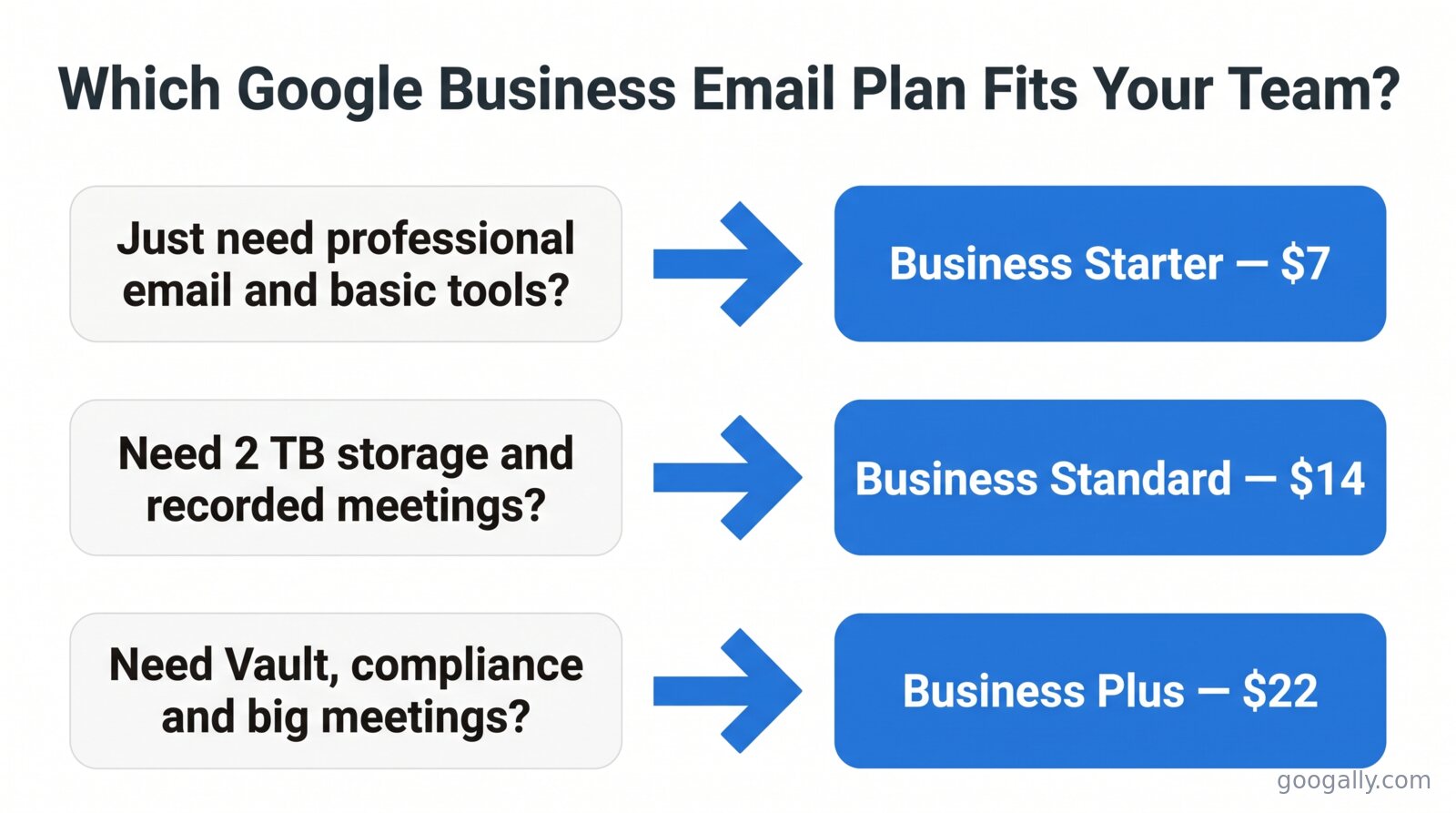
Google business email is part of Google Workspace and is billed per user, not per email address. On an annual plan, Business Starter is $7 per user per month, Business Standard $14, and Business Plus $22 — each with custom email at your own domain. Monthly billing runs about 20% more.
That per-user distinction changes how much most teams actually pay, because one user can hold far more than one email address. Below I'll break down every plan, the annual-versus-monthly gap, how many addresses you really get per person, and where teams quietly overspend.
How Much Does Google Business Email Cost?
Google doesn't sell "business email" as a standalone product — it comes bundled inside Google Workspace, and every paid plan includes a custom email address at your own domain (you@yourcompany.com). Here's what each business plan costs per user per month in 2026:
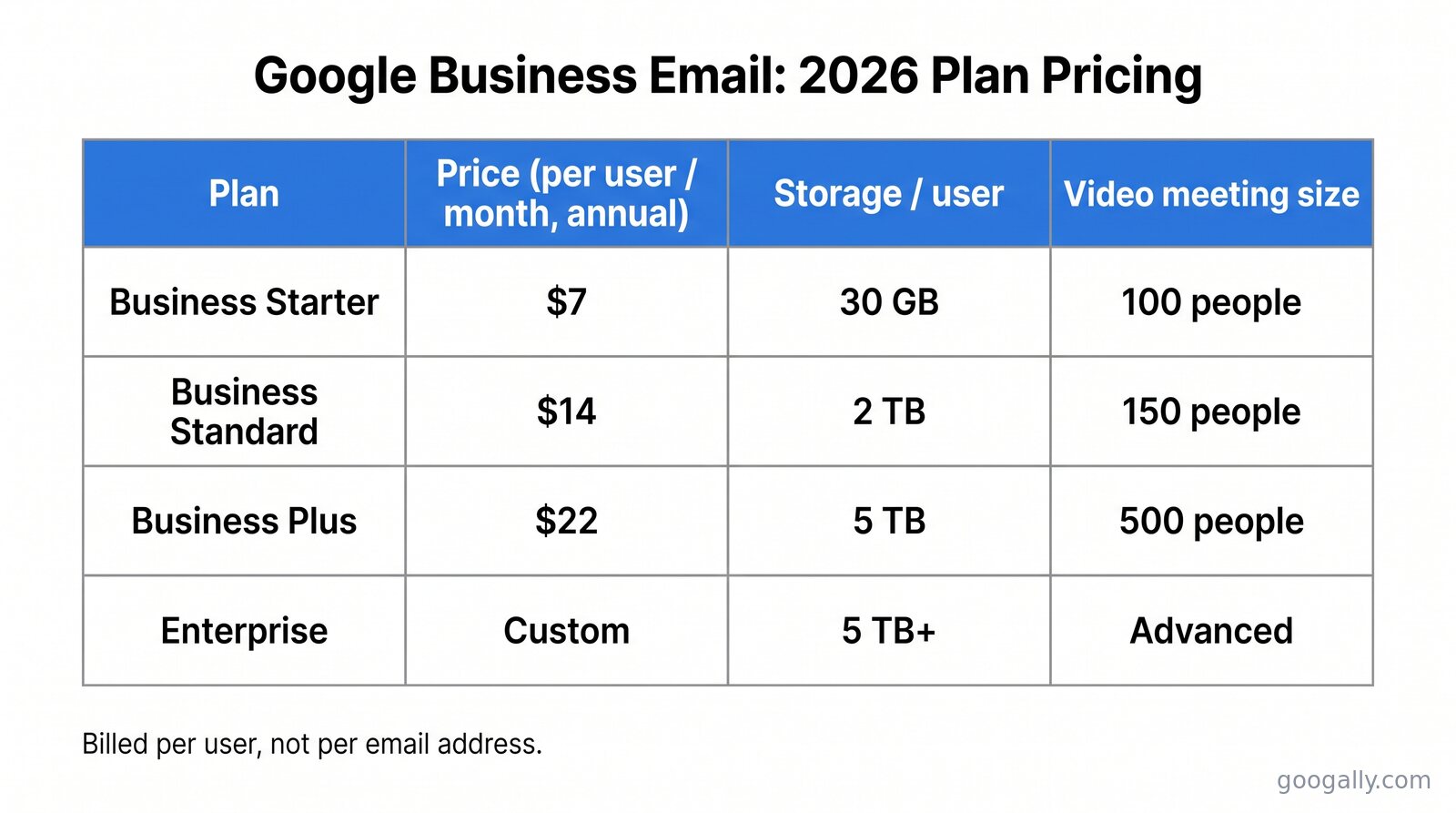
Those are the same figures Google publishes on its own pricing page. Notice the prices climb by feature tier, not by mailbox — you're paying for storage, meeting size, security controls, and AI, all of which I'll unpack below. If you only care about email itself, the $7 Starter plan already gives you the full Gmail experience on your domain.
The one detail most comparison articles get wrong: those numbers rose in 2025 when Google folded its Gemini AI features into every Business plan. Older guides still quoting $6, $12, and $18 are out of date. The current entry point is $7 per user per month.
What You're Actually Paying For: The Per-User Rule
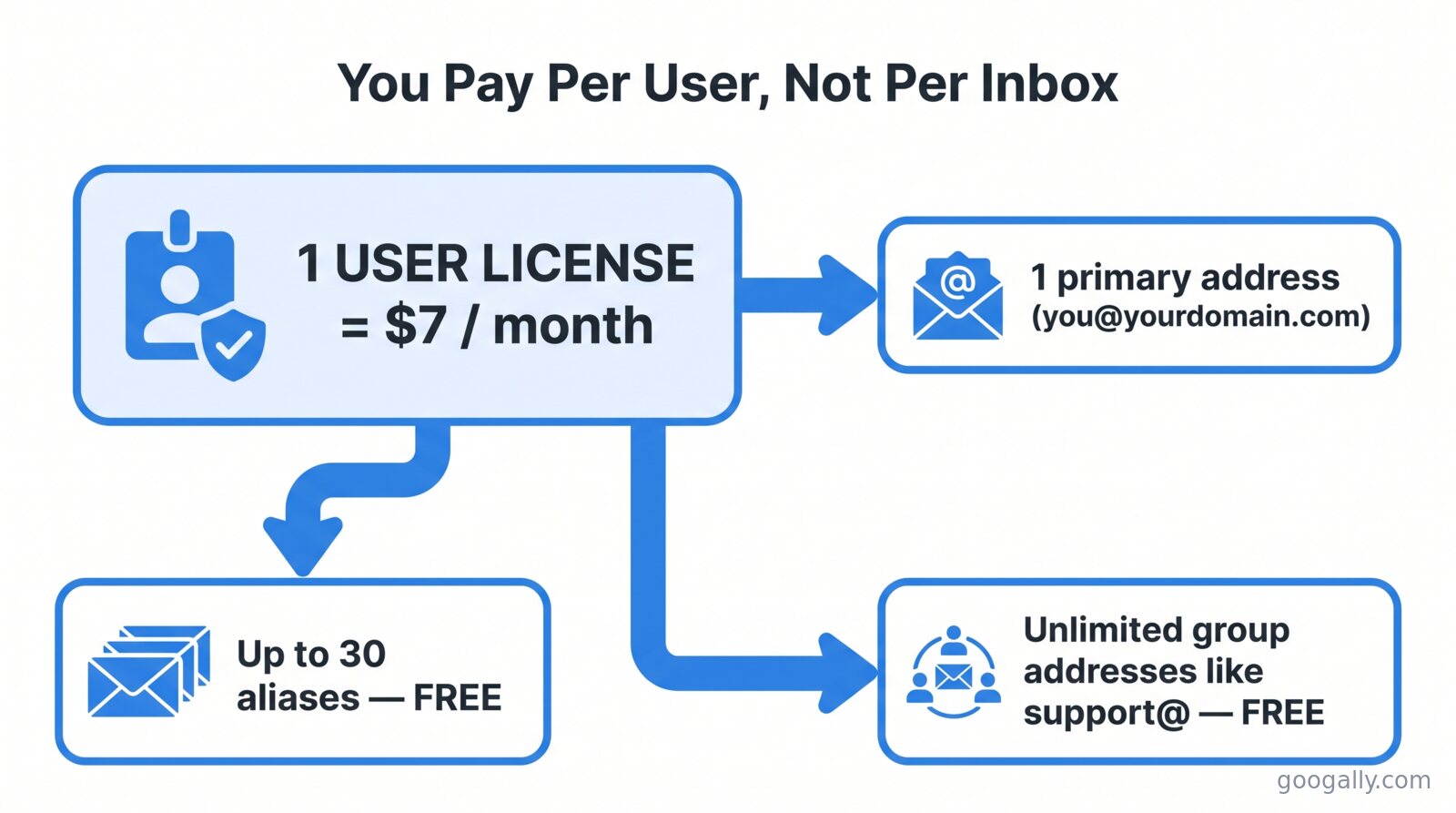
Google charges per user — a named person with a login — not per email address or per inbox. This is the rule that decides your real bill, because a single user license can carry one primary address plus up to 30 additional aliases at no extra cost.
I watch teams get this wrong constantly. A five-person company decides it needs sales@, support@, billing@, hello@, and info@, assumes that's five or more paid mailboxes, and braces for a big number. In reality those are almost never separate users. Most of them should be aliases or groups pointed at people you're already paying for.
Here's the distinction I walk every client through, and it's worth understanding the difference between a user, an alias, and a group before you buy anything:
- User — a paid license. A real person with their own login, storage, and primary address. This is what you pay $7–$22/month for.
- Alias — a second (or third, up to 30) address that lands in an existing user's inbox. Free. Setting up an email alias is how sales@ and hello@ reach the right person without a new license.
- Group — a shared address like support@ that fans out to several people. Free, and it doesn't consume a license either.
So a five-person team usually needs exactly five user licenses — and can run a dozen branded addresses on top of them for nothing. If you take one thing from this article, take that.
Annual vs Flexible: The Two Ways to Pay
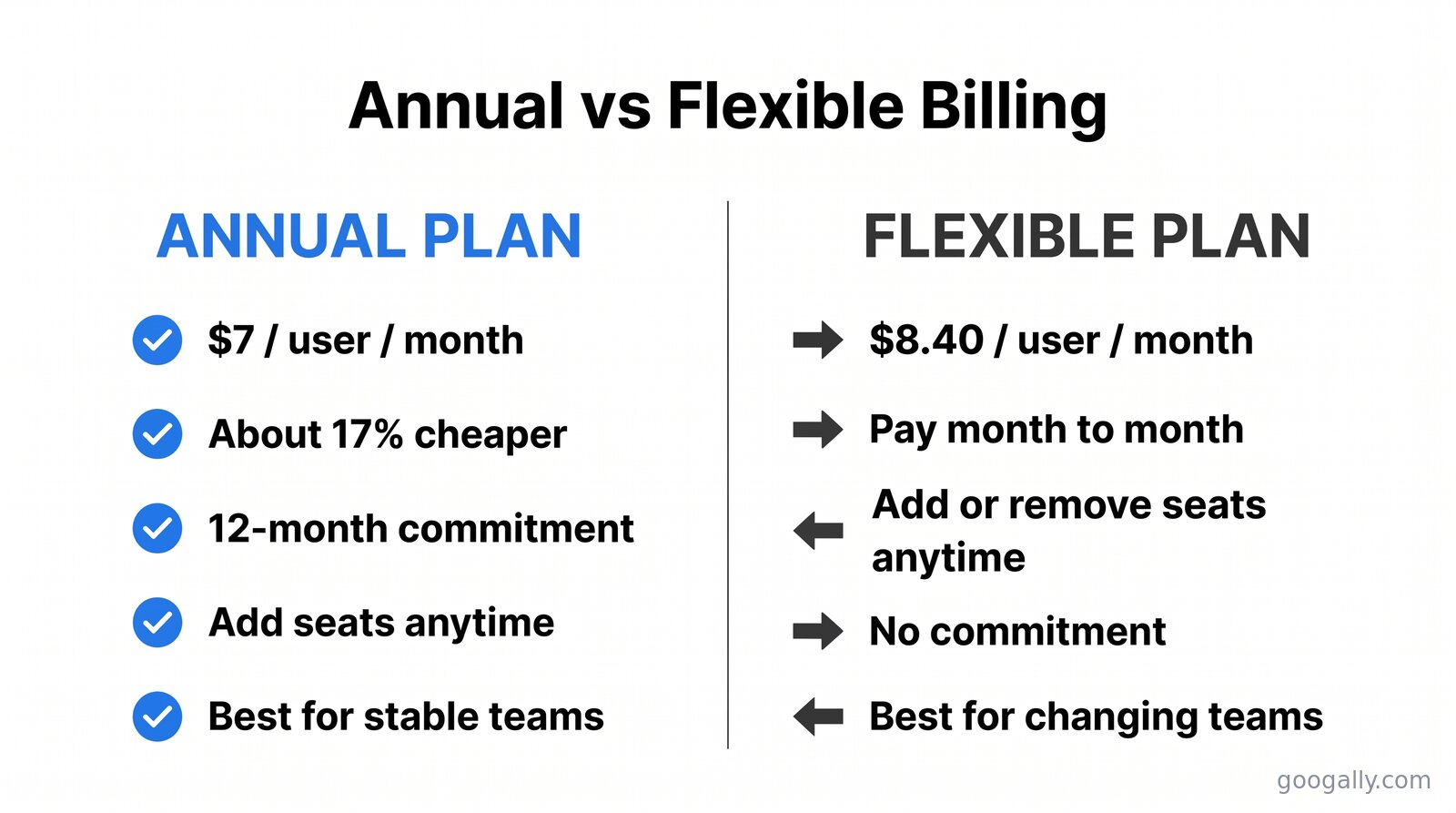
Google offers each plan on two billing terms, and choosing the wrong one is the most common way teams overpay. The annual (fixed-term) plan is cheaper per user but commits you to a set number of licenses for 12 months; the flexible plan is month-to-month at roughly 20% more per user, but you can add or remove seats anytime.
The math is straightforward. On Business Starter, annual billing is $7/user/month versus $8.40 on flexible — the annual commitment saves you about 17%. The same roughly 17% saving applies at every tier.
Which one is right depends less on price and more on how stable your headcount is:
- Choose annual if your team size is steady. You lock the lower rate, and you can still add users mid-term (the new seats just extend to your renewal date). You simply can't reduce the count until renewal.
- Choose flexible if you're hiring fast, seasonal, or running a project team that will shrink. Paying 20% more per user is worth it if it means never paying for empty seats.
A practical middle path I often recommend: put your stable core team on annual and any uncertain or temporary hires on flexible. Google lets you run both.
How Many Email Addresses Do You Get Per User?
Every Google Workspace user gets one primary email address plus up to 30 email aliases, all included in the per-user price. Combined with free groups for shared addresses, most small businesses can run every branded address they need without buying a single extra license.
Play that out for a typical small business:
- 10 paid users at Business Starter = $70/month (annual).
- Each user can hold up to 30 aliases — that's a ceiling of 300 additional addresses at no cost.
- Unlimited groups for shared inboxes like support@, careers@, and orders@ — also free.
The practical limit is almost never money; it's organization. I usually tell clients to keep aliases to the handful they'll actually use, and to route true shared inboxes (where more than one person needs to reply) through groups rather than piling them onto one person as aliases.
If you ever genuinely need more than 30 aliases on a single user — rare outside of agencies juggling many client domains — that's the edge case where a second license or a group makes more sense than fighting the cap.
What Each Plan Includes Beyond Email
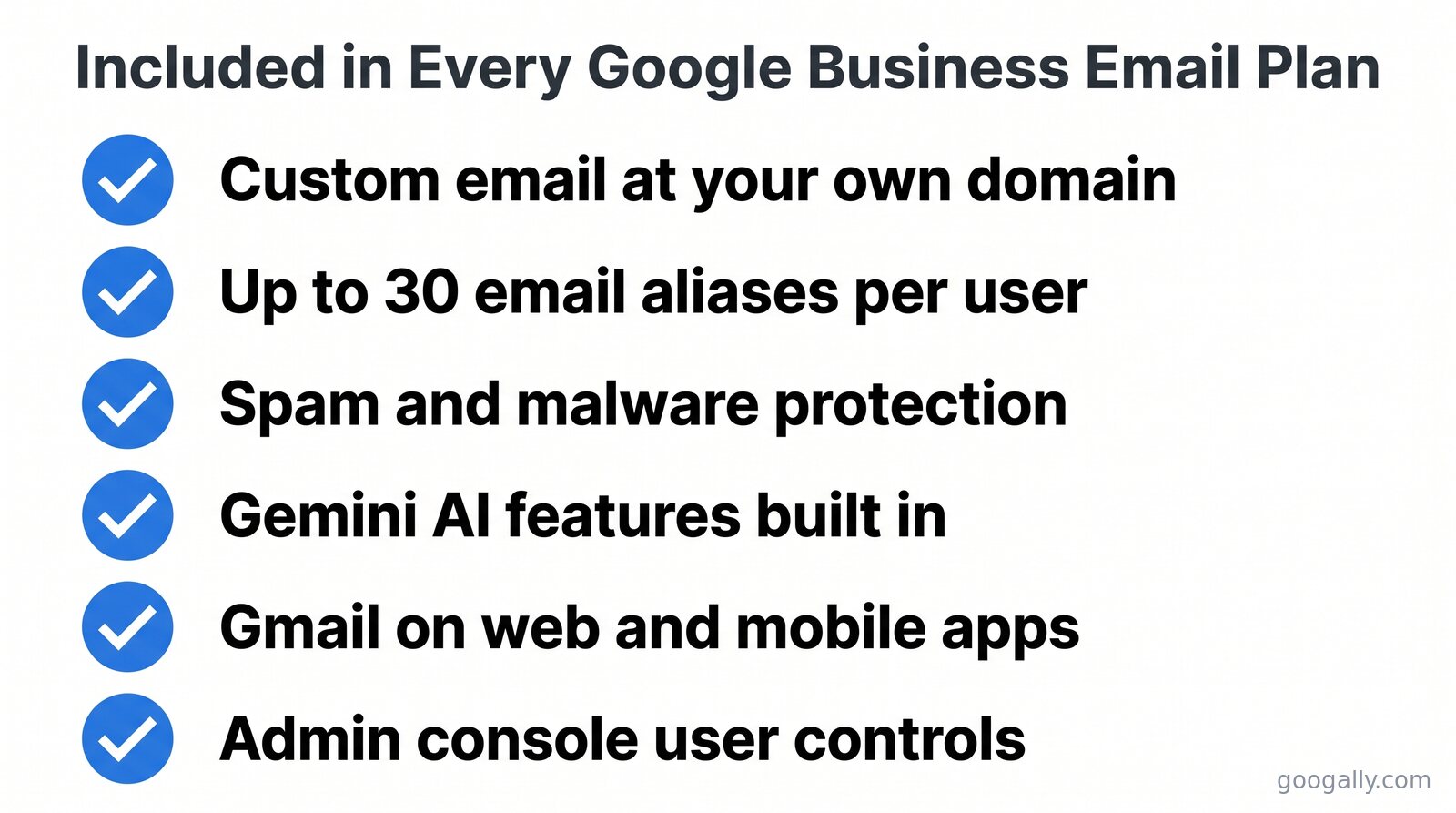
Since email itself is identical across plans — the same Gmail, the same custom domain, the same up-to-30 aliases — the price differences come down to storage, meetings, security, and management. Here's where the extra dollars go:
Business Starter — $7/user/month
The email-first plan. Custom domain email, 30 GB of pooled storage per user, video meetings for up to 100 participants, and the full Docs/Sheets/Slides/Drive suite. Gemini AI features are now included. For a team that mostly needs professional email and basic collaboration, this is genuinely all you need. See my full breakdown of Business Starter for the fine print.
Business Standard — $14/user/month
The most popular tier, and usually the one I recommend for growing teams. You jump from 30 GB to 2 TB of pooled storage per user, meetings expand to 150 participants with recording, and you get appointment booking pages. If storage or client meetings matter, the extra $7 is easy to justify — here's when Standard is worth it.
Business Plus — $22/user/month
Built for teams with compliance or security needs. 5 TB per user, 500-participant meetings with attendance tracking, Google Vault for eDiscovery and retention, and enhanced security controls. It's the right call for regulated industries; for everyone else it's often storage you won't touch. I lay out exactly who needs Business Plus so you don't overbuy.
Enterprise — custom pricing
For larger organizations needing advanced security, data-loss prevention, and the biggest meetings. Pricing is quoted by Google's sales team rather than published. Most businesses under a few hundred users never need it.
If you're still weighing tiers, my side-by-side of Business Starter vs Standard vs Plus shows the jumps in one place, and the full Google Workspace pricing breakdown covers every cost line.
How to Lower Your Google Business Email Price
Two levers actually move the number: billing term and a partner discount. Commit annually rather than month-to-month and you save about 17% per user right away. Then, because Googally is an authorized Google referral partner, you can stack a promo code on top of that for new accounts.
We offer 15% off the first 3 months for new customers — a bigger discount than the 12% most partners provide, because Googally is one of Google's top referring partners. On a 10-user Business Standard account, that's real money in your first quarter while you're still setting things up. Grab the current Google Workspace promo code and paste it at checkout.
One more free lever: start with the 14-day free trial so you're not paying anything until you've confirmed the plan fits. Set up your domain, migrate a test mailbox, and only commit once it works — that's the sequence I use with every client.
Frequently Asked Questions
Is Google business email free?
No. Google Workspace, which provides business email at your own domain, starts at $7 per user per month on an annual plan. A personal @gmail.com address is free, but it can't use your custom domain or the admin controls a business needs. There is a 14-day free trial before billing begins.
Does Google charge per email address or per user?
Per user. Each paid user license includes one primary address plus up to 30 free aliases, and shared group addresses (like support@) don't consume a license at all. You only pay for named people, not for each address.
How much is Google business email for one person?
A single user is $7 per month on Business Starter (annual billing) or $8.40 month-to-month. That one license still gives you a custom domain email and up to 30 aliases, so a solo owner can run several branded addresses on one paid seat.
What's the difference between annual and flexible billing?
The annual (fixed-term) plan is about 17% cheaper per user but locks your license count for 12 months. The flexible plan costs roughly 20% more per user and lets you add or remove seats month to month. Annual suits stable teams; flexible suits fast-changing ones.
Can I get a discount on Google business email?
Yes. Billing annually saves about 17% versus monthly, and as an authorized Google partner Googally offers 15% off the first 3 months for new customers on top of that. New accounts can apply a promo code at checkout.
Related Posts
Explore Tips and Guides! Discover expert insights and practical guides for optimizing your Google Workspace experience with our informative resources.





















.png)
.png)
.png)
.png)
.png)
.png)
.png)
.png)



.png)
.png)

.png)








.png)
.png)


.png)


