
Google Workspace Annual vs Monthly: When 17% Isn't Worth It
When a client asks me to "just get them the cheapest Google Workspace," the first thing I check isn't the plan tier — it's how their headcount is going to move over the next year. I've watched businesses lock in the annual plan to save a few dollars a seat, then quietly overpay for months because they hired for a busy season and couldn't drop the licenses when it ended. The cheaper sticker price isn't always the cheaper bill.
Google Workspace's Annual (Fixed-Term) plan costs about 17% less per user than the Flexible (monthly) plan — $7 vs $8.40 on Business Starter — but locks you into a 12-month commitment you pay in full even if you cancel. Flexible costs more per seat but lets you add or drop users anytime.
So the real question isn't which plan is cheaper per user — annual always is. It's whether your team size will hold steady for the next twelve months. Below is the actual math, the fine print Google buries, and the rule of thumb I use to pick a plan for the businesses I onboard.
Is Google Workspace cheaper annually or monthly?
Yes — the Annual plan is cheaper per user, by roughly 17% on every tier. Google prices the same plans two ways: the Annual (Fixed-Term) plan for a one-year commitment, and the Flexible plan you can start and stop month to month. The Flexible plan carries about a 20% premium for that freedom.
Here's how the two plans compare across the three business tiers, at current U.S. pricing. Business Starter is $7 per user per month on the annual plan versus $8.40 on flexible; Business Standard is $14 versus $16.80; and Business Plus is $22 versus $26.40. Put another way, the flexible plan adds roughly $1.40, $2.80, and $4.40 per user per month respectively — about 20% more for the freedom to leave.
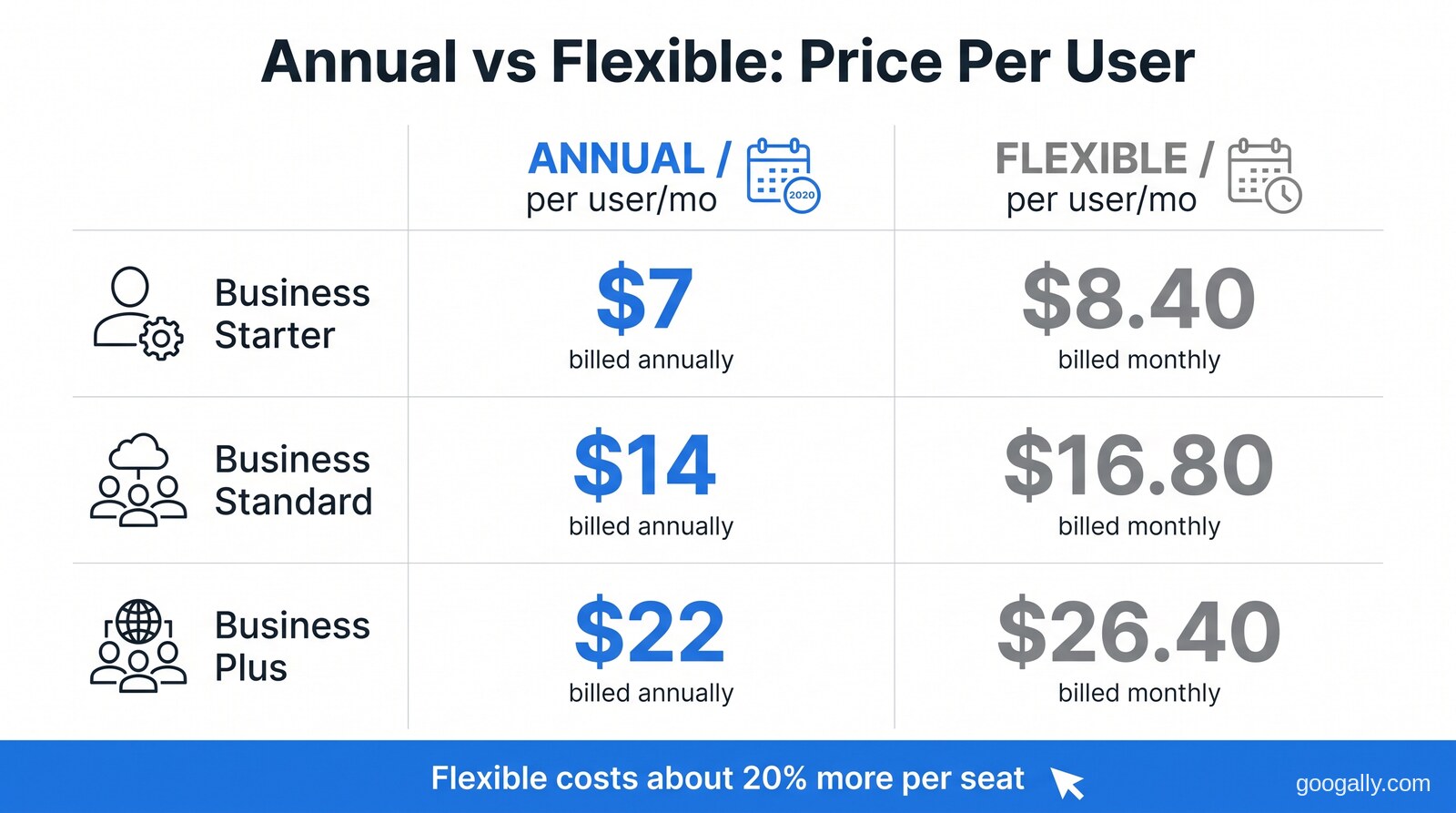
On paper, annual wins every row. For a stable five-person team on Business Standard, choosing annual over flexible saves $14 a month — $168 over the year. That's real money, and for most established teams it's the right call.
But that table only tells you the price of a seat. It doesn't tell you the price of a seat you no longer need — and that's where the flexible plan quietly earns its premium back.
What's the real difference between the Flexible and Annual plans?
The difference isn't the features — both plans give you the identical Google Workspace apps, storage, and support. The difference is entirely in the billing commitment and how freely you can change your license count.
On the Flexible plan, you're billed monthly for each user account, you can add or remove users at any time, and you can cancel the whole subscription whenever you want without a penalty. It behaves like a normal month-to-month subscription.
On the Annual (Fixed-Term) plan, you commit to a year of service for the licenses you buy. You can still add licenses mid-year if you grow — but any new licenses commit to the end of your term too. The catch that surprises people: you can only reduce your license count when the plan renews, and if you cancel early, you pay out the full remaining commitment anyway. Per Google's own payment plan comparison, annual subscribers who leave early still "pay full commitment (even if you cancel early)."
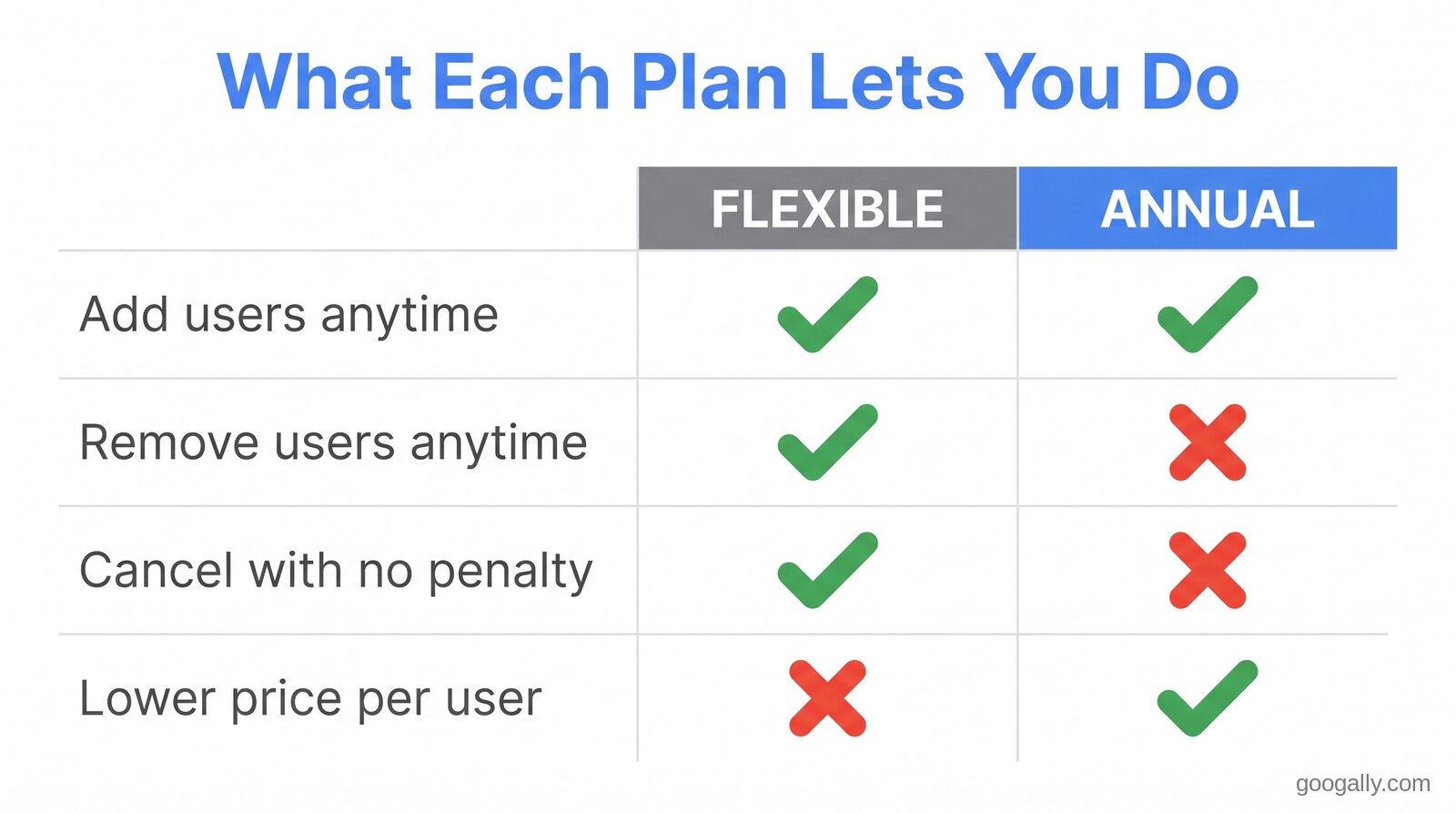
That one asymmetry — add anytime, but shrink only at renewal — is the whole decision. It means your annual bill is pinned to the highest number of seats you ever provision during the year, not the number you actually need at any given moment.
When the 17% discount isn't worth it
The annual discount stops being a discount the moment you're paying for seats you're not using. Because you can't drop licenses mid-term, any team whose headcount swings during the year can easily hand back the full 17% — and then some — in idle seats.
These are the situations where I steer clients toward the Flexible plan even though it costs more per user:
- Seasonal businesses. A tax practice, a retailer, or an events company that staffs up for three months and back down for nine will overpay for the nine on an annual plan. Flexible lets you scale the license count to the actual season.
- Agencies and teams that use contractors. If you spin up mailboxes for freelancers on a per-project basis, you need to remove them when the project ends. Annual won't let you until renewal.
- Early-stage startups. When you genuinely don't know if you'll be three people or eight in six months, paying a small premium to stay nimble beats guessing wrong and being locked in.
- Anyone planning a possible switch. If you're trialing Workspace against another platform, the flexible plan's penalty-free cancellation is worth far more than $1.40 a seat.
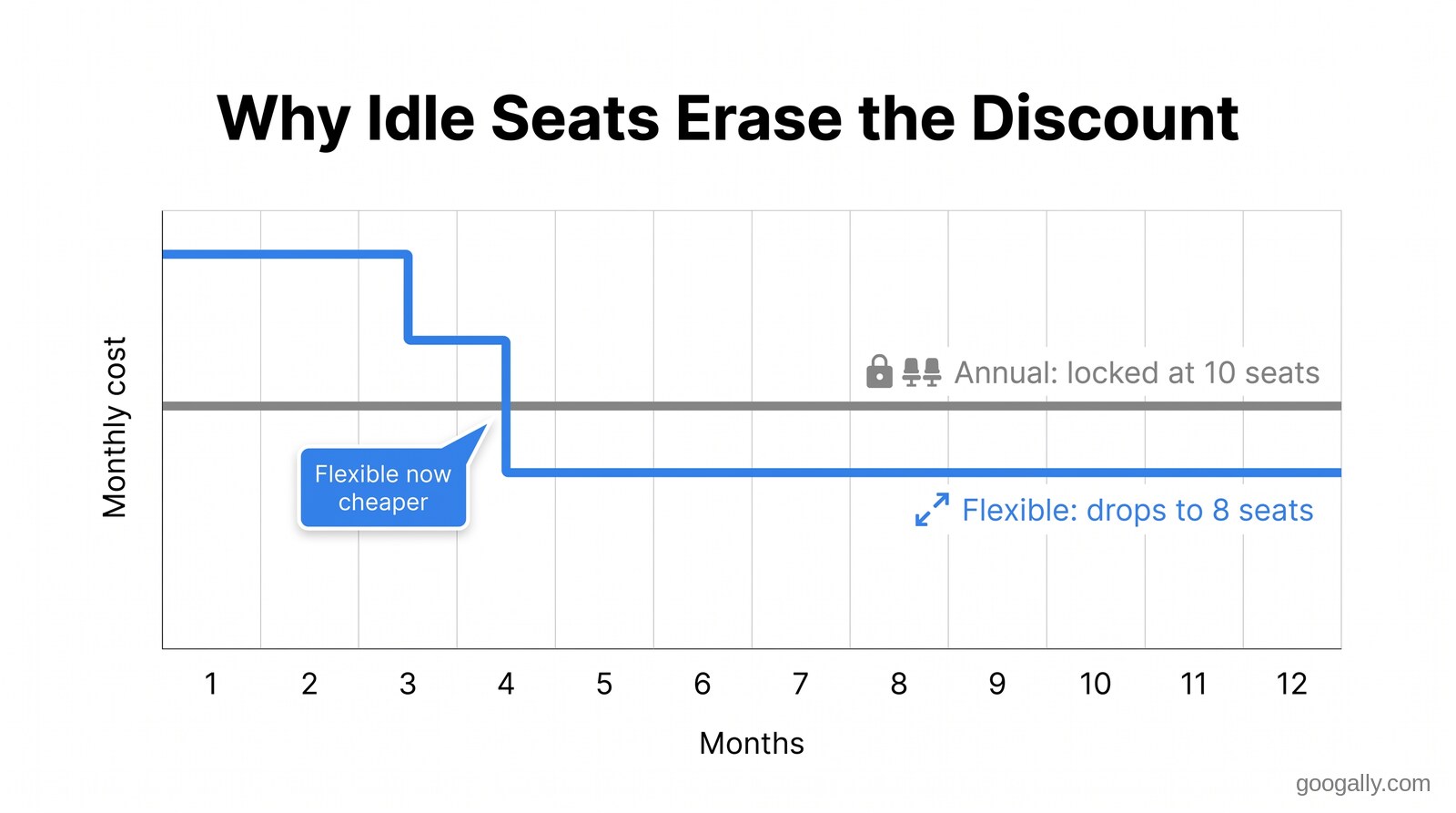
Run the math on a worst case. Say you put ten seats on the annual Business Standard plan at $14 to "save" versus $16.80 flexible — a $28/month saving. Three months in, you lose two contractors. On flexible you'd drop to eight seats and pay $134.40/month. On annual you're stuck paying for all ten — $140/month — until renewal. Your $28 monthly saving is now a loss, and it compounds for every remaining month of the term.
When the annual plan is the obvious choice
For a team whose size is stable, the annual plan is a no-brainer — take the 17% and don't overthink it. If you've had the same headcount for a year and expect to grow rather than shrink, there's no scenario where paying the flexible premium pays off. Annual is built for exactly this: an established small business, a professional practice with steady staff, or any team that only ever adds people.
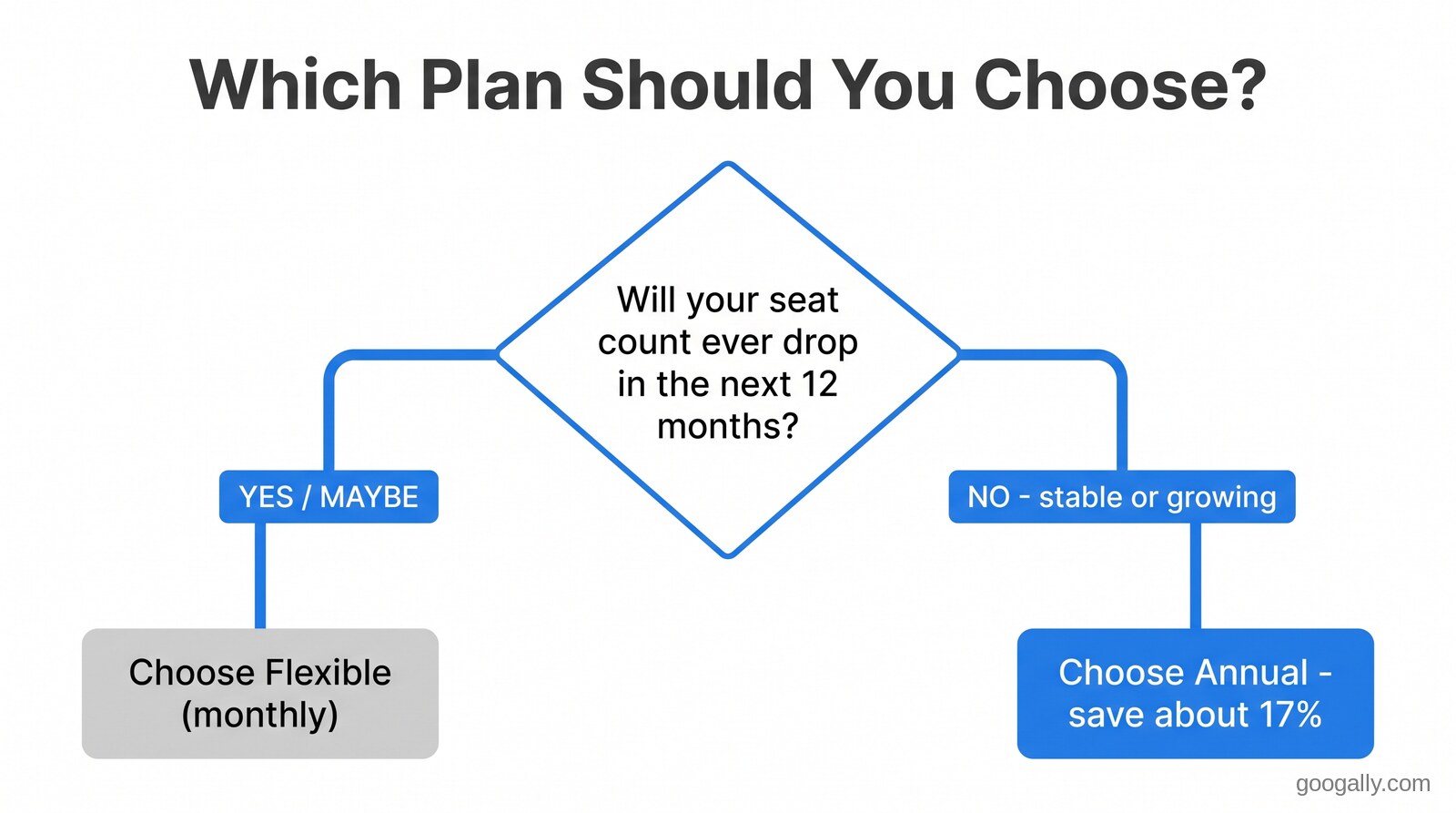
Remember that growing is fine on annual — you can buy more licenses the day you need them. The only thing the annual plan punishes is shrinking. So the honest test is simple: over the next twelve months, is your seat count more likely to go down (or bounce around) than to only go up? If it can go down, buy flexibility. If it only goes up or stays flat, buy the discount. And if you're still weighing whether the platform earns its keep at all, I've made the case for whether Google Workspace is worth it separately.
If you're still deciding which tier fits before you even get to billing, that's a separate question — I've broken down which Google Workspace plan is right for most teams and the full plan and pricing breakdown elsewhere. This post is only about how you pay for whichever tier you land on.
Can you switch from Annual to Flexible (or the other way)?
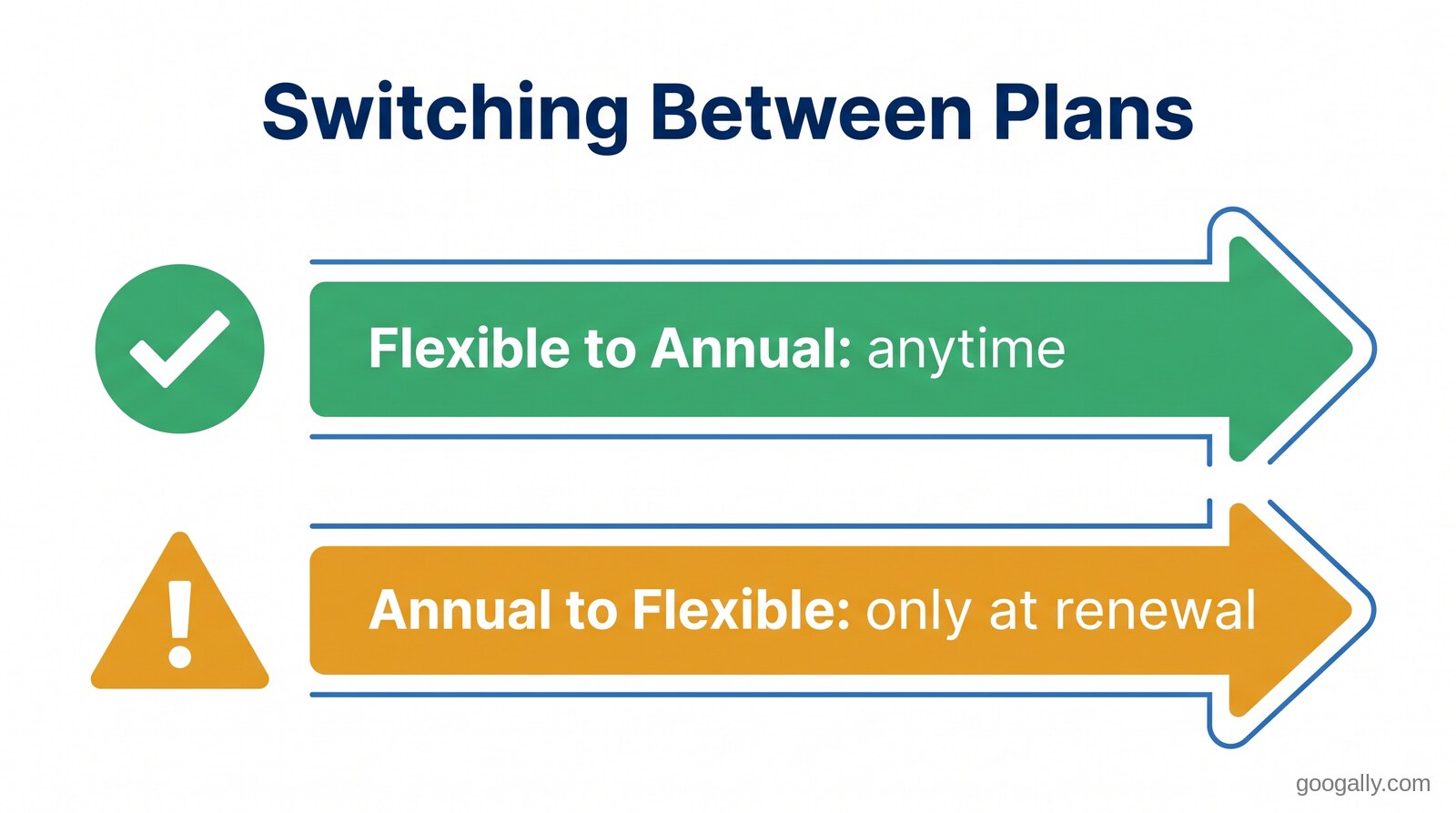
You can switch payment plans, but the timing rules aren't symmetric — and this trips people up. Moving from Flexible to Annual is easy and can be done any time; you're simply committing, which Google is happy to let you do. Moving from Annual to Flexible generally has to wait until your annual term is up for renewal, because you're trying to exit a commitment early.
In practice, that means the safe move when you're unsure is to start on Flexible. You keep every option open: you can commit to annual later once your headcount settles and claim the discount, but you can't un-commit an annual plan on a whim. Starting flexible costs you a little each month; starting annual can cost you a lot if you guessed wrong. If you do need to change tiers or billing, here's how plan changes work in Google Workspace.
Don't forget the free trial and the new-customer discount
Before you commit to either plan, note two things that lower your real first-year cost. Google offers a 14-day free trial on new accounts, so you can test the tier and the apps before a dollar changes hands. And because Googally is an authorized Google referral partner, new customers can stack an exclusive Googally discount — 15% off the first 3 months on Business Starter, Standard, or Plus — on top of whichever billing plan you choose.
That discount applies to the price you're already paying, so the smart sequence is: pick the billing plan that matches your headcount stability first, then apply the promo to knock down the first three months regardless. If keeping costs down is the whole goal, it's also worth reading the cheapest legitimate way to get Google Workspace so you're not leaving savings on the table.
Quick takeaways
- Annual is ~17% cheaper per user than Flexible on every tier ($7 vs $8.40 on Business Starter), because Flexible charges a ~20% premium for month-to-month freedom.
- The plans are identical in features — the only difference is the billing commitment and how freely you can change license counts.
- Annual locks you in: you can add seats anytime, but drop them only at renewal, and canceling early means paying the full remaining commitment.
- Choose Flexible if your headcount fluctuates — seasonal teams, contractor-heavy agencies, or early startups — because idle annual seats erase the discount.
- Choose Annual if your team size is stable or only growing, and take the discount without overthinking it.
- When unsure, start Flexible — you can commit to annual later, but you can't easily undo an annual commitment.
Frequently Asked Questions
What happens if I cancel Google Workspace on the annual plan early?
You still pay for the rest of your one-year commitment. Google's Annual (Fixed-Term) plan requires payment for the full term even if you cancel before it ends, so early cancellation doesn't save you the remaining months. The Flexible plan, by contrast, can be canceled any time with no penalty.
Can I add users in the middle of my annual term?
Yes. You can buy additional licenses at any point during your annual term if your team grows. The catch is that each new license commits to the end of your existing term, and you can't reduce your total license count until the plan renews.
Is the monthly (Flexible) plan a bad deal?
Not at all — it's the right deal for any team whose size changes during the year. The ~20% premium buys you the ability to add and remove seats and cancel penalty-free, which easily pays for itself the first time you'd otherwise be stuck paying for unused annual licenses.
Which Google Workspace payment plan is best for a small business?
For a stable small business that only adds staff, the Annual plan is best because of the ~17% per-user savings. For a business with seasonal, project-based, or uncertain headcount, the Flexible plan is best because it prevents you from paying for seats you no longer need.
Does the Googally promo code work on both plans?
Yes. The 15% off the first 3 months for new customers applies to Business Starter, Standard, and Plus regardless of whether you choose the Annual or Flexible billing plan. Pick the billing plan that fits your team first, then apply the promo on top.
Not sure which billing plan fits how your team actually grows? That's exactly the kind of call we make for businesses every week at Googally — and new customers can start with a Google Workspace promo code for 15% off the first 3 months on any plan.
Related Posts
Explore Tips and Guides! Discover expert insights and practical guides for optimizing your Google Workspace experience with our informative resources.










.png)
.png)
.png)
.png)
.png)
.png)
.png)
.png)


.png)
.png)

.png)




.png)
.png)


.png)


