
Is Google Vids Free? What You Actually Pay For
The first time a client asked me whether Google Vids was free, I gave the only honest answer: yes and no. I've since switched it on for a dozen small teams at Googally, and the confusion is always the same — the app opens for free, but the parts that make it genuinely useful at work depend on your plan. So let me draw the line clearly.
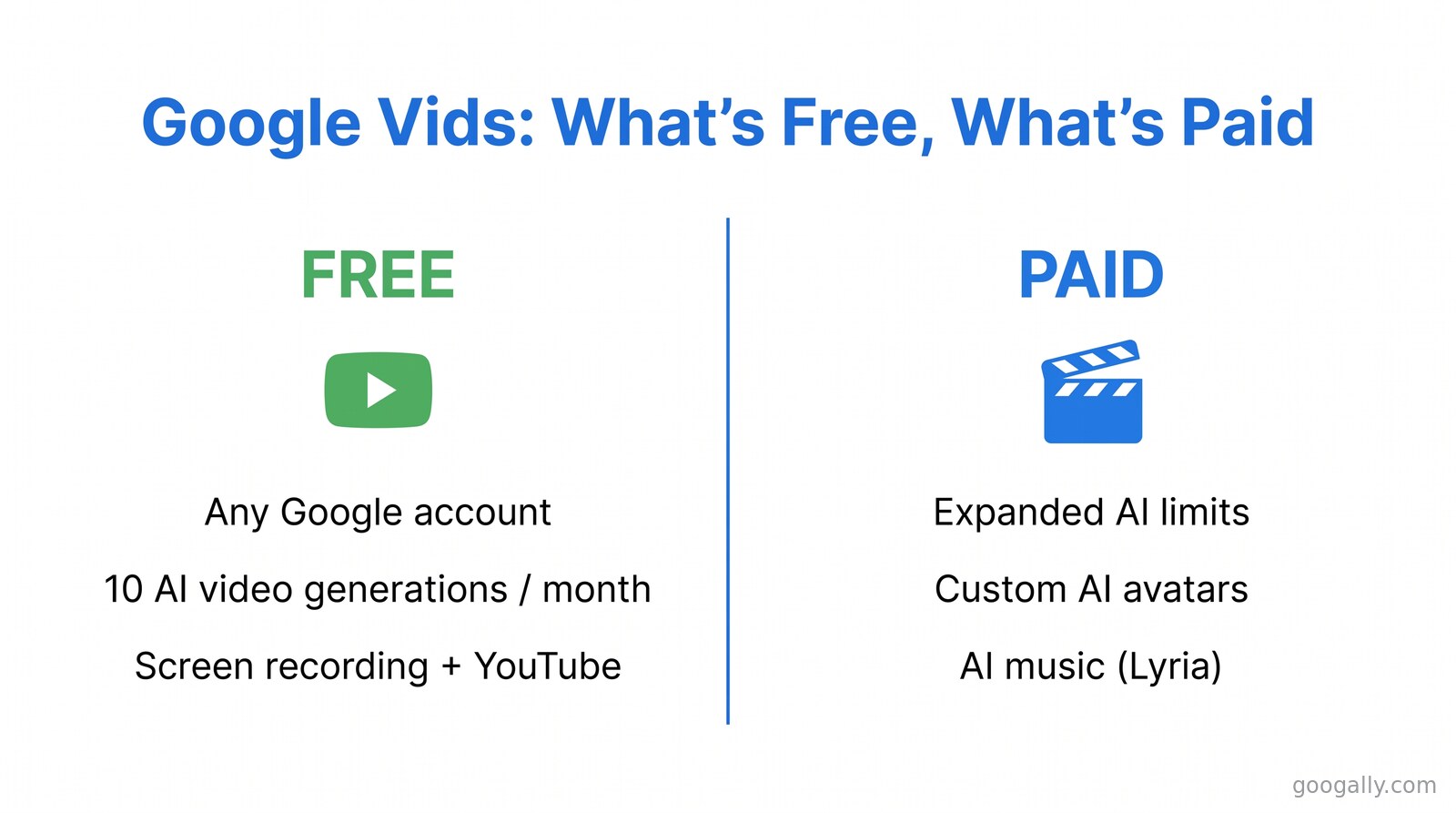
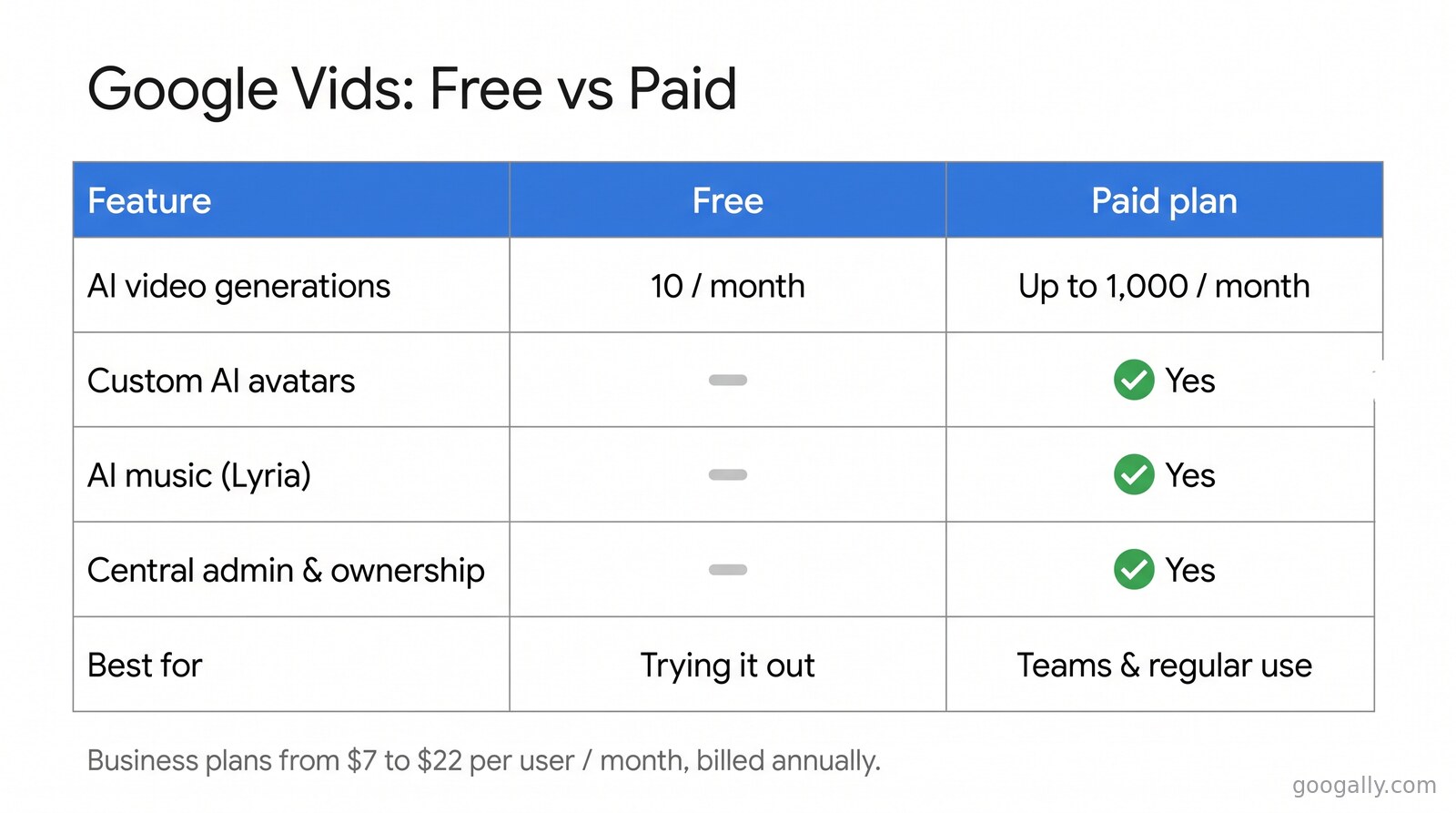
Google Vids is free for anyone with a Google account — you get basic video creation, screen recording, and 10 AI video generations a month at no cost. Advanced capabilities like expanded AI limits, custom avatars, and AI-composed music require a paid Google Workspace or Google AI plan.
That short answer hides a few details worth knowing before you hand Vids to a team: what the free tier actually covers, which Workspace plans unlock the rest, and whether it's the right fit for your business at all. Here's the full breakdown.
What Is Google Vids?
Google Vids is an AI-powered video creation and editing app built into Google Workspace. Think of it as the video sibling to Docs, Sheets, and Slides: you create in the browser, collaborate in real time, and everything saves to Google Drive automatically.
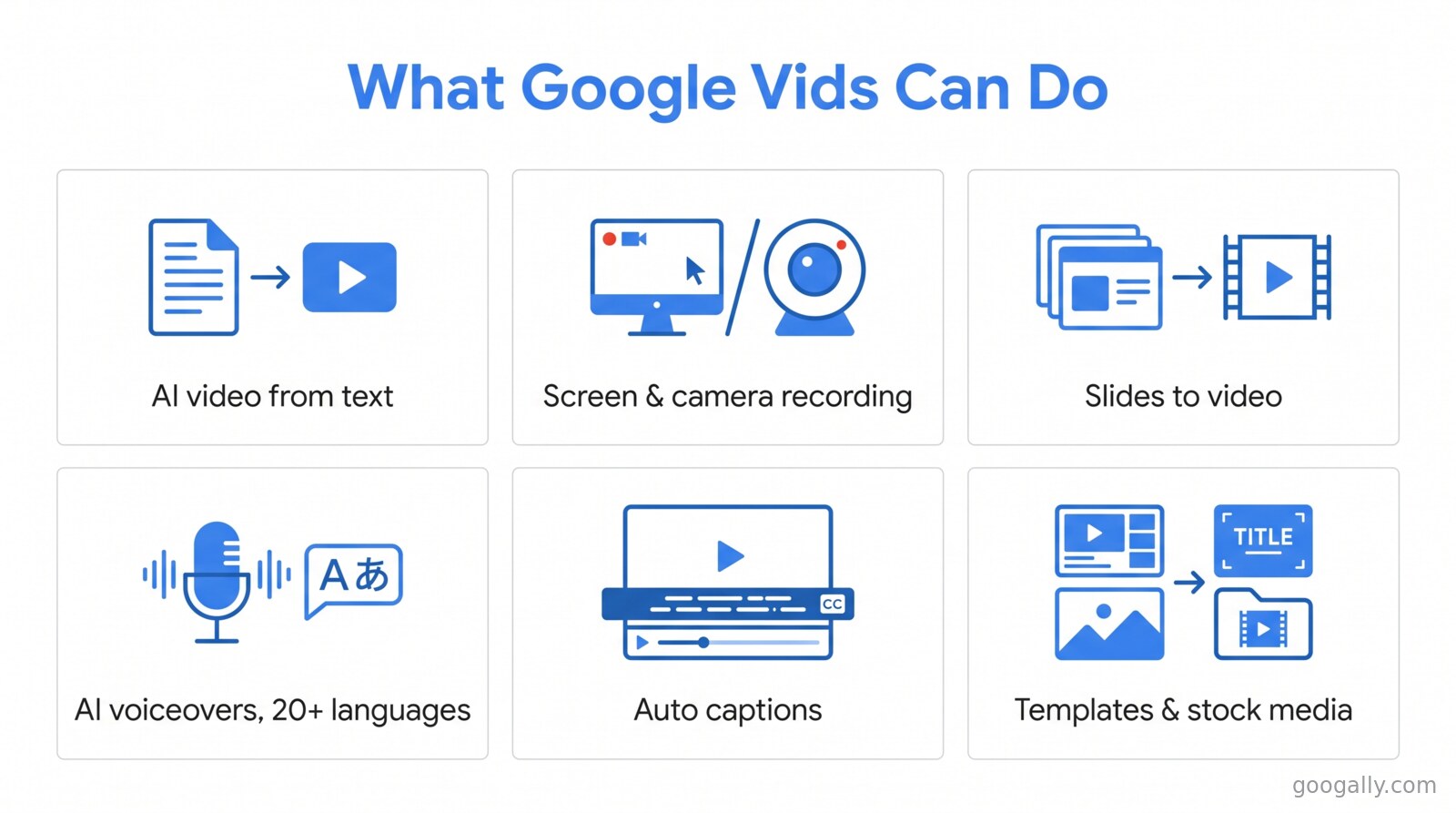
It launched at Google Cloud Next in 2024 and became generally available in November 2024. Since then Google has folded a lot of AI into it. Today you can generate video clips from a text prompt, record your screen and camera, turn an existing Slides deck into a narrated video, add AI voiceovers and avatars in more than 20 languages, auto-generate captions, and pull in royalty-free media and templates — all without leaving the tab.
The pitch is speed. Instead of learning a heavyweight editor, someone on your team can describe what they want, let the AI assemble a first draft, and polish from there. For onboarding clips, internal announcements, and quick social videos, that's a real time-saver.
Is Google Vids Free? Here's Exactly What You Get
Yes, Google Vids has a genuine free tier. As of April 2026, Google confirmed that anyone signed in with a personal Google account can create, edit and share videos at no cost in Vids — and that now includes AI video generation, which used to be paid-only.
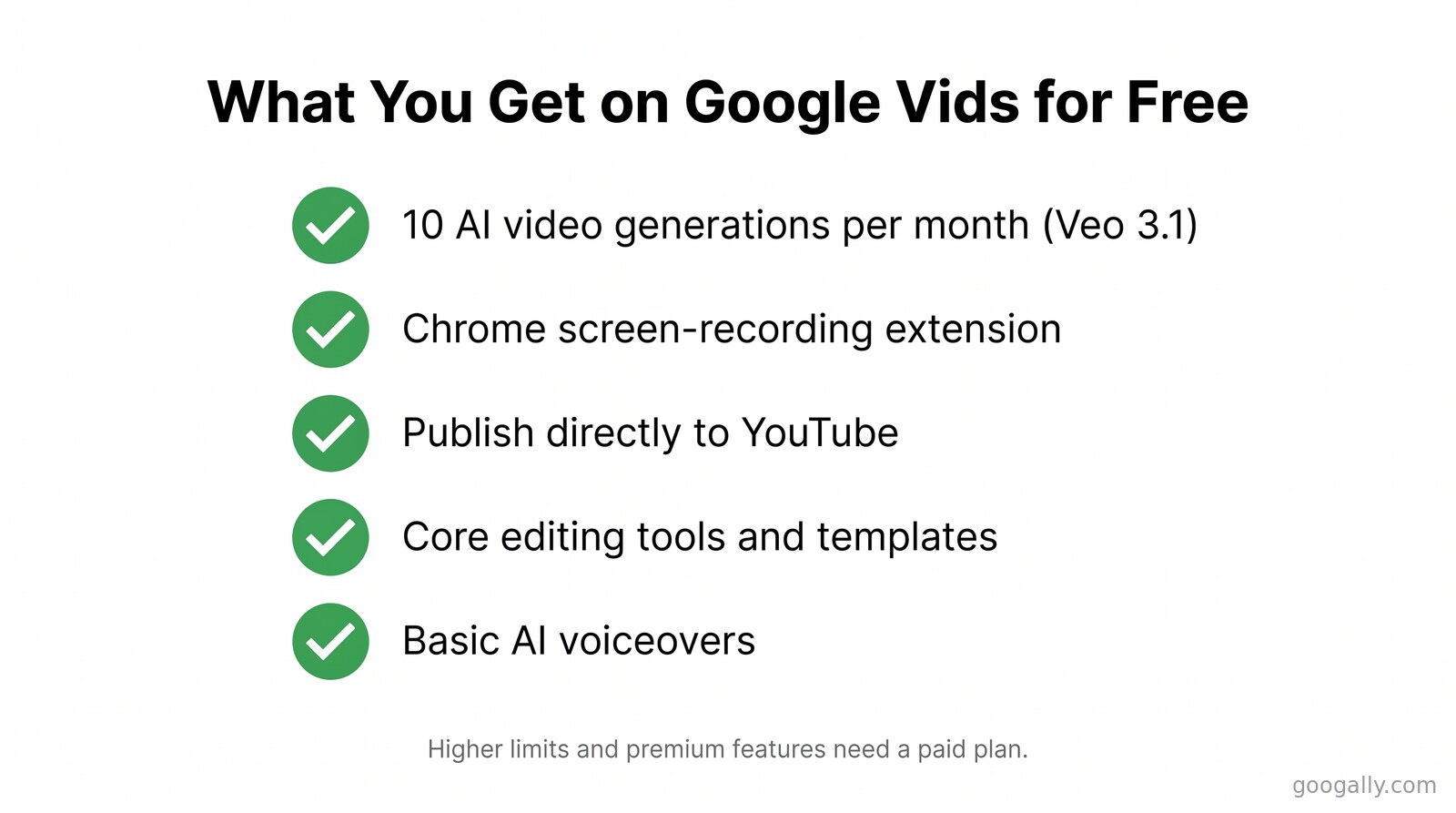
Here's what the free tier covers today:
- 10 AI video generations per month, powered by Google's Veo 3.1 model, at no cost on a personal account.
- The Chrome screen-recording extension, free for everyone, so you can capture your screen and drop it straight into a video.
- Direct publishing to YouTube from inside Vids.
- Core editing tools, templates, and basic AI voiceovers to assemble and finish a video.
For a solopreneur making the occasional explainer or a founder recording a quick product walkthrough, that free allowance genuinely covers the job. You do not need to pay anything to try Vids or to make your first several videos.
The catch is the ceiling. Ten AI generations a month disappears fast once a team is producing regularly, and the features that make Vids feel professional — the ones I'll cover next — are gated.
What Do You Pay For — and Which Plan Unlocks It
You pay for scale and polish. The free tier lets you make videos; a paid plan lets a team make them at volume with the premium AI features switched on. Specifically, the paid capabilities include expanded (much higher) AI generation limits, customizable AI avatars, and custom background music composed by Google's Lyria model — all restricted to paid Google AI or Google Workspace subscribers.
For a business, the cleaner route is a Google Workspace plan, because Vids then sits alongside the business Gmail, Drive, Meet, and admin controls your team already needs. Workspace also keeps everything under one bill and one admin console instead of a pile of personal accounts.
If you're weighing the cost, this is where a new-customer discount matters. As a top Google referral partner, Googally offers a Google Workspace promo code worth 15% off the first 3 months for new customers on Business Starter, Standard, and Plus — a small thing that takes the sting out of trying a paid tier.
Which Google Workspace plans include Google Vids?
Google Vids is included with the paid Business plans — Business Standard, Business Plus, and Enterprise — and with the education and larger AI tiers; the heaviest AI limits (up to 1,000 video generations a month) come with the top Workspace AI tiers. As of 2026, current Business pricing (billed annually) runs about $7/user/month for Business Starter, $14 for Business Standard, and $22 for Business Plus.
Business Standard is the usual sweet spot for teams that want Vids plus the full AI-assisted Workspace, so if you're comparing tiers it's worth reading our plain-English Business Standard breakdown and the full Workspace pricing guide before you commit. Not sure any paid tier is justified yet? Our take on whether Google Workspace is worth it walks through the math.
How to Use Google Vids: A Quick Start
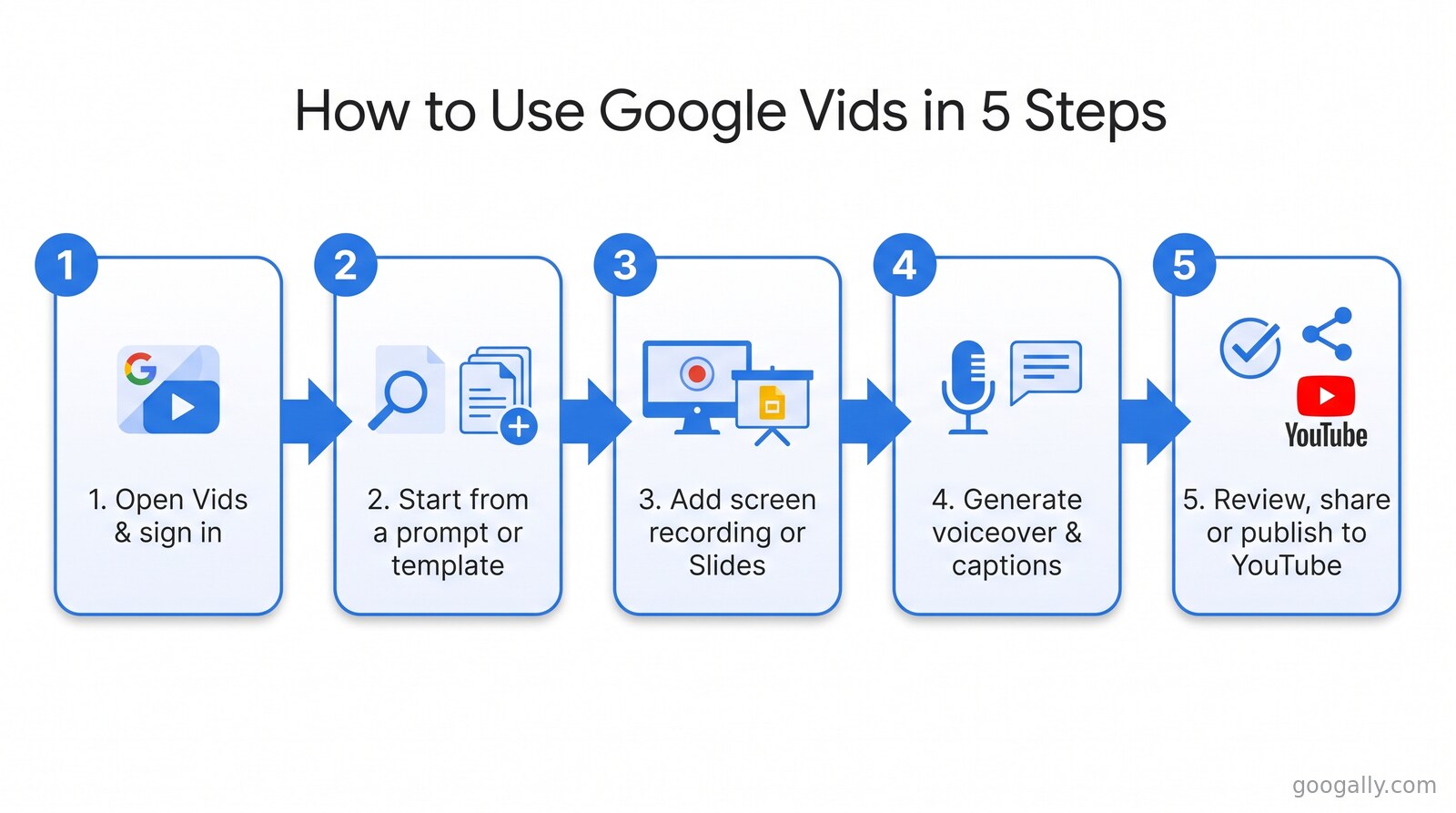
Getting started takes about a minute. Here's the workflow I walk new teams through:
- Open Vids. Go to your Google apps grid or visit the Vids URL and sign in. If you're on Workspace, it's already there for licensed users.
- Start from a prompt or a template. Describe the video you want ("a 60-second welcome video for new dental patients") and let the AI draft a storyboard, or pick a ready-made template.
- Bring in your own material. Record your screen or camera, import clips from Drive, or convert an existing Slides deck straight into video scenes.
- Add voice and captions. Generate an AI voiceover, choose an avatar to present, and let Vids auto-caption the whole thing.
- Review, then share. Edit on the timeline, collaborate with teammates exactly like a Google Doc, then export, share a link, or publish to YouTube.
The learning curve is genuinely gentle — if your team can use Slides, they can use Vids.
What AI Actually Powers Google Vids
Google Vids runs on the same AI stack as the rest of Workspace, which is why the free-versus-paid line falls where it does. Gemini handles the prompts, scripts, and scene suggestions. Veo (currently Veo 3.1) generates the actual video clips from text — this is the part capped at 10 free generations a month on a personal account. Lyria 3 composes original background music, and that one stays behind a paid Google AI plan.
If your team is already leaning on Google's AI elsewhere, it's worth understanding how Gemini is included in Google Workspace and how tools like Google Workspace Studio automate work — Vids is one piece of a much bigger AI rollout across the suite.
Is Google Vids Worth It for Your Business?
For most small teams, Vids is worth using precisely because you can start free and only pay once it earns its keep. If you make videos rarely, the free tier is plenty. If video is becoming a regular channel — training, marketing, customer updates — the paid AI limits and the fact that it lives inside your existing Workspace make it an easy add rather than another standalone subscription to manage.
The businesses that get the most from it are the ones already on Google Workspace, because Vids becomes one more app in a suite they administer centrally. If you're not there yet, moving your email and files over is the first step — and it's what we do all day at Googally, with zero downtime.
The Limits of Free Google Vids (and How to Tell You've Outgrown It)
The free tier is generous enough to fool you into thinking it's unlimited — until it isn't. In my experience setting Vids up for small teams, three ceilings show up first, usually in the same order.
The first is the 10-generation monthly cap. One person experimenting burns through that in an afternoon of trial and error, long before a polished video exists. The second is music and avatars: the moment someone wants a branded presenter or custom background score instead of the stock options, they hit the Lyria and custom-avatar paywall. The third is administration — free personal accounts mean videos live in individual Google accounts, not your company's, which becomes a real problem the day an employee leaves.
Templates are the quiet tell. Google Vids templates cover the common formats — announcements, training, social clips — and the free tier includes them, so a team can standardize its look early. But once several people are producing from those templates every week, you're firmly in "this is a business workflow now" territory, and that's the signal to move everyone onto a shared Workspace plan so the content, permissions, and billing sit in one place.
The good news: outgrowing free is a good problem. It means video is working for you. And moving up is a plan change, not a migration — your videos, drafts, and templates come with you.
Frequently Asked Questions
Do I need a paid plan just to try Google Vids?
No. Anyone with a personal Google account can use Google Vids at no cost, including 10 AI video generations per month with Veo. A paid Google Workspace or Google AI plan only becomes necessary when you need higher limits or advanced features.
What AI models power Google Vids?
Google Vids uses Gemini for prompts and scripting, Veo 3.1 for AI video generation, and Lyria 3 for AI-composed music. Veo generation is free up to 10 clips a month; Lyria music and custom avatars require a paid plan.
Can I publish Google Vids videos straight to YouTube?
Yes. Google Vids supports direct publishing to YouTube, and the companion Chrome screen-recording extension is free for everyone to install and use.
Does Google Vids work for languages other than English?
Yes. Google Vids can generate AI voiceovers and avatars in more than 20 languages, which makes it practical for teams creating content for multilingual audiences or international customers.
Is Google Vids the same as Veo?
No. Veo is Google's underlying AI video-generation model; Google Vids is the full editing app that uses Veo (alongside Gemini and Lyria) to create, edit, and share complete videos.
Thinking about adding Google Vids — and the rest of the AI-assisted suite — to your business? We help small teams move to Google Workspace and set it up properly, without the downtime or the guesswork. Talk to us at Googally and we'll get you on the right plan.
Related Posts
Explore Tips and Guides! Discover expert insights and practical guides for optimizing your Google Workspace experience with our informative resources.





.png)
.png)
.png)
.png)
.png)
.png)
.png)
.png)


.png)
.png)

.png)



.png)
.png)


.png)


