
Google Workspace Email Sending Limits: 2,000 a Day
When a client's first big newsletter stalled halfway out the door, the first thing they asked me was whether Google had shut their account down. It hadn't — they'd simply hit Gmail's daily sending limit. I've walked dozens of small teams through these caps at Googally, and once you know the actual numbers, they almost never get in your way.
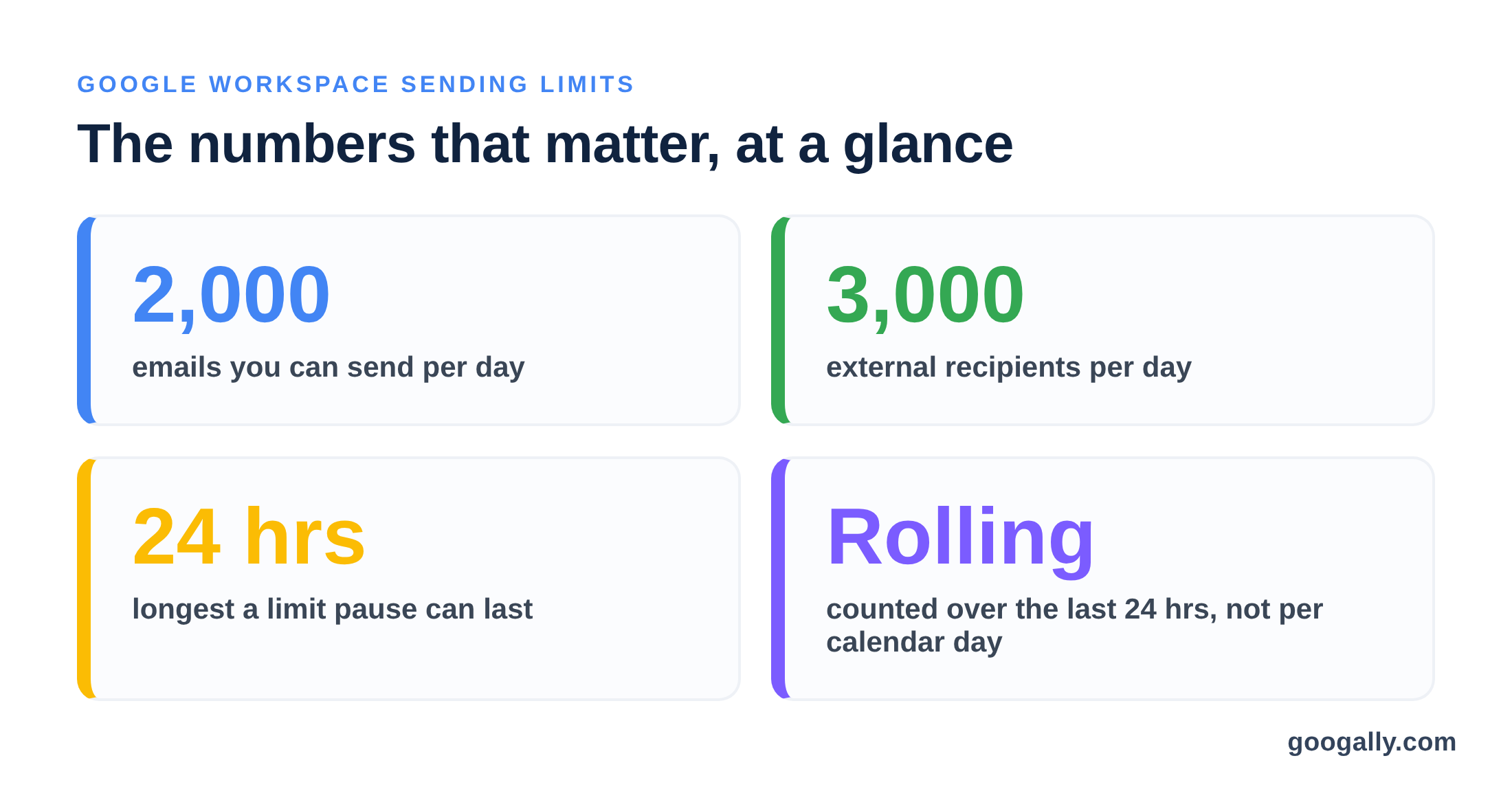
A paid Google Workspace account can send up to 2,000 emails per day, measured over a rolling 24 hours — four times the 500 free Gmail allows — and reach up to 3,000 external recipients daily. Go over the cap and sending pauses for up to 24 hours; incoming mail is never affected.
Below I'll break down how many emails you can send on Google Workspace, how that compares to free Gmail, why a brand-new account starts lower, what actually counts toward the limit, and the right way to email a bigger list without tripping it.
How many emails can you send per day on Google Workspace?
A paid Google Workspace user can send 2,000 messages per day, counted on a rolling 24-hour basis rather than resetting at midnight. That single number is the one most people are looking for, but a few related caps matter just as much once your list grows.
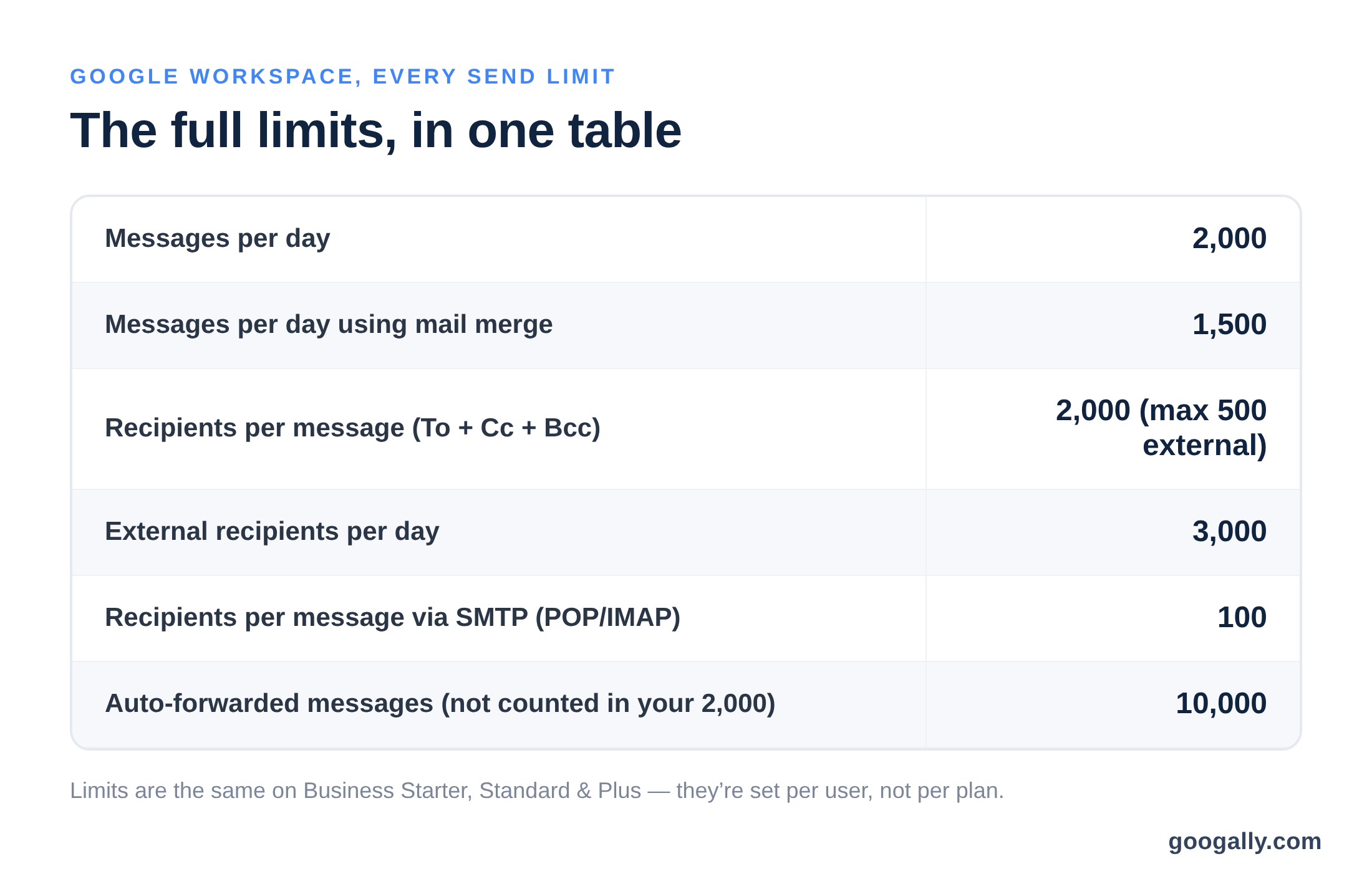
Here are the limits that apply to every Business edition — Starter, Standard, and Plus share the exact same sending caps, because the limit is set per user, not per plan:
- Messages per day: 2,000 (1,500 if you use Gmail's built-in mail merge)
- External recipients per day: 3,000
- Recipients per message (To + Cc + Bcc): 2,000, of which at most 500 can be external
- Messages sent through SMTP via POP/IMAP: 100 recipients per message
- Auto-forwarded messages: up to 10,000 — and these do not count toward your 2,000
For almost every small business, 2,000 sends a day is far more headroom than a normal workday needs. The caps are really there to stop a hijacked account from blasting spam, not to limit your real work. These figures come straight from Google's own Gmail sending-limit documentation.
How do Workspace sending limits compare to free Gmail?
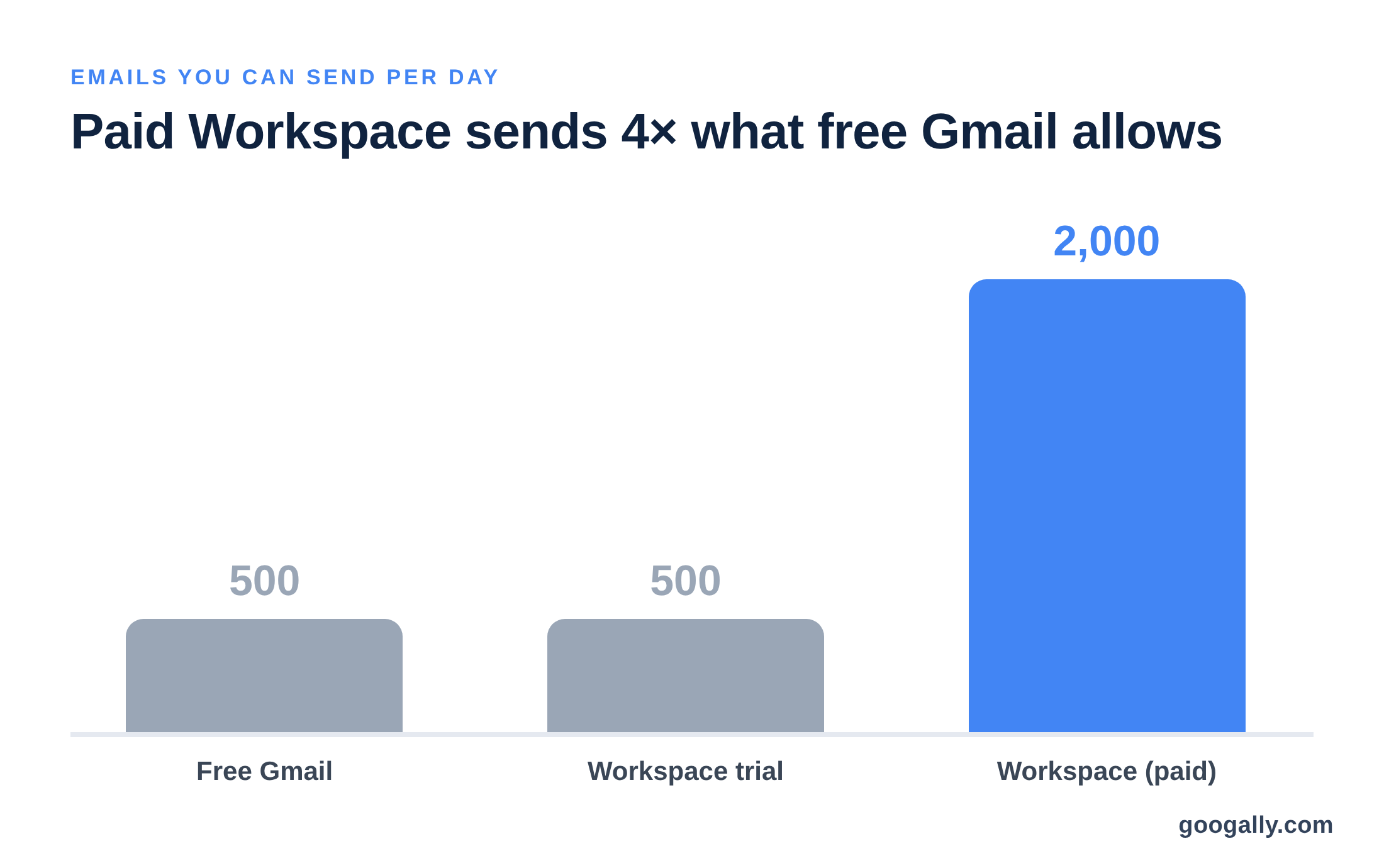
This is where paying for Workspace quietly pays off. A free, personal @gmail.com account is capped at 500 emails per day. A paid Google Workspace account lifts that to 2,000 — a 4x jump — plus the much higher recipient limits above.
If you're still running your business from a free inbox and wondering whether the upgrade is worth it, the sending limit is one of the clearest answers. I compare the two side by side in personal Gmail vs Google Workspace, and the short version is that a free account simply isn't built for the volume a growing team sends. It's one of the reasons to upgrade from Gmail to Google Workspace that owners feel almost immediately.
Why a brand-new Workspace account starts at 500
Here's the detail that trips people up on day one: a Workspace account that's still on its free trial — or very new — is temporarily held to 500 messages per day, the same as free Gmail. The full 2,000 limit switches on only after the account has been active and paid at least $100 USD toward the subscription, which can take a little time to register.
So if you just signed up, sent a few test blasts, and got cut off at 500, nothing is broken — your account simply hasn't graduated to the full limit yet. I explain the trial's moving parts in how the Google Workspace free trial works. The fix is almost always patience plus completing your billing setup, not a support ticket.
What actually counts toward your daily limit?
Not everything you touch in Gmail eats into the 2,000. Knowing what counts keeps you from over-worrying about normal day-to-day email.

Counts toward the limit: every message you send, including replies and internal emails to coworkers; and each recipient on a message counts individually, so one email to 50 people uses 50 of your daily recipient allowance.
Doesn't count: messages that Gmail auto-forwards on your behalf (those have their own 10,000 ceiling), and — importantly — every email you receive. Incoming mail is unlimited, so hitting your send cap never stops new messages from landing in your inbox. If you rely heavily on forwarding, my guide to email forwarding in Gmail shows how to set it up cleanly.
One more point that surprises people: email aliases and "send as" addresses don't get their own separate allowance. Everything sent from a single user — no matter which alias is on the From line — draws from that one user's 2,000. I cover how aliases actually behave in creating an email alias in Google Workspace.
What happens when you hit the sending limit?
If you cross a daily cap, Gmail temporarily blocks you from sending new mail and shows an error such as "You have reached a limit for sending mail." That block lasts up to 24 hours, and because the window rolls continuously, access usually returns gradually as your oldest sends age out of the 24-hour count — you rarely wait the full day.
Nothing is lost and nothing is deleted. Messages you already sent still go through, incoming email keeps arriving normally, and once the window clears you can send again without doing anything. It feels alarming the first time, but it's a pause, not a penalty.
How to email a bigger list the right way
If you're regularly bumping against the cap, that's usually a sign you're using a personal inbox for a job meant for a proper sending tool. Here's how I steer small teams, from smallest need to largest:
- A handful of recipients (well under 2,000): just send normally from Gmail. No special setup needed.
- A modest newsletter or announcement: use Gmail's built-in mail merge (sometimes called multi-send), which personalizes each copy and lets you send up to 1,500 a day. Great for a customer update or an event invite.
- A recurring internal list: create a Google Group so one address reaches the whole team, which keeps individual recipient counts down.
- True marketing at scale: move to a dedicated email platform (Mailchimp, Brevo, and the like). These are built for deliverability, unsubscribe handling, and volumes no personal inbox should attempt.

Matching the tool to the task is the real fix. Your Workspace inbox is for your everyday business mail; a marketing platform is for campaigns. Used that way, you'll rarely think about the 2,000 limit again. If storage is your other growth question, I break down the pooled model in Google Workspace storage limits.
The bottom line for your business
For the vast majority of small businesses, Google Workspace's 2,000-a-day limit is generous headroom, not a ceiling you'll fight. You get four times free Gmail's capacity, room for 3,000 external recipients daily, and a clean upgrade path to mail merge or Groups when a bigger send comes up.
If you're ready to move off a free inbox and want the full limit (and the professional name@yourdomain.com address that comes with it), new customers can use our Google Workspace promo code for 15% off the first 3 months for new customers as an official Google partner. And if you'd rather not touch DNS or billing yourself, I handle the full setup and migration at Googally with zero downtime — your old email keeps flowing while we switch you over.
FAQ
Does a higher Google Workspace plan raise the daily sending limit?
No. Business Starter, Standard, and Plus all share the same 2,000-messages-per-day cap, because the limit is set per user rather than per plan. Upgrading buys more storage and features, not a bigger send quota.
Do scheduled emails count toward the limit on the day I write them or the day they send?
They count on the day they're actually sent, not the day you schedule them. Scheduling a batch for next Monday won't use up today's allowance — but it will draw against Monday's.
Does adding more users increase my company's total sending capacity?
Yes. Each user gets their own 2,000-a-day allowance, so a five-person team can collectively send up to 10,000 messages a day across their individual accounts.
Can I see how many emails I've already sent today?
Gmail doesn't show a live counter. You'll only know you're near the cap when sending pauses and the limit error appears, so for heavy sending days it's worth spacing messages out rather than firing them all at once.
Do email aliases or "send as" addresses get their own separate limit?
No. Every message from one user draws from that single user's 2,000-a-day allowance, regardless of which alias or "send as" address is on the From line.
Related Posts
Explore Tips and Guides! Discover expert insights and practical guides for optimizing your Google Workspace experience with our informative resources.














.png)
.png)
.png)
.png)
.png)
.png)
.png)
.png)



.png)
.png)

.png)





.png)
.png)


.png)


